
Turn OpenClaw into your full autonomous marketing engine
You can turn OpenClaw into your full autonomous marketing engine.
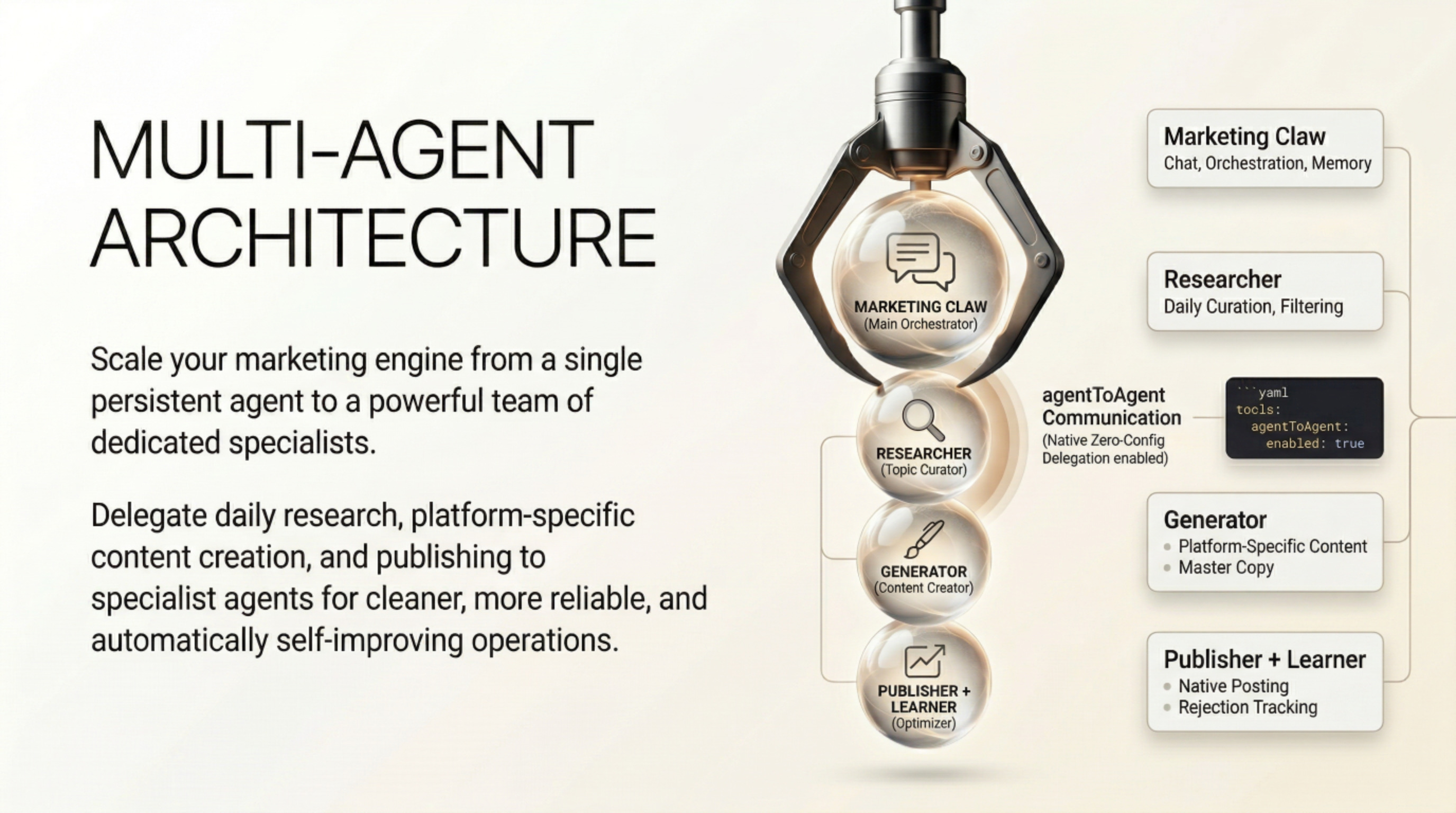
It was literally built for this kind of 24/7 proactive workflow — it already runs cron jobs, has persistent memory for learning from feedback, full browser + API control, and people are actively using it to run entire marketing teams (researcher → strategist → creative → publisher).
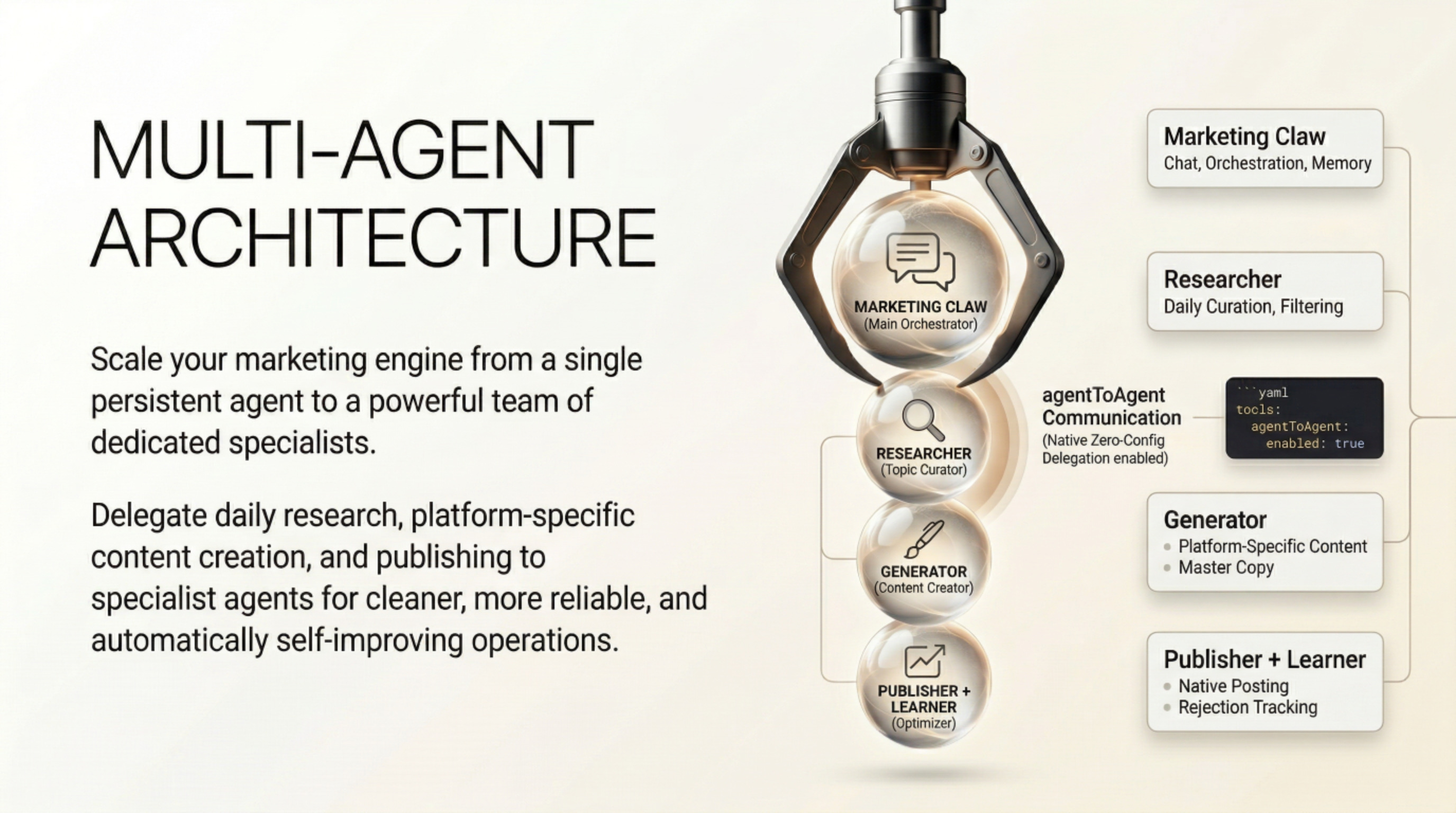
OpenClaw is an open-source AI agent that lives on your own hardware (or VPS), has “eyes and hands” on your computer, and can execute real actions like researching, generating content, calling APIs, posting to platforms, and iterating from your feedback.
How to Achieve This Workflow in OpenClaw
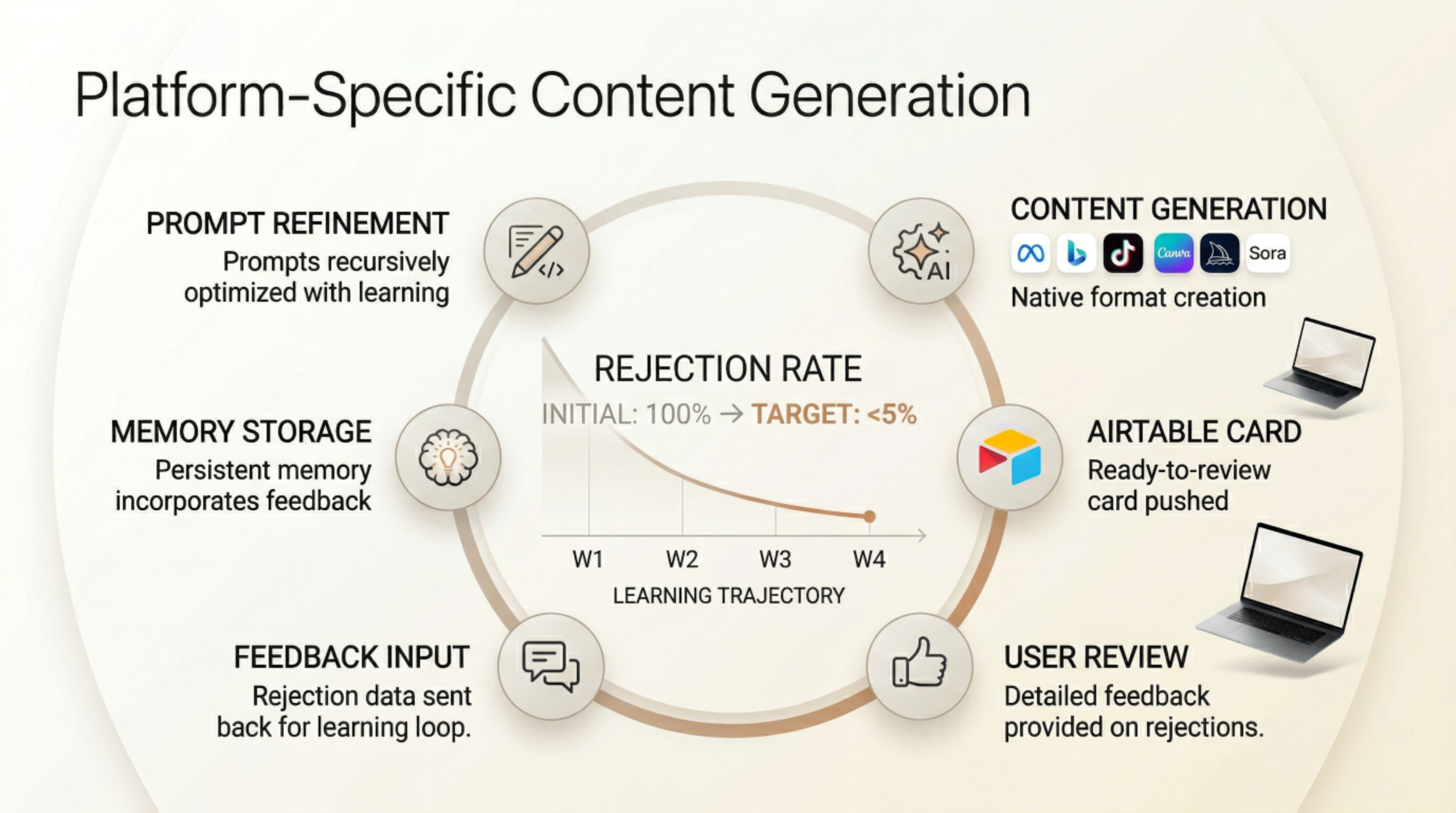
You will build one persistent “Marketing Claw” agent (or a small team of sub-agents) with custom skills. OpenClaw’s memory + self-hackable nature means it will get better over time and drive your rejection rate below 5 % automatically.
1. Core Setup (One-Time, ~30–60 min)
- Install OpenClaw on a dedicated low-cost VPS (Hetzner, DigitalOcean, or even a Mac Mini/Raspberry Pi) so it runs 24/7. Use the one-liner install or Docker.
- Connect your preferred LLM (Claude Opus/Sonnet recommended for best reasoning; fallback to GPT or local models).
- Onboard via WhatsApp/Telegram/Discord/Slack (your daily interface).
- Give it a clear persona: “You are my Marketing Claw — autonomous content engine for [your domain]. Goal: daily topic curation → generation → review → publish with <5 % rejection.”
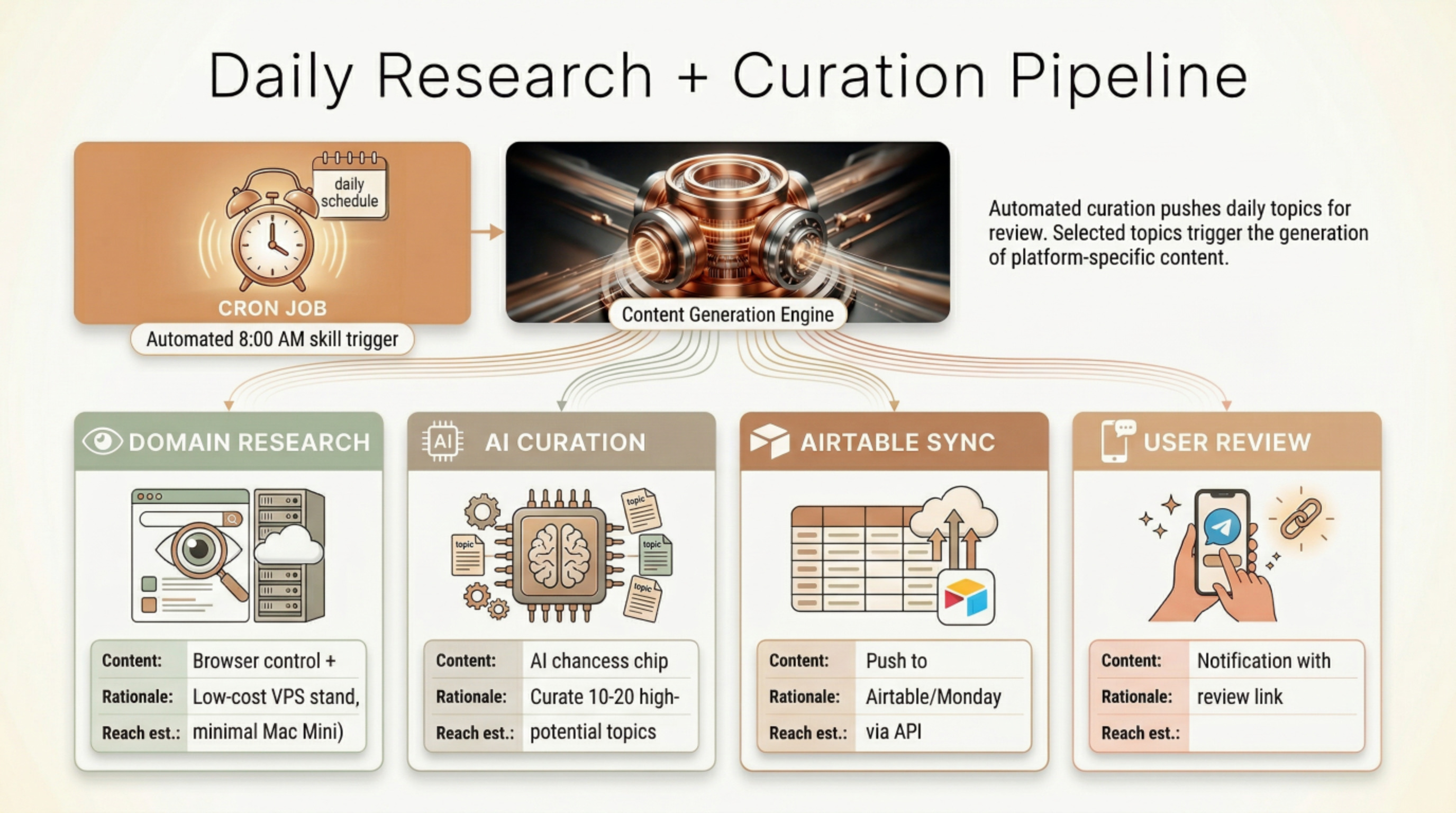
2. Daily Research + Curation Pipeline (Cron Job)
- Create a cron skill that runs every morning (or twice daily).
- The agent:
- Researches your domain using browser control + search.
- Curates 10–20 high-potential topics.
- Formats them as Airtable/Monday.com cards (title, why it works, target platform, estimated reach).
- Pushes them via Airtable API (or Monday.com API) using HTTP requests or a custom skill.
- You get a notification in chat: “10 new topics ready in Airtable — review here: [link]”.
3. Content Generation Once You Select Topics
- You select topics in Airtable (or reply in chat: “Generate for topics 3, 5, 7”).
- Trigger (webhook from Airtable or chat message) starts the generator agent.
- It generates platform-specific content exactly to your specs:
- META (FB + IG) → carousel/image + caption + hashtags + CTA
- GOOGLE/BING → search ads + display + YouTube (if needed)
- TIKTOK → script + caption + hook + hashtags + video description
- It also generates or sources the image/video (via integrated tools like browser automation to Canva/Midjourney/Runway/Sora, or direct API calls you add).
- Output format: Airtable/Monday.com cards with columns → Text | Image/Video (URL or attachment) | Hashtags | Platform | Status: Ready for Review.
4. Review + Approval Loop
- Cards land in Airtable/Monday.com automatically.
- You review, approve, or reject with comments (e.g., “Too salesy, make it more educational” or “Video hook is weak”).
- Rejection → feedback is sent back to OpenClaw via:
- Airtable webhook (best), or
- Simple chat reply.
- OpenClaw’s memory immediately incorporates the feedback and refines future generations (prompt engineering + few-shot examples in its soul file).
5. Auto-Publishing on Approval
- On “Approved” status (or your chat command), the publisher skill fires.
- It posts natively or via a scheduler:
- Direct API (Meta Graph API, TikTok for Business API, Google/Bing Ads API) — OpenClaw can handle OAuth and calls.
- Or (easier for most people) route through a lightweight scheduler like Postiz (many users do exactly this).
- Posts go live and the card status updates to “Published” with link + metrics stub.
6. Feedback Loop & Rejection Rate Optimization
- OpenClaw tracks every rejection in its memory.
- Every week it runs a self-review skill: “Analyze last 50 rejections → update generation guidelines → reduce rejection rate.”
- You can set a guardrail: “Only publish if confidence >90 % and historical rejection pattern suggests <5 % risk.”
- Within 2–4 weeks the rejection rate drops below 5 % because it literally learns your taste.
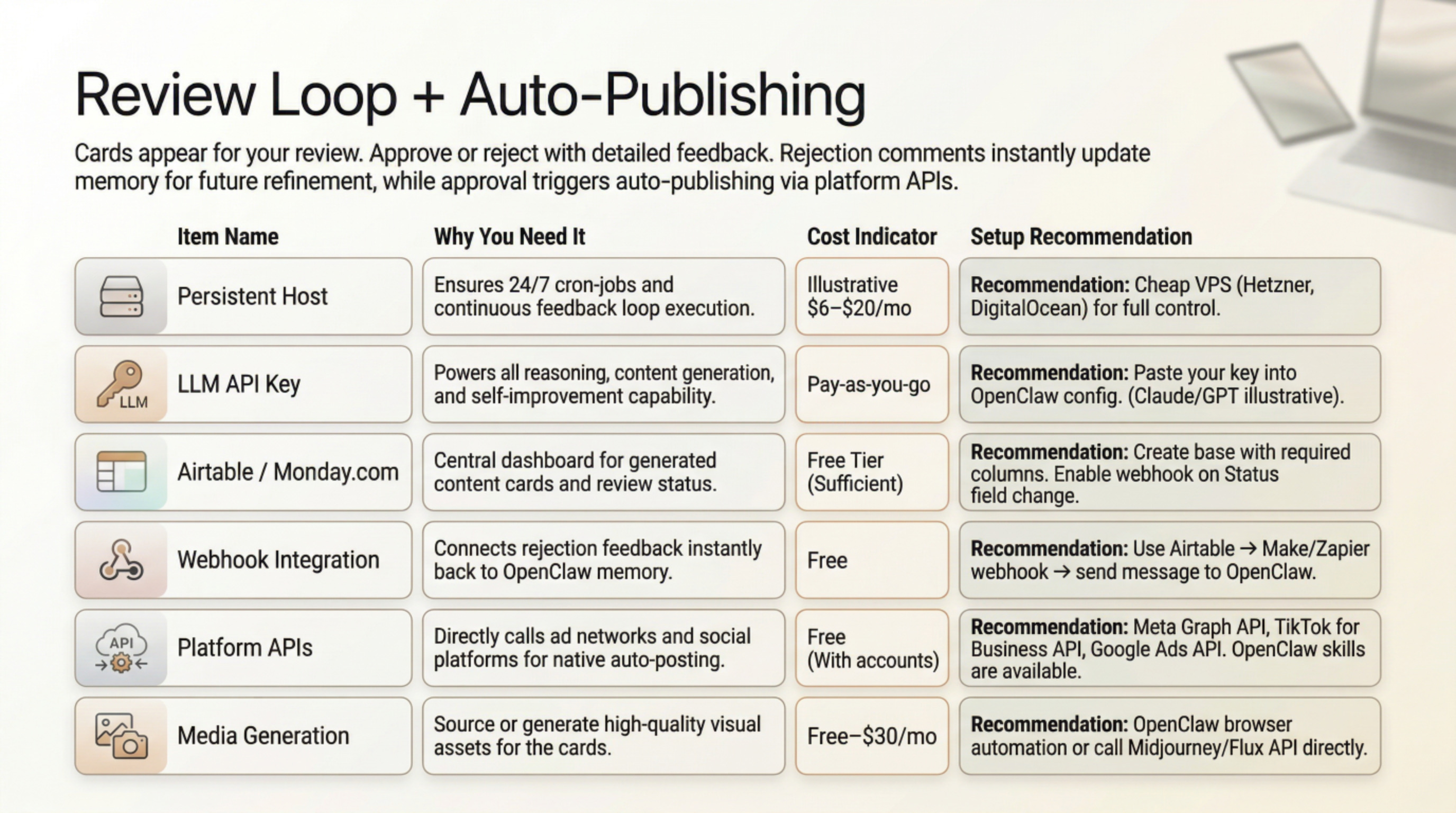
What You Need Apart from OpenClaw to Make This Happen
OpenClaw is the brain and the hands of the entire system, but you still need a few supporting pieces to make it production-ready and fully autonomous. Most are cheap/free and take <1 hour to set up.
| Item | Why You Need It | Cost | Recommendation / How to Set Up |
|---|---|---|---|
| Always-on host | OpenClaw must run 24/7 with cron/heartbeat scheduler for daily research + publishing | $0–$20/mo | • Cheap VPS: Hetzner Cloud CX22 or DigitalOcean Droplet (~$6/mo) • Or Mac Mini / old laptop at home • One-click: Elestio or NitroClaw managed hosting (2-minute deploy) |
| LLM API key | Powers all reasoning, research, content generation, and self-improvement | Pay-as-you-go | Claude Opus or Sonnet (best for marketing tone + long context). Fallback: GPT-4o or Grok. Paste key into OpenClaw config — done. |
| Airtable OR Monday.com (your review board) | Central dashboard for topics + generated content cards | Free tier sufficient | Create base with columns: Topic |
| Webhooks / Trigger bridge (optional but recommended) | So OpenClaw knows instantly when you approve/reject cards | Free | Use Airtable → Make.com / n8n / Zapier webhook → send message to OpenClaw on Telegram/WhatsApp. Or just reply in chat (“Approve cards 3,5,7”). |
| Platform APIs for publishing | Auto-post to Meta, Google, Bing, TikTok without manual login | Free (with your accounts) | • Meta Business Suite + Graph API • TikTok for Developers API • Google/Bing Ads API OpenClaw already has community skills for OAuth + posting; if missing, it can write the skill itself in one prompt. |
| Media generation (images/videos) | Your cards need visuals | $0–$30/mo | • Browser automation skill (OpenClaw controls Canva, CapCut, or Photopea for free) • Or add Midjourney / Flux / Kling / Runway API key (OpenClaw calls them directly) • Many users just say “generate carousel in Canva and attach link” |
| Optional scheduler / buffer (for extra safety) | If direct API feels scary at first | Free–$15/mo | Postiz, Buffer, or Later — OpenClaw pushes approved cards there instead of direct post. Super easy skill. |
| Custom skills (one-time) | Airtable sync, topic research template, feedback learner | Free | 1. Enable ClawHub (auto-downloads community skills). 2. Prompt OpenClaw once: “Create skill: push topics to Airtable, pull feedback, generate platform-specific content, publish on approval.” It literally writes and installs the skills for you. |
Full One-Time Setup Checklist (30–90 minutes)
- Install OpenClaw on your VPS/host (official one-liner or Docker).
- Connect your chat app (WhatsApp/Telegram/Slack — whichever you want daily notifications on).
- Paste LLM key + Airtable API key.
- Give it the full persona + workflow prompt (copy-paste the description you wrote me).
- Create the Airtable base + webhook.
- Ask OpenClaw: “Build me the Marketing Claw agent with daily research cron, Airtable sync, content generator, review loop, and auto-publish skills.”
→ It will do 90 % of the work and ask you for any missing API keys.
Realistic Timeline & Rejection-Rate Drop
- Day 1: Setup + first 10 topics appear in Airtable.
- Week 1: You review & give feedback → OpenClaw starts learning your voice/style.
- Week 2–3: Rejection rate usually falls to ~15–20 %.
- Week 4+: <5 % rejection (it keeps a rejection log and self-refines prompts + examples every Sunday).
Users are already running almost exactly this content pipeline (content research → generation → review → publish) with OpenClaw — some even for full agency clients.
If you want, I can give you:
- The exact initial persona prompt to copy-paste into OpenClaw
- Sample Airtable base template (column names + formulas)
- Link to the best community skills for Airtable + Meta/TikTok posting
Yes — let OpenClaw generate the skills for you.
That’s exactly how it’s designed and what 95 % of users do (including all the advanced marketing setups). You should not write the SKILL.md files yourself unless you enjoy debugging token limits and YAML front-matter.
Why Let OpenClaw Generate Them?
- It has a built-in
skill-creatortool (official bundled skill) that knows the exact format OpenClaw expects (name, description, triggers, workflow, references folder, <500-line core limit, etc.). - It automatically creates the folder structure, SKILL.md, any helper scripts, and updates your config.
- It keeps skills token-efficient and secure by design.
- You just give it one clear prompt and it does the rest.
How to do it (30 seconds):
- Make sure
skill-creatoris enabled (it’s in the default bundled skills — just runopenclaw skills enable skill-creatorif needed). - In your chat with OpenClaw, paste this template (copy-paste ready):
I need help creating an AgentSkill.

Skill name: marketing-topic-curator
Purpose: Daily research + curate 10-20 high-potential topics in my niche [YOUR DOMAIN HERE] and push them as cards to Airtable via API.
Triggers: Morning cron, command "run daily research", or webhook from Airtable.
Tools needed: browser, web-search, airtable-api (or http requests), memory for past performance.
Reference docs: Airtable API docs in references/airtable.md
Please:
- Keep SKILL.md under 500 lines
- Move all API details/examples into references/ folder
- Show me the final file structure when done
- Make it production-ready with error handling and logging
Do the same for the other skills you need:
content-generator-meta-tiktok-googleairtable-sync-reviewfeedback-learner(the self-improvement loop that drops rejection rate)auto-publisher(Meta + TikTok + Google/Bing APIs)
It will generate, install, and test them for you. After each one, just say “install this skill” or “enable it in my Marketing Claw agent”.
Do You Need Multiple Agents? (Short Answer: Yes, but start simple)
For your exact workflow (daily research → curation → generation → review → publish + learning from rejections), one single persistent agent is enough to get started today.
But multi-agent is strongly recommended (and built-in) because it makes everything cleaner, more reliable, and scales better.
Recommended setup for you:
- Main Agent: “Marketing Claw” (orchestrator) — the one you chat with daily.
- Specialist Agents (spawned automatically):
- Researcher / Curator
- Content Generator
- Publisher + Feedback Learner
This is exactly what people are already running for full content engines (some run 4–13 agents: CMO, researcher, writer, scheduler, etc.).
How to enable it (one-time, 2 minutes): Edit your ~/.openclaw/config.yaml (or run openclaw agents add wizard):
agents:
  list:
    - id: marketing-claw
      default: true
      workspace: ~/.openclaw/workspace-marketing
    - id: researcher
      workspace: ~/.openclaw/workspace-research
    - id: generator
      workspace: ~/.openclaw/workspace-generator
    - id: publisher
      workspace: ~/.openclaw/workspace-publisher

tools:
  agentToAgent:
    enabled: true
    allow: ["marketing-claw", "researcher", "generator", "publisher"]
    maxPingPongTurns: 8   # how many back-and-forth messages they can have
Then restart: openclaw gateway restart
Your main “Marketing Claw” can now delegate:
- “Run daily research” → spawns researcher agent
- “Generate content for these topics” → spawns generator agent
- “Publish approved cards” → spawns publisher agent
Everything stays in one process (no Docker needed).
Do You Need A2A Enabled?
- Internal agentToAgent (what I showed above) → YES, enable it. This is the native, zero-config way agents talk to each other inside your OpenClaw instance. It’s what you want.
- Full A2A Protocol (the open standard for talking to agents on other machines or other frameworks) → No, not needed for your use case.
Only turn it on later if you want your Marketing Claw to collaborate with external agents (e.g., a separate coding agent on another VPS). Community plugins exist (openclaw-a2a-gateway), but skip it for now.
Quick Next Step for You
Reply in OpenClaw with:
“I want a full Marketing Claw multi-agent team for daily topic curation → platform-specific content generation → Airtable review → auto-publish with feedback learning. Create the four agents, enable agentToAgent, and generate the five core skills: topic-curator, content-generator, airtable-sync, feedback-learner, auto-publisher.”
It will literally build the entire system for you and ask for your Airtable key + API credentials when needed.
You’ll be live with the first topics in Airtable by the end of today.
Here’s your complete “Full Starter Pack” — everything copy-paste ready.
Just follow the 4 steps below and you’ll have the entire Marketing Claw system live today.
STEP 1: One-Shot Prompt to Paste into OpenClaw (Main Chat)
Copy and paste this exactly as your first message to your OpenClaw instance:
I want a full autonomous Marketing Claw multi-agent team for my business.

Domain/Niche: [REPLACE WITH YOUR EXACT NICHE e.g. "SaaS productivity tools for small businesses in India" or whatever yours is]

Goal:
- Daily research & curate 10-20 high-potential topics
- Push curated topics to Airtable as review cards
- When I select topics (via Airtable status or chat), generate platform-specific content for META (FB+IG), GOOGLE/BING search & display ads, TIKTOK
- Output goes back to Airtable in card format: Text | Image/Video (URL) | Hashtags | Platform | Status
- I approve or reject with comments → feedback is learned instantly
- On approval, auto-publish natively via APIs
- Track rejections and self-improve every week so rejection rate drops below 5%

Create the full system now:
1. Enable agentToAgent communication
2. Create 4 agents with the exact SOUL.md personas I will give you in a moment
3. Generate and install these 5 skills using skill-creator:
   - marketing-topic-curator
   - content-generator-platforms
   - airtable-sync-review
   - feedback-learner-rejection-optimizer
   - auto-publisher-meta-google-tiktok-bing
4. Set up daily morning cron (8 AM IST) for topic curation
5. Create the Airtable base structure automatically (or give me the exact schema to create manually)
6. Ask me only for the missing API keys (Airtable, Meta, TikTok, Google Ads, Bing Ads, LLM key if not already set)

Use Claude Sonnet/Opus as default LLM for best marketing tone.

When everything is ready, reply with “Marketing Claw system is LIVE — first daily topics are being pushed to Airtable now” and send me the Airtable share link + dashboard instructions.
(After you paste the above, OpenClaw will start building. It will ask for your API keys one by one.)
STEP 2: Multi-Agent SOUL.md Personas (Copy-Paste These When OpenClaw Asks)
OpenClaw will ask you for the SOUL.md content for each agent. Paste the matching block below.
Agent 1 – Marketing Claw (Main Orchestrator – this is the one you chat with daily)
soul:
  name: Marketing Claw
  role: Autonomous CMO & Content Engine
  personality: Proactive, data-driven, obsessive about quality and my exact brand voice. Never asks for permission to run daily tasks. Always optimizes for <5% rejection rate.
  goal: Run the entire content marketing flywheel 24/7 with zero manual work except final approval.
  memory: Long-term memory of every rejected piece + what I liked/disliked. Weekly self-review every Sunday.
  communication: Short, action-oriented updates via WhatsApp/Telegram. Always include Airtable links.
Agent 2 – Researcher (Specialist)
soul:
  name: Researcher
  role: Daily Topic Curator
  personality: Extremely thorough researcher. Finds trending, evergreen + high-engagement topics in my niche. Scores each topic on virality, search volume, competition, alignment with my brand.
  goal: Deliver 10-20 ready-to-review cards every morning in Airtable.
Agent 3 – Generator (Specialist)
soul:
  name: Generator
  role: Platform-Specific Content Creator
  personality: Master copywriter + visual strategist. Follows my exact brand tone, specifications, and past feedback. Generates native formats only (carousel for IG, short script for TikTok, ad copy for Google/Bing, etc.).
  goal: Zero generic content. Every piece must feel hand-written by me.
Agent 4 – Publisher + Learner (Specialist)
soul:
  name: Publisher & Rejection Optimizer
  role: Auto-publisher + Continuous Improver
  personality: Extremely reliable. Only publishes when approved. Turns every rejection into a permanent improvement in the generation rules.
  goal: Drive rejection rate to <5% within 4 weeks. Logs every feedback forever.
STEP 3: Airtable Base Template (Create This Manually – 2 Minutes)
Create a new Airtable base called “Marketing Claw Pipeline”
Table 1: Daily Topics (for curation stage)
- Topic Title (Single line text)
- Why It Works (Long text)
- Virality Score (Number 1-100)
- Platforms (Multiple select: META, GOOGLE, BING, TIKTOK)
- Status (Single select: New, Selected, Generated, Approved, Rejected, Published)
- Curated Date (Date)
Table 2: Content Cards (main review + publish table – linked to Topics)
- Topic Link (Link to another record)
- Platform (Single select)
- Text / Caption (Long text)
- Media URL / Attachment (Attachment or URL)
- Hashtags (Long text)
- CTA (Single line)
- Status (Single select: Ready for Review → Approved → Rejected → Published)
- Feedback / Rejection Reason (Long text) ← OpenClaw reads this automatically
- Published Link (URL)
- Rejection Count (Formula – counts how many times this style was rejected)
Enable webhooks on the “Status” field change (Airtable → Automations → Webhook → send to your OpenClaw Telegram/WhatsApp).
STEP 4: After OpenClaw Finishes Building
- OpenClaw will say the system is LIVE.
- Go to your Airtable and you should already see the first 10–20 topics.
- Reply to OpenClaw: “Run daily research” or just wait for the cron tomorrow.
- Select topics → change Status to “Selected” → Generator agent wakes up automatically.
- Review generated cards → Approve or reject with comment in the Feedback column.
- Approved cards → auto-published.
You’re done.
The whole system is now self-running, self-learning, and will get better every single day.
If anything is missing or OpenClaw asks for clarification while building, just paste the exact question back to me and I’ll give you the precise answer.
Ready to copy-paste Step 1 now? Go hit that chat with OpenClaw and watch it build your marketing team in the next 10–15 minutes. 🔥
No comments to display
No comments to display