
Building Production-Ready OpenClaw Skills, Agents, and Orchestrators: A Comprehensive Engineering Guide

OpenClaw Skills, Agents, and Orchestrators: A Comprehensive Engineering Guide
1. Foundations of OpenClaw Architecture
1.1 Core Concepts for Software Engineers
1.1.1 Understanding the Agent-Tool-Skill Hierarchy
OpenClaw operates on a three-layer architecture that fundamentally restructures how software engineers approach automation. At the foundation are Tools—the primitive capabilities that determine what the system can do. These include file operations (read, write, edit), command execution (exec), web access (web_search, web_fetch), browser automation (browser), and memory management. Without tools enabled, OpenClaw is essentially non-functional—it has no hands to act in the world .
The middle layer consists of Skills—structured instructions that teach the agent how to combine tools to accomplish specific tasks. Skills are not code in the traditional sense; they are documented contracts between the agent and external services, written primarily in natural language with YAML frontmatter for metadata. A skill for PDF processing, for example, doesn't add new capabilities—it instructs the agent how to use existing tools (Bash, Read) to accomplish PDF-related workflows . The critical insight is that skills do not grant new permissions—they merely instruct the agent how to use existing tool permissions effectively. If the write tool is disabled, no amount of skill installation will enable file modification .
The top layer is the Agent itself—the orchestrating intelligence that interprets user requests, selects relevant skills, and executes multi-step workflows. The agent's decision-making is driven by the descriptions in skill metadata; it scans installed skills by name and description, selects the most relevant one, loads its full SKILL.md into context, and executes the commands or HTTP calls described inside .
This hierarchy creates a clean separation of concerns: tools provide the interface to the external world, skills encode domain knowledge and workflows, and the agent provides the reasoning layer that binds them together. For engineers with backgrounds in microservices or plugin architectures, this model will feel familiar—tools are like low-level system calls, skills are like service libraries, and agents are like deployed service instances.
| Layer | Function | Examples | Key Characteristic |
|---|---|---|---|
| Tools | Primitive capabilities | read, write, exec, browser, web_search |
Deterministic, well-defined schemas |
| Skills | Composed behaviors | github, gmail-connector, calendar-assistant |
Natural language instructions, reusable |
| Agents | Orchestration and reasoning | Personal assistant, marketing agent, lead qualifier | Persistent, adaptive, goal-directed |
1.1.2 How OpenClaw Differs from Traditional Automation Frameworks
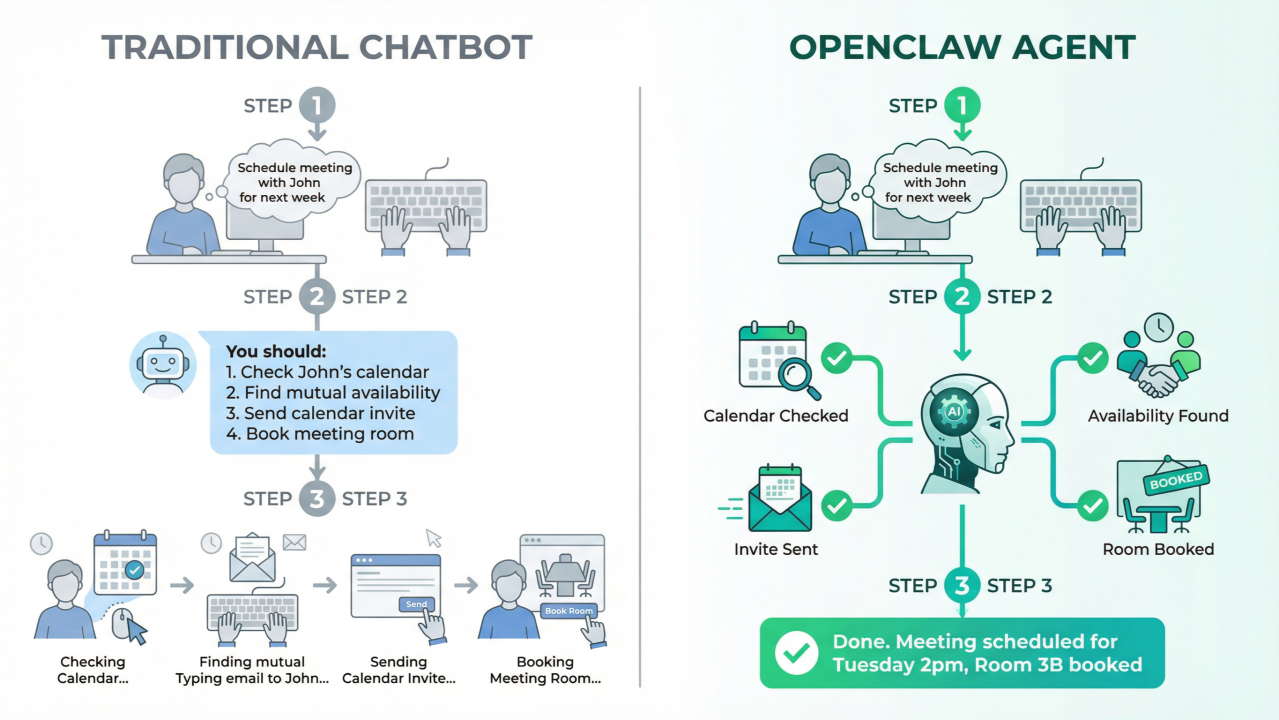
Traditional automation frameworks—whether RPA tools like UiPath, workflow engines like Apache Airflow, or scripting environments like Python with Selenium—operate on imperative programming models. Developers explicitly define sequences of actions, conditional branches, and error handling. OpenClaw inverts this paradigm through goal-directed autonomy: developers describe what should be achieved in natural language, and the agent determines how to make it happen .
This declarative approach has profound implications for development velocity and maintenance burden. Consider a traditional web scraping script: it breaks when target site layouts change, requires explicit handling of pagination, rate limiting, and error recovery. An OpenClaw skill for the same task describes the goal ("extract product information from search results") and lets the agent adapt to structural changes using its reasoning capabilities .
However, this flexibility comes with trade-offs. Traditional frameworks offer deterministic execution—given the same inputs, they produce identical outputs. OpenClaw's behavior is probabilistic, influenced by model temperature, context window limitations, and the quality of natural language instructions. Production deployments must account for this variability through careful prompt engineering, comprehensive testing, and appropriate guardrails .
Another critical difference is the skill loading mechanism. OpenClaw loads skills on-demand based on relevance, not at startup. When a user asks about stock prices, only the stock-price skill's full instructions enter the context window. This keeps token usage efficient even with dozens of skills installed—a crucial optimization given that each skill adds approximately 24 tokens to the system prompt, plus the length of its name and description .
| Aspect | Traditional Automation | OpenClaw |
|---|---|---|
| Control flow | Explicit, deterministic | Implicit, adaptive |
| Error handling | Fail-fast, explicit retry | Self-healing, dynamic recovery |
| State management | External databases, explicit I/O | Persistent conversational context |
| Integration | Structured APIs, webhooks | Natural language + browser automation |
| Security model | Fixed credentials, explicit boundaries | Broad authority with operator trust |
1.1.3 The Runtime Environment: Gateway, Sessions, and Message Flow
OpenClaw's runtime architecture centers on the Gateway—a persistent process that maintains connections to AI models, external services, and communication channels. The Gateway handles message routing, session management, and tool execution coordination. When deployed in organizational settings, multiple agents can share a single Gateway, enabling resource pooling and centralized configuration management .
Sessions represent bounded conversation contexts. Each user interaction initiates a session that maintains conversation history, loaded skills, and accumulated state. Sessions are ephemeral by default—when a conversation ends, its context is discarded unless explicitly persisted to memory or external storage. This design supports both stateless request-response patterns and long-running multi-turn workflows .
The message flow follows a clear pattern: (1) user input arrives through a configured channel (CLI, Slack, Telegram, etc.); (2) the Gateway routes it to the configured AI model; (3) the model generates a response that may include tool calls; (4) the Gateway executes those calls and returns results; and (5) the cycle continues until the task completes. For multi-step workflows, this loop may iterate dozens of times, with each iteration consuming tokens and adding to context window pressure .
Understanding this flow is essential for debugging and optimization. Slow responses often indicate excessive tool calls or large context windows. Unexpected behavior typically stems from skill selection—either the wrong skill was chosen, or the right skill's instructions were ambiguous. The Gateway logs provide visibility into each decision point, though interpreting them requires familiarity with OpenClaw's internal telemetry format .
1.2 Installation and Environment Setup
1.2.1 System Requirements and Prerequisites
OpenClaw's flexibility in deployment environments creates corresponding complexity in prerequisites. For local development, the minimal requirements are modest: Node.js 18+, approximately 500MB disk space for the core installation, and network access to at least one AI model provider (OpenAI, Anthropic, Google, or local alternatives). However, production deployments—especially those involving browser automation, document processing, or multi-agent orchestration—demand substantially more resources .
Browser-based skills require Chromium or Chrome installation, with corresponding memory overhead (2-4GB per concurrent browser instance). PDF processing skills need poppler-utils on Linux/macOS or equivalent on Windows. Skills integrating with cloud services require authenticated CLI tools (aws, gcloud, az) with appropriate credentials configured .
The most frequently overlooked prerequisite is API key management. OpenClaw itself doesn't require payment, but every meaningful operation consumes tokens from connected model providers. A typical development session with GPT-4 might consume $5-20 in API credits; production workloads can scale to hundreds or thousands of dollars monthly without careful optimization. Engineers must establish key rotation procedures, spending alerts, and organizational controls before deploying at scale .
For organizational deployments, additional infrastructure considerations apply: dedicated VPS or container orchestration platforms, persistent storage for session state and logs, network egress controls for security compliance, and monitoring integrations for observability. The "self-hosted private AI" pattern—deploying on dedicated VPS with stable IP addresses—has become standard for professional use cases requiring 24/7 availability and consistent identity for platform trust scoring .
| Deployment Type | Minimum Specs | Recommended Specs | Critical Add-ons |
|---|---|---|---|
| Local development | 4GB RAM, Node 18+ | 8GB RAM, SSD | None |
| Light production | 4GB RAM, 2 vCPU | 8GB RAM, 4 vCPU | Persistent storage |
| Browser automation | 8GB RAM + 4GB/browser | 16GB RAM, dedicated instance | Chrome/Playwright |
| Multi-agent org | 16GB RAM, 4 vCPU | 32GB RAM, container orchestration | Redis, monitoring |
1.2.2 Installation via Package Managers
OpenClaw supports multiple installation paths, each with trade-offs for different use cases. The npm-based installation provides the most flexibility for development environments:
npm install -g openclaw@latest
This enables easy updates and access to bleeding-edge features. The @latest tag tracks stable releases; beta and dev channels are available via @beta and @dev dist-tags for teams requiring cutting-edge features or contributing to development .
For automated and containerized deployments, platform-specific scripts provide dependency-free installation:
# macOS and Linux
curl -fsSL https://openclaw.ai/install.sh | sh

# Windows (PowerShell)
irm https://openclaw.ai/install.ps1 | iex
These scripts perform comprehensive environment validation: detecting Node.js version compatibility, installing or upgrading Node via platform-appropriate methods, configuring PATH entries, and installing the Gateway as a persistent service where requested .
Docker deployment has emerged as the dominant pattern for production orchestration:
FROM node:20-alpine
RUN apk add --no-cache chromium git
ENV PUPPETEER_SKIP_CHROMIUM_DOWNLOAD=true \
    PUPPETEER_EXECUTABLE_PATH=/usr/bin/chromium-browser
RUN npm install -g openclaw@latest
COPY openclaw.json /root/.openclaw/
EXPOSE 8080
CMD ["openclaw", "gateway", "--verbose"]
The critical configuration for containerized deployments is persistent volume mounting for ~/.openclaw/—without this, API keys, skill installations, and conversation history are lost on container restart .
1.2.3 Initial Configuration: openclaw onboard and Profile Setup
The openclaw onboard command initiates an interactive configuration wizard that establishes the foundational runtime environment. This process configures: default AI model and API credentials, enabled tools and their permission levels, communication channels (CLI, Slack, Telegram, etc.), and basic security policies .
Profile management enables environment-specific configurations. A typical setup maintains separate profiles for:
| Profile | Purpose | Configuration |
|---|---|---|
development |
Local iteration | Verbose logging, all tools enabled, local models |
staging |
Pre-production | Production-like restrictions, monitored spending |
production |
Live deployment | Minimal logging, strict tool allowlists, budget caps |
Profile switching (openclaw --profile production) ensures consistent behavior across environments without configuration drift .
The most critical configuration decisions during onboarding relate to tool permissions. OpenClaw defaults to a restrictive posture—most tools require explicit enablement. Engineers must evaluate each tool's risk profile: read is generally safe, write enables data modification, exec permits arbitrary command execution, and browser opens network connections and can interact with external services. Production deployments should follow the principle of least privilege, enabling only tools required for deployed skills .
Post-onboarding configuration centers on ~/.openclaw/openclaw.json, the primary configuration file using JSON5 syntax (allowing comments and trailing commas). A minimal production configuration illustrates key domains:
{
  // LLM provider configuration with failover
  agent: {
    model: "anthropic/claude-sonnet-4",
    fallbackModels: ["openai/gpt-4o", "google/gemini-1.5-pro"],
    thinkingLevel: "medium",
  },

  // Gateway network binding
  gateway: {
    bind: "loopback",
    port: 8080,
    auth: {
      mode: "password",
      password: "${GATEWAY_PASSWORD}",
    },
  },

  // Default agent behavior
  agents: {
    defaults: {
      workspace: "~/.openclaw/workspace",
      sandbox: {
        mode: "non-main",
      },
      dmPolicy: "pairing",
    },
  },
}
1.2.4 Verifying Installation with Basic Commands
Post-installation verification should progress through increasing complexity levels. First, confirm core functionality:
| Command | Purpose | Expected Output |
|---|---|---|
openclaw --version |
Version confirmation | Installed version and build info |
openclaw health |
Connectivity check | Model provider status, all green |
openclaw config validate |
Configuration audit | No errors or missing required fields |
openclaw tools list |
Tool availability | List of enabled tools with descriptions |
Second, test tool execution: openclaw exec "echo 'Hello World'" verifies command execution; openclaw read ~/.openclaw/config.json confirms file access; openclaw web_search "OpenClaw documentation" validates network connectivity .
Third, validate skill loading: openclaw skills list --eligible displays all skills that meet their declared requirements. Newly installed skills may not appear if requirements are unmet—common issues include missing binaries, unset API keys, or OS incompatibility .
Finally, execute an end-to-end workflow: openclaw chat "Summarize the latest OpenClaw release notes" tests the complete pipeline from user input through model reasoning, tool execution, and response generation .
1.3 Understanding Tools vs. Skills
1.3.1 Built-in Tools: Read, Write, Exec, Browser, and 25+ Default Capabilities
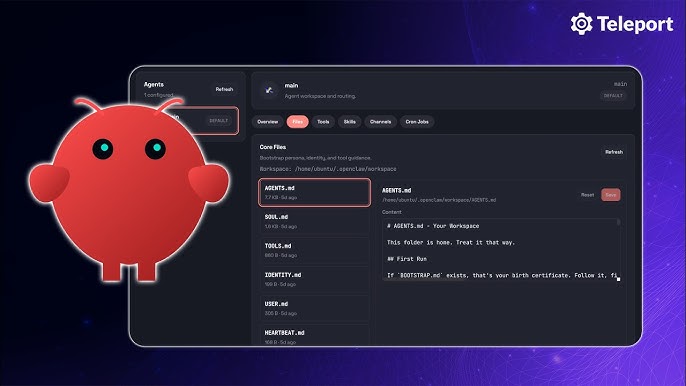
OpenClaw ships with 25+ built-in tools organized into functional categories. Understanding these tools' capabilities and limitations is essential for effective skill design and security policy formulation .
File Operations (read, write, edit, apply_patch) form the foundation for document processing and code manipulation. read is read-only and generally safe; write creates or overwrites files; edit performs targeted modifications using search-replace patterns that preserve surrounding context; apply_patch applies unified diff format changes. The edit tool is particularly powerful for code refactoring—its idempotent design prevents accidental duplicate insertions .
Command Execution (exec, bash) enables shell command execution with the full privileges of the OpenClaw process. This is the most dangerous tool category—arbitrary code execution is fundamentally incompatible with untrusted input. Production deployments should restrict exec to specific allowlisted commands or disable it entirely for channels exposed to external users .
Web Access (web_search, web_fetch, browser) provides graduated internet interaction capabilities. web_search performs search queries and returns summarized results; web_fetch retrieves specific URLs with content extraction; browser launches a full Chromium instance capable of JavaScript execution, form interaction, and screenshot capture. The browser tool is essential for modern web automation but carries 10-100x higher token costs than fetch .
| Tool Category | Examples | Risk Level | Typical Use Cases |
|---|---|---|---|
| File Operations | read, write, edit, apply_patch |
Medium | Document processing, code refactoring, configuration management |
| Command Execution | exec, bash |
Critical | Build automation, system administration, custom scripts |
| Web Access | web_search, web_fetch, browser |
High | Research, data collection, web automation, competitive analysis |
| Communication | message, email, slack |
Medium | Alerts, notifications, human approval workflows |
| Advanced | memory, schedule, heartbeat, nodes |
Medium-High | Persistent workflows, monitoring, distributed execution |
1.3.2 Community Skills: 53+ Pre-built Solutions by Category
Beyond built-in tools, OpenClaw distributes 53+ official skills covering common automation scenarios. These skills are maintained by the core team, undergo security review, and are optimized for reliable operation across diverse environments .
Development Skills include github (repository operations via gh CLI), git-helper (commit message generation, branch management), tmux (terminal session management), session-logs (conversation analysis), and coding-agent (delegation to specialized coding assistants like Claude Code). The github skill is particularly valuable for CI/CD integration—enabling agents to check build status, review PRs, and trigger deployments .
Productivity Skills encompass gog (full Google Workspace integration: Gmail, Calendar, Tasks, Drive, Docs, Sheets), himalaya (IMAP/SMTP email for non-Google providers), things-mac and apple-reminders (task management), and trello (Kanban board operations). The gog vs. himalaya choice illustrates important trade-offs: gog provides deeper integration but requires OAuth and Google account access; himalaya works with any email provider but offers only basic send/receive functionality .
Communication Platform Skills (wacli for WhatsApp, imsg for iMessage, bird for X/Twitter, slack, discord) provide deep platform integration including message history search, conversation synchronization, and channel management. Unlike the base message tool, these skills can read historical messages and maintain persistent presence .
The complete skill catalog is browsable at ClawHub (clawhub.com), which hosts 13,700+ community-contributed skills beyond the official set. However, community skills require careful vetting—a February 2026 audit flagged 341 malicious skills, primarily distributing the AMOS macOS stealer. The Skill Vetter skill can scan installations for known threats, but manual review of SKILL.md contents remains essential .
1.3.3 When to Use Existing Skills vs. Build Custom
The decision between using existing skills and building custom implementations depends on multiple factors: specificity of requirements, security constraints, maintenance capacity, and optimization opportunities .
| Factor | Use Existing Skill | Build Custom |
|---|---|---|
| Time to value | Immediate; install and configure | Days to weeks for development and testing |
| Maintenance burden | Borne by community or vendor | Internal responsibility; requires expertise |
| Customization depth | Limited to configuration parameters | Unlimited; full control over behavior |
| Integration specificity | Generic; may require adaptation | Purpose-built for internal systems |
| Security review | Depends on source trustworthiness | Controllable; internal audit possible |
| Performance optimization | Fixed implementation | Tunable for specific workloads |
Use existing skills when: requirements align with standard workflows (email management, GitHub operations, calendar scheduling); rapid deployment is prioritized over customization; maintenance resources are constrained; and security requirements permit third-party code execution .
Build custom skills when: workflows involve domain-specific tools without community coverage; specialized behavior is required that generic skills cannot provide; integration depth matters more than breadth; or competitive advantage derives from proprietary automation. The canonical example is wine cellar management: no generic skill understands vintage tracking, region classification, tasting notes, and optimal drinking windows. A custom skill wrapping a specialized database delivers precisely targeted functionality .
A hybrid approach is often optimal: extend existing skills through configuration and wrapper skills rather than building entirely from scratch. The GitHub skill provides foundation operations; a custom skill layers team-specific review checklists, comment formatting standards, and merge policies. This composition pattern—leveraging community skills for standard operations while adding custom logic for differentiation—balances development velocity with competitive advantage .
2. Designing and Building Custom Skills
2.1 The SKILL.md Anatomy
2.1.1 File Structure and Required Components
Every OpenClaw skill resides in a directory containing at minimum a SKILL.md file. This Markdown file serves as both documentation and executable specification—the agent reads its contents to understand how to perform the skill's tasks. The file structure is intentionally minimal to reduce friction in skill creation and distribution .
The essential components are: a YAML frontmatter block (delimited by ---) containing metadata; natural language instructions describing the skill's purpose, inputs, workflow, and error handling; and optional references to supporting scripts, templates, or documentation. Unlike traditional software modules, skills do not require compiled artifacts or complex build processes—plain text instructions suffice .
A minimal valid SKILL.md contains only:
---
name: example-skill
description: Brief description of what this skill does
---
# Example Skill
Instructions for the AI agent go here.
This simplicity enables rapid prototyping but production skills should be substantially more comprehensive. The name field becomes the skill's identifier for invocation and logging; the description drives skill selection—agents match user requests against descriptions to determine relevance. Vague descriptions ("helps with invoices") produce poor selection accuracy; specific, keyword-rich descriptions ("Generate PDF invoices from client details, line items, hours, and rates") enable precise matching .
The directory structure can include additional files: scripts/ for executable code (Python, shell, etc.), references/ for documentation loaded on-demand, assets/ for templates and static files. These are optional—many effective skills are pure instruction without supporting code. When scripts are included, the {baseDir} placeholder in instructions resolves to the skill's installation directory, enabling portable path references .
2.1.2 Natural Language Instructions: Writing Effective Descriptions
The body of SKILL.md contains instructions written in natural language—English prose that describes what the skill does, when to use it, what inputs to collect, what steps to execute, and how to handle errors. This approach mirrors explaining a tool to a colleague rather than programming a computer .
Effective instructions share structural patterns. They begin with a clear purpose statement: "This skill generates professional PDF invoices from client billing information." They specify inputs with types and validation rules: "Collect client name (string, required), line items (array of {description, hours, rate}, at least one required), and output path (string, defaults to ./invoice-{client}-{date}.pdf)." They describe the workflow as numbered steps, with explicit tool invocations: "1. Validate all required fields are present. 2. Format line items as JSON array. 3. Execute python3 {baseDir}/generate_invoice.py with validated parameters." They address error conditions: "If reportlab is missing, run uv pip install reportlab and retry. If output directory doesn't exist, create it first."
The quality of instructions directly impacts agent performance. Ambiguous instructions produce inconsistent behavior; overly verbose instructions consume context window and may confuse the model. The optimal instruction style is checklist-like: clear defaults, clear stop conditions, clear questions when input is missing. The agent is already creative; skills should provide strictness where strictness helps .
Critical instruction elements often overlooked: confirmation points for destructive operations ("Ask user to confirm before overwriting existing files"); progress indicators for long-running tasks ("Report 'Processing page N of M' every 10 pages"); fallback behaviors when primary approaches fail ("If API returns 429, wait 60 seconds and retry up to 3 times"); and escalation triggers for human intervention ("If confidence score below 0.7, present draft for human review") .
2.1.3 The metadata.openclaw YAML Block: Dependencies, Environment, and Configuration
The YAML frontmatter controls how OpenClaw loads, configures, and executes the skill. Beyond basic name and description, the metadata.openclaw block specifies requirements, installation procedures, and runtime configuration .
Dependency declaration uses the requires subsection:
metadata:
  openclaw:
    requires:
      bins: [python3, pdftotext]        # Must exist in PATH
      anyBins: [node, python3]          # At least one must exist
      env: [GEMINI_API_KEY, PDF_API_KEY] # Must be set or configured
      config: [browser.enabled]          # Must be truthy in openclaw.json
Skills with unmet requirements are filtered from eligibility—they don't appear in skills list --eligible and won't be selected for execution. This gating prevents runtime failures and reduces "skill spam" in the agent's available list .
Installation automation via the install field handles first-time setup:
install:
  brew: [poppler, uv]           # macOS packages
  apt: [poppler-utils, python3-venv] # Debian/Ubuntu
  node: [puppeteer]             # npm packages
  uv: [reportlab, requests]     # Python packages via uv
OpenClaw executes these installations during skill activation, reducing manual setup burden .
Configuration injection enables skill-specific settings without code modification:
# In SKILL.md
metadata:
  openclaw:
    primaryEnv: STRIPE_API_KEY    # Maps to skills.entries.<name>.apiKey

# In ~/.openclaw/openclaw.json
{
  "skills": {
    "entries": {
      "payment-processor": {
        "enabled": true,
        "apiKey": "sk_live_...",
        "env": { "STRIPE_API_KEY": "sk_live_..." },
        "config": { "webhook_url": "https://..." }
      }
    }
  }
}
Environment variables are injected for each agent run then restored, keeping secrets out of chat history and logs .
Behavioral controls include:
user-invocable: true|false— Exposes skill as slash command (/skill-name)disable-model-invocation: true|false— Excludes from automatic selection (manual only)command-dispatch: tool— Bypasses model, routes directly to specified toolalways: true— Skips requirement checking, always eligible
2.1.4 Usage Examples and Edge Case Documentation
Production-quality skills include comprehensive usage examples demonstrating typical invocations, boundary conditions, and error scenarios. These examples serve dual purposes: they guide users in effective skill utilization, and they provide the agent with pattern matching targets for appropriate skill selection .
Effective example structure:
## Usage Examples

### Basic invoice generation
User: "Create an invoice for Acme Corp, 10 hours at $150/hour for consulting"
→ Generates invoice-AcmeCorp-2026-03-24.pdf with $1,500 total

### Multiple line items with custom output
User: "Invoice for Beta Inc: design 5h@$100, development 10h@$150,
       save to /clients/beta/Q1-2026.pdf"
→ Creates specified file with itemized breakdown and $2,000 total

### Error: Missing required information
User: "Make an invoice"
→ Asks: "Who is the client? What services were provided?
         Please provide hours and rates for each item."
Edge case documentation addresses failure modes and recovery procedures:
## Error Handling

- **Missing dependencies**: If `reportlab` import fails, auto-install via
  `uv pip install reportlab` and retry
- **Invalid rates**: Reject negative or zero rates, prompt for correction
- **File permission denied**: Suggest alternative output path or
  request elevated permissions
- **Disk full**: Clear error message with cleanup suggestions
2.2 Skill Development Workflow
2.2.1 Defining the Problem Space and Success Criteria
Skill development should begin with precise problem definition and measurable success criteria. The natural language flexibility of OpenClaw can obscure whether a skill actually solves the intended problem—explicit criteria prevent scope creep and enable objective evaluation .
Problem definition template:
- Trigger: What user request or system event initiates this skill?
- Inputs: What information is required, optional, or derived?
- Outputs: What artifacts, notifications, or state changes result?
- Constraints: Time limits, resource budgets, compliance requirements?
- Failure modes: What can go wrong, and what's the acceptable response?
For a lead qualification skill, this might produce:
| Aspect | Definition |
|---|---|
| Trigger | New lead form submission or CRM webhook |
| Inputs | Lead email, company domain, form responses; optional: LinkedIn profile, job posting history |
| Outputs | Qualification score (0-100), recommended action (nurture/fast-track/reject), routed to appropriate sales rep |
| Constraints | Complete within 60 seconds; cost <$0.50 per lead; GDPR-compliant data handling |
| Failure modes | Unreachable sources → flag for manual review; ambiguous signals → conservative scoring with explanation |
Success criteria should be specific and testable: "80% of qualified leads receive score ≥70" or "Average processing time <30 seconds for leads with complete profiles." These metrics guide iterative refinement and identify when the skill is production-ready .
2.2.2 Selecting Appropriate Tools and External APIs
Tool selection balances capability, cost, and security. Each tool enabled expands the agent's potential actions but also its attack surface and operational cost. The principle of least privilege applies: enable only tools essential for the skill's core functionality .
For web-based research skills, three tools provide graduated capabilities:
| Tool | Cost | Capability | Best For |
|---|---|---|---|
web_search |
Lowest | Search result snippets | Initial context gathering |
web_fetch |
Medium | Full page content | Deep analysis of specific pages |
browser |
10-100x higher | Full JavaScript execution, interaction | Modern SPAs, form submission, screenshots |
A lead research skill might use web_search for initial company identification, web_fetch for about page and press release analysis, and browser only for LinkedIn profile extraction when standard scraping fails. This tiered approach optimizes cost while maintaining capability .
External API integration requires credential management and error handling. The metadata.openclaw.requires.env declaration ensures API keys are present, but skills should also handle: authentication failures (expired/invalid keys), rate limiting (429 responses with exponential backoff), and service degradation (graceful degradation to cached data or manual fallback). The api_gateway skill provides OAuth token refresh for 100+ services, reducing plumbing code for common integrations .
2.2.3 Iterative Testing and Refinement
Skill development follows an iterative cycle: implement, test with diverse inputs, analyze failures, refine instructions, repeat. Unlike traditional software with deterministic test suites, OpenClaw skills require probabilistic evaluation—multiple runs with identical inputs may produce varying outputs due to model temperature and context variations .
Testing strategy components:
| Test Type | Purpose | Implementation |
|---|---|---|
| Unit testing | Validate individual tool invocations | Capture and replay agent execution traces |
| Scenario testing | Evaluate complete workflows | Maintain corpus of test cases covering common, edge, and adversarial inputs |
| Adversarial testing | Probe failure modes | Ambiguous instructions, missing fields, malformed responses, unexpected tool errors |
| Regression testing | Ensure changes don't break existing cases | Version control for SKILL.md enables bisection |
Testing infrastructure: OpenClaw's execution logs (openclaw logs --skill <name>) capture each decision, tool invocation, and response. Analyzing these logs reveals where agent behavior diverges from expectations—whether due to ambiguous instructions, incorrect skill selection, or tool execution failures .
2.2.4 Packaging and Distribution
Skills are distributed as directories or version-controlled repositories. The minimal packaging requirement is a SKILL.md file; supporting scripts, assets, and documentation enhance usability but aren't strictly required .
| Distribution Channel | Method | Best For |
|---|---|---|
| Local/organizational | Copy to ~/.openclaw/skills/ or <workspace>/skills/ |
Internal tools, rapid iteration |
| GitHub | git clone into skills directory |
Version pinning, collaborative development |
| ClawHub | Submit to official registry | Community discovery, external validation |
Publication checklist: Verify all requires dependencies are accurately declared; test on clean environment without implicit dependencies; document installation and configuration procedures; include usage examples and troubleshooting guidance; specify license (MIT recommended for broad adoption); and consider security implications of enabled tools and external API access .
2.3 Advanced Skill Patterns
2.3.1 Multi-Step Workflows with Conditional Logic
Complex automation requires skills that execute multiple steps with conditional branching, looping, and state accumulation. OpenClaw skills support these patterns through natural language instruction rather than control flow primitives .
Conditional execution is expressed as decision rules: "If the lead's company size is >500 employees, set account_tier to 'enterprise' and route to senior_sales_team. Otherwise, set account_tier to 'mid-market' and route to general_sales_team." The agent evaluates conditions and selects appropriate branches based on accumulated state.
A production example from marketing automation: "Campaign-in-a-Box" workflow that transforms a brief into complete campaign assets. The skill executes: (1) parse brief for offer, audience, channels, constraints; (2) generate 1-page creative brief document; (3) draft landing page copy with 3 headline variants; (4) create 5-email nurture sequence with subject line A/B tests; (5) produce 12 ad variants for different platforms; (6) specify KPI dashboard metrics and tracking implementation. Each step's output feeds subsequent steps, with conditional expansion based on channel selection and audience complexity .
2.3.2 Integrating External Services and APIs
Production skills frequently integrate with external services—CRMs, marketing platforms, payment processors, communication APIs. Effective integration requires handling authentication, rate limiting, error recovery, and data transformation .
Retry strategy for resilient API integration:
api_integration:
  retry_policy:
    max_attempts: 3
    backoff: exponential  # 1s, 2s, 4s
    retryable_statuses: [429, 502, 503, 504]
    non_retryable_statuses: [400, 401, 403, 404]  # Fail fast
  timeout:
    connect: 5s
    read: 30s
  circuit_breaker:
    failure_threshold: 5
    recovery_timeout: 60s
Credential management patterns: API keys via environment variables (simplest); OAuth 2.0 with token refresh (for user-delegated access); mutual TLS (for enterprise integrations). The api_gateway skill abstracts OAuth for 100+ services .
Data transformation between external APIs and internal representations is often the most complex skill component. JSONPath or jq expressions extract relevant fields; validation schemas ensure data quality; mapping tables handle enum translations. Documenting these transformations in skill instructions aids debugging when integrations behave unexpectedly .
2.3.3 Error Handling and Recovery Strategies
Robust skills anticipate failure modes and specify recovery procedures. OpenClaw's agentic execution means failures can cascade unpredictably—explicit error handling instructions constrain this chaos .
| Error Category | Examples | Response Pattern |
|---|---|---|
| Input validation | Missing required fields, malformed data | Request clarification with specific guidance |
| Dependency failures | Missing binaries, unavailable services | Auto-install if possible, otherwise clear error with remediation steps |
| External API errors | Timeouts, rate limits, authentication failures | Retry with backoff, fallback to cached data, or escalate to human |
| Tool execution errors | Permission denied, resource exhaustion | Diagnostic information, alternative approaches, graceful degradation |
| Model errors | Hallucination, incorrect tool selection | Self-correction attempt, confidence threshold, human escalation |
The "Anti-Loop" rule is critical for production safety: "If a task fails twice, STOP and alert a human." Without this guardrail, agents can enter infinite retry loops, consuming hundreds of dollars in API tokens overnight. This rule should be prominent in any skill performing iterative operations or external API calls .
Confidence-based escalation: For subjective judgments (lead scoring, content quality assessment), skills should calculate and expose confidence scores. Below threshold, present reasoning and request human confirmation. This hybrid human-agent loop maintains automation benefits while ensuring quality control for high-stakes decisions .
2.3.4 Performance Optimization Techniques
Skill performance encompasses latency, cost, and reliability. Optimization requires understanding OpenClaw's execution model and the cost structure of underlying AI models .
| Optimization Technique | Implementation | Impact |
|---|---|---|
| Context window management | Disable unused skills; use disable-model-invocation for rarely-needed capabilities |
Each skill adds ~24 tokens; 50 skills = 1,200+ tokens before user input |
| Model routing for subtasks | GPT-4o-mini for data cleaning ($0.15/M tokens); Claude 3.5 Sonnet for standard reasoning ($3/M tokens); Claude 3.5 Opus for creative generation ($15/M tokens) | 10-100x cost reduction for appropriate task-model matching |
| Tool call batching | Combine multiple independent calls in single browser session |
Reduced overhead, but increased complexity and failure surface |
| Caching and memoization | Filesystem cache in {baseDir}/cache/; memory-based via memory tool; external via Redis |
Eliminate redundant expensive operations |
| Subagent delegation | Delegate complex subtasks to specialized agents | Parallel processing, independent failure domains, specialized optimization |
3. Building Production Agents: Three Real-World Examples
3.1 Personal Email Assistant
3.1.1 Use Case Definition: Inbox Triage, Drafting, and Response Management
The personal email assistant represents the quintessential OpenClaw application—automating high-volume, cognitively demanding tasks that resist traditional rule-based automation. Email management requires understanding context, prioritizing by urgency and importance, drafting appropriate responses, and maintaining conversational history across threads. These capabilities align precisely with large language model strengths .
Core functional requirements: Inbox triage—categorizing incoming messages by priority (urgent/important, important/not urgent, urgent/not important, neither); Response drafting—generating contextually appropriate replies for common request types; Send scheduling—optimizing delivery timing for maximum impact; Follow-up management—tracking pending responses and escalating stalled conversations; Archive organization—maintaining searchable history with appropriate folder/tag assignment .
Success metrics for email assistant deployment: Average time from receipt to triage decision (<5 minutes for urgent items); Draft quality score (human edit rate <30% for standard responses); False positive rate for urgent classification (<5%); User satisfaction with daily email summary (NPS >50). These metrics enable objective evaluation and iterative improvement .
The email assistant operates in a high-trust environment—full access to potentially sensitive communications. Security considerations include: local processing preference (avoid cloud email APIs where possible); explicit confirmation for send operations; audit logging of all automated actions; and clear user override capabilities. The AgentMail pattern provides dedicated inbox infrastructure, isolating automated email from personal accounts .
3.1.2 Core Skills: Email Reading, Classification, Draft Generation, Send Scheduling
The email assistant agent composes multiple skills into cohesive workflow. Each skill addresses a specific capability, with the agent orchestrating their execution based on incoming message characteristics .
| Skill | Function | Key Tools | Critical Configuration |
|---|---|---|---|
Email reading (himalaya or gog) |
IMAP/SMTP or Gmail API access, authentication refresh, threading | read, fetch |
OAuth credentials, folder mappings |
| Classification | Priority matrix logic, learned preferences | memory_read, memory_write |
Urgent keywords, VIP domains, auto-reply threshold |
| Draft generation | Contextually appropriate replies, tone matching | write, memory_read |
Default signature, max variants, approval-required topics |
| Send scheduling | Optimal delivery timing, timezone awareness | schedule, message |
Working hours, recipient timezone detection |
The classification skill applies multi-dimensional analysis: sender relationship (known contact, vendor, cold outreach); urgency indicators (time-sensitive language, explicit deadlines, sender seniority); importance evaluation (project relevance, financial impact, relationship value); and priority tier assignment with confidence score. For confidence <0.7, flag for human review .
The draft generation skill produces response options based on message type and relationship context. Instructions specify: match tone to relationship (formal for executives, casual for colleagues); address all explicit questions and implicit requests; propose specific next actions with clear ownership; include appropriate sign-off and contact information; and generate 2-3 variants for user selection. For sensitive topics (compensation, termination, legal matters), generate "acknowledgment only" draft with escalation recommendation .
3.1.3 Integration with AgentMail for Dedicated Inbox Management
AgentMail represents an architectural pattern for production email automation—dedicated email infrastructure isolating automated correspondence from personal accounts. This separation enables: granular permission scoping (automated agent doesn't access personal communications); clean audit trails for compliance; graceful degradation (personal email unaffected by agent issues); and multi-agent deployment (different agents for different functions sharing infrastructure) .
AgentMail implementation components: dedicated domain (e.g., agent.company.com); subdomain routing (support@, sales@, billing@ → appropriate agent); shared inbox with conversation threading; API access for agent integration; and human escalation paths for complex cases. The infrastructure mirrors traditional support desk setup but with AI-first processing .
Integration workflow: incoming email arrives at AgentMail infrastructure; webhook or polling triggers OpenClaw agent; agent fetches message content via himalaya or gog skill; classification skill determines priority and appropriate response; draft generation produces response options; for high-confidence cases, automated send; for low-confidence or sensitive cases, human notification with draft for approval; all actions logged to conversation thread for continuity .
3.1.4 Implementation: SKILL.md Configuration and Tool Selection
Implementing the email assistant requires careful tool selection and skill configuration. The security-sensitive nature of email access demands minimal privilege principle and explicit user control .
Required tools: read (for configuration and template access); write (for draft storage and logging); memory (for preference learning and conversation context); message or platform-specific email tool (for send operations). The exec tool should be disabled or heavily restricted—email operations shouldn't require arbitrary command execution .
Skill configuration in ~/.openclaw/openclaw.json:
{
  "skills": {
    "entries": {
      "email-classifier": {
        "enabled": true,
        "config": {
          "urgent_keywords": ["deadline", "asap", "urgent", "blocking"],
          "vip_domains": ["company.com", "partner.com"],
          "auto_reply_threshold": 0.85
        }
      },
      "email-drafter": {
        "enabled": true,
        "config": {
          "default_signature": "Best regards,\n[Name]\n[Title] | [Company]",
          "max_draft_variants": 3,
          "require_approval_for": ["compensation", "termination", "legal"]
        }
      }
    }
  }
}
The SKILL.md for classification skill emphasizes explicit decision criteria and confidence calibration. Poorly calibrated confidence—always high or always uncertain—defeats the purpose of automated triage. Regular review of classification decisions against actual outcomes enables iterative improvement .
3.1.5 Deployment and User Interaction Patterns
Email assistant deployment patterns vary by organizational context. Individual professionals may prefer tight integration with personal inbox—agent suggesting drafts in real-time, requiring explicit send confirmation. Enterprise deployments favor AgentMail pattern with automated handling of standard requests, human escalation for exceptions .
| Interaction Pattern | Description | Best For |
|---|---|---|
| Real-time suggestions | Agent monitors inbox, proposes actions via notification, user approves/declines/modifies | Maximum control, highest attention burden |
| Batch processing | Agent processes inbox on schedule (hourly, twice daily), presents summary with recommended actions | Balanced efficiency and oversight |
| Full automation with escalation | Agent handles routine messages autonomously, escalates based on confidence/rules, user reviews escalations and periodic samples | Maximum efficiency, requires trust and monitoring |
Monitoring and feedback loops: Weekly classification accuracy review; monthly draft quality assessment; quarterly preference update sessions; continuous logging for audit and improvement. The agent's effectiveness degrades without feedback—organizational commitment to maintenance is essential for sustained value .
3.2 Marketing Campaign Agent
3.2.1 Use Case Definition: End-to-End Campaign Creation and Execution
Marketing campaign automation represents OpenClaw's potential for complex, multi-stakeholder workflows. Campaign creation involves: strategic planning (brief development, audience definition, channel selection, timeline establishment); asset creation (copywriting, visual coordination, landing page construction, email sequence development); audience management (segmentation, list hygiene, personalization logic); execution coordination (scheduling across channels, budget allocation, bid management); performance monitoring (data collection, metric calculation, anomaly detection); and optimization iteration (A/B test analysis, performance-based reallocation) .
Business impact for marketing agent deployments is consistently strong: 60% reduction in campaign setup time; 3x increase in campaign frequency; 25% improvement in conversion through systematic A/B testing; and consistent brand voice across all touchpoints .
The "campaign-in-a-box" pattern—transforming a strategic brief into complete, ready-to-launch campaign infrastructure—exemplifies how agentic AI compresses execution timelines from weeks to hours while maintaining quality and coherence across touchpoints .
3.2.2 Core Skills: Content Generation, Audience Segmentation, Multi-Channel Distribution
The marketing agent integrates capabilities across the martech stack :
| Skill Domain | Capabilities | Key Integrations |
|---|---|---|
| Content generation | Ad copy variants, email sequences, social posts, landing pages, sales enablement | Brand voice guidelines, template libraries, variant generation for A/B testing |
| Audience segmentation | Rule-based and lookalike segmentation, privacy compliance, data hygiene | CRM platforms, marketing automation, consent management |
| Multi-channel distribution | Email service providers, social platforms, ad networks, content management | API integrations, rate limit management, cross-channel coordination |
Content generation leverages large language models for creative production at scale. Effective implementations incorporate brand voice guidelines—documented in the agent's context or referenced from a knowledge base—to ensure consistency. The skill handles platform-specific formatting (character limits, hashtag optimization, image requirements) and generates multiple variants for A/B testing .
Audience segmentation integrates with CRM and marketing automation platforms to access contact data, apply segmentation logic, and manage list operations. Critical capabilities include privacy compliance (GDPR unsubscribe handling, consent tracking), data hygiene (bounce management, duplicate resolution), and dynamic personalization (merging contact attributes into content templates) .
Multi-channel distribution orchestrates publication across platforms, handling API integrations, scheduling logic, and cross-channel coordination. The skill manages platform-specific requirements: email service provider APIs for deliverability optimization, social media platform rate limits and content policies, advertising platform budget pacing and bid strategies .
3.2.3 "Campaign-in-a-Box" Workflow: Landing Pages, Email Nurture, Ad Variants, KPI Dashboards
The "Campaign-in-a-Box" workflow transforms a strategic brief into complete campaign infrastructure through structured execution :
| Phase | Activities | Output |
|---|---|---|
| Strategy (30 min) | Analyze historical performance, research competitor positioning, generate positioning options | 1-page creative brief |
| Creative Development (2 hours) | Draft landing page copy with variants, create email nurture sequence, produce ad creative | Asset library with variants |
| Production (1 hour) | Build landing page, configure email sequence, upload ad creative, set up tracking | Channel-ready content |
| Launch & Monitor (ongoing) | Execute coordinated launch, monitor early indicators, auto-pause underperformers, generate daily summaries | Published campaign with optimization loop |
Input specification captures campaign fundamentals: offer details (product, pricing, promotion); target audience definition (firmographics, psychographics, behavioral criteria); channel mix (primary and supporting channels); constraints (budget, timeline, regulatory considerations); and success metrics (lead volume, cost per acquisition, revenue attribution). The agent validates completeness and flags ambiguities before execution .
Output package includes: one-page strategic brief synthesizing positioning and messaging; creative angles and copy variants for each channel; landing page copy with conversion optimization elements; email nurture sequence (typically 3-7 emails) with subject line variants; advertising creative and targeting specifications; measurement plan with KPI definitions and dashboard specifications; and timeline with dependencies and approval checkpoints .
3.2.4 Integration with Marketing Stack: HubSpot, Google Ads, Social Media APIs
Production marketing agents require deep integration with established marketing technology platforms :
| System | Integration Pattern | Key Capabilities | Authentication |
|---|---|---|---|
| HubSpot | REST API + webhooks | Contact sync, list management, workflow triggers, bidirectional data flow | OAuth 2.0 (private app) |
| Google Ads | Google Ads API | Campaign creation, keyword management, bid adjustments, performance extraction | Service account |
| Meta Ads | Marketing API | Ad creative, audience targeting, performance data, budget pacing | System user |
| Campaign Manager API | Sponsored content, lead gen forms, account targeting | OAuth 2.0 | |
| SendGrid/Customer.io | REST API | Email send, template management, event webhooks | API key |
HubSpot integration enables bidirectional data flow: the agent reads contact records, deal stages, and engagement history to inform segmentation and personalization; writes campaign activity, lead scores, and interaction summaries back to the CRM; and triggers workflow automation for lead nurturing and sales handoff. Configuration uses HubSpot's private app mechanism with OAuth 2.0 authentication, with permissions scoped to required operations .
The HubSpot skill implementation follows this pattern: read operations on contacts, companies, deals, and engagements; write operations on contact properties and engagement creation; workflow trigger for enrollment and suppression. Error handling includes rate limit management with exponential backoff, authentication refresh, and graceful degradation when APIs are unavailable .
3.2.5 Human-in-the-Loop Approval for Brand Safety
Marketing agents operate with significant brand and financial exposure, making human oversight mechanisms essential. The approval workflow design maps decision types to appropriate authorization levels :
| Decision Type | Automation Level | Example |
|---|---|---|
| Automated execution | Full autonomy | Data extraction, report generation, draft creation |
| Human approval required | Review before execution | Brand-facing communications, budget commitments >$X |
| Human execution only | No automation | Strategic decisions, crisis response, creative direction |
Implementation patterns include: draft review queues where all customer-facing content awaits human approval with clear presentation of context and alternatives; budget thresholds where spend commitments below a defined limit proceed automatically while larger amounts require authorization; brand safety scanning using both pattern matching (prohibited terms, competitive mentions) and LLM-based analysis for tone and appropriateness; and scheduled execution windows providing review periods before publication .
The approval interface emphasizes efficiency for high-volume operations: batch review capabilities, one-click approval with variant selection, inline editing with change tracking, and escalation paths for uncertain cases. Metrics track approval velocity and bottleneck identification, ensuring that human oversight does not reintroduce the delays that automation sought to eliminate .
3.3 Lead Qualification and Management Agent

3.3.1 Use Case Definition: Real-Time Lead Research, Scoring, and Routing
Lead qualification represents a critical bottleneck in B2B revenue operations, where marketing-generated leads often languish awaiting sales attention while competitors engage first. Research documents that AI-driven lead qualification achieves 35% faster lead-to-conversion cycles and 400% higher conversion rates compared to traditional form-based capture . The lead qualification agent addresses this gap through autonomous research, intelligent scoring, and immediate routing to appropriate sales resources.
The operational scope includes: lead ingestion from multiple sources (website forms, content downloads, event registrations, purchased lists); enrichment research using web sources and databases to build comprehensive prospect profiles; qualification assessment against defined criteria (budget, authority, need, timeline—BANT or alternative frameworks); scoring and prioritization enabling sales focus on highest-probability opportunities; routing logic matching leads to appropriate sales representatives based on territory, industry, expertise, and workload; and handoff orchestration ensuring seamless transition with complete context preservation .
The real-time dimension is critical: the agent operates continuously, processing new leads within minutes of creation rather than batch cycles that may delay response for hours or days. This immediacy captures the "golden hour" of prospect attention when engagement likelihood peaks .
3.3.2 Core Skills: CRM Integration, Browser-Based Research, Qualification Questionnaires
The technical implementation requires three integrated skill domains :
| Skill | Function | Key Tools | Critical Capabilities |
|---|---|---|---|
| CRM integration | Lead object operations, bidirectional sync, activity logging | fetch, memory |
Duplicate detection, conflict resolution, workflow trigger |
| Browser-based research | Prospect investigation beyond API-accessible data | browser, web_search, web_fetch |
Company intelligence, trigger event detection, technology stack identification |
| Qualification questionnaires | Structured conversation flows for direct engagement | message, memory |
BANT/MEDDIC framework implementation, adaptive questioning, response interpretation |
CRM integration follows patterns similar to marketing use cases, with emphasis on lead object operations: creation with duplicate detection based on email and company matching; field updates from qualification progress; activity logging for audit trail completeness; and opportunity creation for qualified leads meeting score thresholds. The skill implements sophisticated conflict resolution for concurrent modifications .
Browser-based research leverages OpenClaw's browser automation for prospect investigation that goes beyond API-accessible data. The research workflow is structured as a prioritized sequence: company website for firmographic data (employee count, industry vertical, geographic presence, technology stack indicators from job postings and product descriptions); LinkedIn profiles for individual background and organizational context; Crunchbase or similar sources for funding history and growth trajectory; and news search for recent developments indicating buying triggers or organizational change .
The browser automation handles complex modern web applications including JavaScript-rendered content, authentication-required resources, and rate-limited APIs through respectful access patterns. Research results are synthesized into a structured enrichment record with confidence scores and source attribution .
Qualification questionnaires implement structured conversation flows for direct prospect engagement, typically deployed via chatbot or email sequence. The agent asks BANT or custom framework questions, interprets responses for qualification signals, and adapts follow-up based on answers. This interactive qualification captures information not available through research and engages prospects in value-adding dialogue .
3.3.3 Implementing Lead Scoring Algorithms with OpenClaw's Browser API
The browser API enables sophisticated lead scoring that incorporates real-time web intelligence beyond static CRM data. The scoring implementation combines multiple signal categories :
| Signal Category | Sources | Scoring Impact |
|---|---|---|
| Firmographic fit | Company size, industry, geography vs. ideal customer profile | Base qualification threshold |
| Behavioral engagement | Content consumption, event attendance, website activity | Urgency and interest indicators |
| Intent indicators | Funding events, hiring patterns, competitive evaluation, executive changes | Dynamic score adjustment with high confidence |
| Accessibility | Identified decision-makers, existing relationships, connection paths | Routing and engagement strategy |
A representative scoring algorithm implementation:
# Lead Scoring Skill Configuration
metadata:
  openclaw:
    name: intelligent-lead-scorer
    version: 2.0.0

    scoring_model:
      dimensions:
        firmographic_fit:
          weight: 25
          criteria:
            - industry_match: {ideal: ["software", "fintech", "healthcare"], score: 10}
            - size_range: {min: 100, max: 5000, optimal: 500, score: 10}

        intent_signals:
          weight: 30
          browser_research:
            - funding_announcement_90d: {score: 15}
            - hiring_growth_50pct: {score: 10}
            - technology_mention: {keywords: ["migration", "modernization"], score: 10}
            - competitive_evaluation: {score: 8}

      thresholds:
        hot: 80      # Immediate sales notification
        warm: 60     # Queue for SDR outreach
        nurture: 40  # Enter marketing nurture
        disqualify: 0 # Archive with reason
The browser research integration enables dynamic score adjustment based on real-time intelligence: a funding announcement detected during research immediately elevates the intent score, while a recent layoff announcement might reduce firmographic fit. This responsiveness ensures scoring reflects current reality rather than stale database records .
3.3.4 Automated Handoff to Sales Teams with Context Preservation
The transition from automated qualification to human sales engagement is a critical moment where context loss dramatically reduces effectiveness. The handoff implementation ensures comprehensive information transfer :
| Context Element | Content | Format |
|---|---|---|
| Structured lead record | All research findings, qualification responses, computed scores | CRM-native fields |
| Qualification rationale | Specific evidence for each scoring dimension | Natural language summary with source links |
| Recommended engagement approach | Talking points, objection handling, competitive positioning | Playbook-style guidance |
| Timing recommendations | Optimal contact windows, urgency indicators, competitive timeline | Calendar-aware scheduling |
Handoff channels vary by urgency and sales team preference: CRM task creation for standard warm leads with defined follow-up timeline; immediate Slack notification for hot leads with full context summary; calendar scheduling link for prospects requesting meetings; and email briefing for complex enterprise opportunities requiring research and preparation. The agent adapts handoff format to lead characteristics and sales team workflow .
Context preservation extends beyond single transactions: the agent maintains continuity across multiple interactions, recognizing returning prospects, referencing previous conversations, and building cumulative understanding of evolving needs. This longitudinal memory distinguishes agent-assisted qualification from transactional form processing .
3.3.5 Multi-Channel Deployment: WhatsApp, Email, Web Chat
Lead qualification agents deploy across engagement channels matching prospect preferences and context :
| Channel | Deployment Pattern | Key Adaptations |
|---|---|---|
| Web chat | Real-time qualification conversation, immediate routing | Fast response latency, concise messages, proactive engagement triggers |
| Multi-touch qualification sequences, asynchronous nurturing | Extended timelines, detailed content, scheduling coordination | |
| High-engagement markets, conversational intimacy | Platform conventions, rich media, session management for 24-hour window |
Channel-specific skills handle platform requirements: message formatting, rate limiting, response time optimization, and compliance (opt-in requirements, unsubscribe handling). The agent maintains unified prospect identity across channels, recognizing the same individual whether they engage via web chat, email reply, or WhatsApp message, ensuring coherent experience and avoiding redundant qualification .
4. Multi-Agent Orchestration and Inter-Agent Communication
4.1 Organizational Deployment Patterns
4.1.1 Single Gateway vs. Multiple Gateway Architectures
Organizations deploying multiple OpenClaw agents face architectural decisions about gateway topology. The single gateway architecture centralizes all agent operations through one OpenClaw gateway instance, with advantages of simplified management, unified configuration, shared resource pools, and consolidated monitoring. This pattern suits smaller organizations or tightly integrated teams where agents collaborate frequently and resource contention is manageable .
The multiple gateway architecture distributes agents across separate gateway instances, potentially by team, function, or security zone. Advantages include: isolation preventing cascade failures, independent scaling based on team-specific load patterns, security boundary enforcement (sensitive functions on restricted gateways), and organizational autonomy for configuration decisions. Trade-offs include increased operational complexity, potential for configuration drift, and need for explicit inter-gateway communication mechanisms .
| Architecture | Best For | Key Advantages | Key Challenges |
|---|---|---|---|
| Single gateway | Small teams, tight integration | Simplified management, shared resources, unified monitoring | No failure isolation, potential resource contention, security zone mixing |
| Multiple gateways | Large orgs, security zones, independent teams | Isolation, independent scaling, security enforcement | Operational complexity, configuration drift, cross-gateway coordination |
| Hybrid | Most enterprise deployments | Core services shared, sensitive functions isolated | Design complexity, clear boundary definition required |
Hybrid approaches are common: core business functions on dedicated gateways with shared services (knowledge base, user directory) on a common infrastructure gateway. The architectural choice should reflect organizational structure, security requirements, and operational capabilities rather than technical constraints alone.
4.1.2 Agent Specialization by Function, Team, or Business Unit
Effective multi-agent deployments emphasize specialization, with each agent optimized for specific domain expertise rather than attempting general-purpose capability. Specialization patterns include :
| Specialization Pattern | Description | Example |
|---|---|---|
| Functional | Agents optimized for specific capability domains | Research agent (browser-heavy), customer communication agent (channel-integrated), system administration agent (exec-heavy) |
| Team alignment | Agents mirroring organizational structure with handoff protocols matching human escalation paths | Sales team agent (CRM-optimized), engineering team agent (development environment access) |
| Business unit segmentation | Complete operational separation for organizational divisions with distinct data environments or regulatory requirements | Financial services, healthcare, government contracting with strict isolation |
Specialization enables several advantages: focused skill development without overwhelming individual agent context; clear responsibility boundaries simplifying troubleshooting; tailored safety guardrails appropriate to domain risk profiles; and performance optimization (model selection, token budgets) matched to task requirements. The trade-off is coordination overhead, addressed through the communication mechanisms described below.
4.1.3 Shared Resource Management and Conflict Resolution
Multi-agent environments require explicit resource management to prevent conflicts and ensure fair access. Resource categories requiring coordination :
| Resource Category | Coordination Mechanism | Implementation |
|---|---|---|
| API rate limits | Token bucket or leaky bucket algorithms distributed across agent instances | Central tracking with graceful degradation |
| Database connection pools | Connection pooling with appropriate sizing and timeout configuration | Optimistic update patterns, transaction isolation, retry logic |
| File system access | Advisory locking or directory partitioning strategies | Immutable file patterns, atomic replacement, cleanup automation |
| Exclusive device control | Queue-based access with timeout and deadlock detection | Lease-based allocation, priority inheritance |
Conflict resolution strategies include: token bucket rate limiting with per-agent quotas ensuring aggregate consumption stays within limits; lease-based access control for exclusive resources with timeout and deadlock detection; optimistic concurrency with retry for database operations; and priority queuing ensuring critical functions (customer-facing) preempt background processing. Monitoring exposes resource contention patterns, informing quota adjustments or architectural changes.
4.2 Agent-to-Agent (A2A) Communication
4.2.1 The A2A Gateway Plugin: Architecture and Configuration
The Agent-to-Agent (A2A) communication capability enables structured interaction between independently operating agents, whether within the same gateway or across organizational boundaries. This capability is fundamental to sophisticated multi-agent orchestration patterns where specialized agents collaborate on complex objectives beyond any single agent's scope .
The A2A Gateway Plugin implements the protocol layer for agent discovery, authentication, and message exchange. The plugin architecture separates transport concerns from application semantics, enabling flexible deployment across network topologies while maintaining consistent interaction patterns. Core components include: the agent registry for capability advertisement and discovery; the message router for reliable delivery with appropriate quality-of-service guarantees; and the security module for authentication and authorization enforcement .
Configuration begins with agent identity establishment, where each agent receives cryptographically verifiable credentials enabling peer authentication. The identity system supports hierarchical trust structures, with organizational certificates enabling automatic trust establishment for agents within the same administrative domain, and explicit certificate pinning for cross-organizational relationships. Agent capabilities are advertised in structured format using emerging standards such as the Agent Card format from the A2A protocol initiative, enabling semantic discovery where agents can locate peers based on required capabilities rather than explicit addressing .
Network configuration addresses connectivity requirements: intra-gateway communication uses optimized local transport with minimal overhead; cross-gateway communication within organizational networks uses configured endpoints with TLS encryption and mutual authentication; internet-facing agent communication implements additional security layers including request signing, replay protection, and rate limiting appropriate to untrusted network environments.
4.2.2 Defining Peer Relationships and Trust Boundaries
Effective A2A deployment requires explicit relationship definition that governs interaction authorization and capability exposure. The relationship model implements graduated trust levels with corresponding access grants :
| Trust Level | Characteristics | Capability Exposure |
|---|---|---|
| Organizational default | Same administrative domain, automatic certificate trust | Broad capability access with logging |
| Explicit partnership | Cross-organizational, manually established trust | Negotiated capability grants with purpose specification |
| Restricted | High-sensitivity functions, time-bounded access | Minimal necessary capabilities with expiration policies |
Peer relationships are established through explicit invitation and acceptance workflows, with cryptographic verification of identity claims. Relationship metadata includes: purpose specification enabling contextual authorization decisions; capability grants defining which skills and tools are accessible to each peer; rate limits preventing any single peer from overwhelming others; and expiration policies for time-bounded access.
Trust boundary enforcement operates at multiple layers: network layer controls restrict which peers can establish connections; application layer authorization evaluates each request against relationship grants; and behavioral monitoring identifies unusual interaction patterns that might indicate compromise or policy violation, with automatic relationship suspension for detected anomalies pending administrative review .
4.2.3 Message Passing: Structured Data vs. Natural Language Handoffs
A2A communication supports two primary message formats, selected based on interaction requirements and agent capabilities :
| Format | Characteristics | Best For |
|---|---|---|
| Structured data | JSON/Protocol Buffer schemas, automatic validation, type-safe processing | Task delegation with acceptance criteria, information queries with specified response formats, status updates with progress indicators |
| Natural language | Flexible communication, human-readable records, maximum compatibility | Complex context requiring explanation, collaborative sense-making, transitions requiring recipient judgment |
Hybrid approaches combine formats, with structured metadata envelopes containing natural language content bodies. This pattern enables efficient routing and processing while maintaining communication flexibility, and is increasingly adopted as a default pattern in production deployments.
4.2.4 Implementing Request-Response Patterns and Callbacks
Reliable agent interaction requires explicit pattern implementation for common communication scenarios :
| Pattern | Use Case | Implementation |
|---|---|---|
| Synchronous request-response | Operations requiring immediate confirmation | Timeout configuration, correlation identifiers, idempotency keys, automatic retry for transient failures |
| Asynchronous with polling | Long-running operations, caller-controlled status checking | Status endpoint, response caching, progress indicators |
| Asynchronous with callbacks | Extended operations, real-time progress updates | Endpoint registration, request signing verification, retry logic with dead letter handling |
| Streaming | Continuous progress updates for extended duration | Chunked delivery, early result utilization, connection management |
Callback security includes: request signing verification ensuring authenticity; replay attack prevention through nonce or timestamp validation; and rate limiting preventing callback flooding.
4.2.5 Cross-Agent Context Preservation and Session Management
Complex multi-agent workflows require context maintenance across agent boundaries, with state preservation enabling coherent operation despite agent transitions and failures :
| Mechanism | Purpose | Implementation |
|---|---|---|
| Session identifiers | Correlation of distributed operations | UUID generation, propagation in message headers |
| Context packaging | Relevant workflow state in transferable format | Objective specifications, historical decisions, intermediate results, pending operations with dependencies |
| Conversation history summaries | State reconstruction without full log transfer | Key decision points, active commitments, open questions |
| Persistent session state | Recovery from individual agent failures | Database-backed storage with appropriate consistency guarantees |
Agent handoff protocols implement structured transition procedures: outgoing agents provide comprehensive context packages; incoming agents perform explicit state verification before accepting responsibility; handoff acknowledgment confirms successful context transfer; and rollback procedures maintain workflow integrity for failed handoffs.
4.3 Practical Orchestration Scenarios
4.3.1 Escalation Chains: Customer Service → Technical Support → Engineering
Escalation chains exemplify sequential orchestration where issues progress through agent specialization levels based on complexity and resource requirements :
| Level | Agent | Capabilities | Handoff Trigger |
|---|---|---|---|
| Entry | Customer service agent | Broad product knowledge, customer communication optimization | Routine inquiries → immediate resolution; product-specific issues → specialist escalation |
| Specialist | Technical support agent | Enhanced system access, log retrieval, configuration inspection, diagnostic tools | Confirmed defects, architectural concerns → engineering handoff |
| Engineering | Engineering agent | Full development environment, code modification, architectural change | Implementation and validation of fixes |
A2A messages enable seamless handoff: customer service agent sends support_escalated message to technical support agent with structured case record and natural language summary; technical support agent responds with case_accepted or resolution_provided; if engineering required, bug_filed message to engineering agent with appropriate template. Each transition preserves customer context, eliminating repetitive explanation and enabling appropriate prioritization.
4.3.2 Parallel Processing: Marketing Agent and Sales Agent Coordinating on Campaign Leads
Campaign launches generate leads requiring simultaneous marketing and sales attention, enabled by parallel orchestration :
Campaign launch → marketing agent publishes `campaign_launched` event
                → sales agent prepares for inbound response (parallel)

Lead qualification → high-engagement leads trigger immediate sales notification
                   → marketing agent continues nurture (parallel)
                   → sales agent accepts lead → marketing automation suspended
                   → sales agent rejects/non-response → marketing continues nurture
Coordination ensures consistent messaging timing—social promotion aligns with email delivery and landing page publication. Shared state management through CRM integration ensures both agents operate on current information, with conflict resolution for concurrent modifications.
4.3.3 Hierarchical Coordination: Manager Agent Delegating to Specialist Agents
Complex operations benefit from hierarchical decomposition: a manager agent receives high-level objectives, decomposes into subtasks, delegates to specialist agents with appropriate capabilities, and synthesizes results into coherent output .
Example: Quarterly business review preparation
| Specialist | Delegated Task | Output |
|---|---|---|
| Financial analysis agent | Revenue, cost, margin trends | Financial summary with variance analysis |
| Customer success agent | Health scores, expansion opportunities, risk indicators | Customer portfolio assessment |
| Product agent | Roadmap progress, feature adoption, technical debt | Product performance summary |
| Competitive intelligence agent | Market positioning, competitive wins/losses | Competitive landscape analysis |
Manager agent synthesizes into cohesive narrative with cross-functional insights, escalating conflicts or gaps for human resolution.
5. Security, Guardrails, and Operational Safety
5.1 OpenClaw's Security Model
5.1.1 Personal Assistant Trust Assumptions
OpenClaw's security architecture is explicitly designed around the personal assistant trust model: the agent operates with the full authority of its user, accessing the same systems and data that the user themselves would access. This design choice reflects OpenClaw's origin as a personal productivity tool rather than a multi-tenant service, with security boundaries oriented toward protecting the user from external threats rather than protecting systems from the user .
The trust assumption has significant implications: the agent possesses credentials and capabilities equivalent to the user, making credential compromise equivalent to user account compromise; the agent's actions are attributed to the user, with audit trails reflecting this delegation; and safety mechanisms focus on preventing accidental harm and malicious exploitation rather than restricting legitimate user intent. Organizations deploying OpenClaw must recognize this model and implement compensating controls where the personal assistant assumptions conflict with enterprise security requirements .
5.1.2 Deployment Environment Security Requirements
Production deployments require hardened infrastructure matching the sensitivity of accessed data and systems :
| Layer | Requirements | Implementation |
|---|---|---|
| Host security | Minimal attack surface, regular updates, intrusion detection | OS hardening, automated patching, log monitoring, backup procedures |
| Network security | TLS for all external communications, segmentation, egress filtering | Certificate management, VLAN isolation, proxy-based egress control |
| Secret management | Encrypted storage, access auditing, rotation procedures | HashiCorp Vault, AWS Secrets Manager, Azure Key Vault; environment variable injection |
5.1.3 The Principle of Least Privilege for Agent Capabilities
While the personal assistant model grants broad authority, the principle of least privilege should still guide capability configuration :
| Control Mechanism | Implementation | Scope |
|---|---|---|
| Tool restrictions | TOOLS.md configuration, allowlists/blocklists |
Which built-in tools can be invoked |
| Skill scoping | disable-model-invocation, user-invocable flags |
Which skills are automatically selected vs. manually invoked |
| Command filtering | exec tool restrictions, allowed command patterns |
What shell operations are permitted |
| Data access boundaries | Path restrictions, network destination allowlists | Which files, databases, APIs are reachable |
5.2 Implementing Guardrails
5.2.1 Tool-Level Restrictions: Allowlists and Blocklists
Tool restrictions operate at multiple granularities :
# Tool restriction configuration
tools:
  exec:
    enabled: true
    restrictions:
      shell: false           # Disable shell interpretation
      allowed_commands:      # Whitelist safe commands
        - git
        - npm
        - python
      blocked_patterns:      # Blacklist dangerous patterns
        - "rm -rf /"
        - "*> /dev/null*"
        - "*curl* | *sh*"

  browser:
    enabled: true
    restrictions:
      allowed_domains:       # Limit navigation targets
        - "*.example.com"
        - "api.github.com"
      blocked_domains:       # Explicit exclusions
        - "*.malicious.example"
      max_session_duration: "30m"

  write:
    enabled: true
    restrictions:
      allowed_paths:
        - "/home/agent/workspace/*"
        - "/tmp/agent/*"
      blocked_paths:
        - "/etc/*"
        - "/usr/bin/*"
        - "~/.ssh/*"
5.2.2 Command Validation and Dangerous Operation Detection
Beyond tool restrictions, dynamic analysis of agent-generated commands provides additional safety layer :
| Detection Layer | Method | Coverage |
|---|---|---|
| Pattern matching | Known-dangerous command structures | Destructive file operations, credential exposure, network exfiltration |
| Semantic analysis | LLM evaluation of command intent | Novel dangerous patterns not in static rules |
| Behavioral baselines | Anomaly detection | Unusual access patterns, volume spikes, off-hours operations |
Validation operates at: generation-time (preventing dangerous command creation), execution-time (blocking or requiring approval for flagged operations), and post-hoc (audit and alerting for retrospective analysis).
5.2.3 Human Approval Workflows for High-Risk Actions
Critical safety mechanism requiring explicit human authorization for operations with significant consequences :
| Risk Type | Trigger | Approval Interface |
|---|---|---|
| Threshold-based | Spend limits, data volume, access scope | Quantitative risk display with contextual information |
| Category-based | External communications, financial transactions, data deletion | Qualitative risk indicators with consequence explanation |
| Anomaly-based | Operations deviating from established patterns | Behavioral context with similarity to historical patterns |
Approval interface design emphasizes clarity and efficiency: clear description of requested action with context and consequences; prominent risk indicators for flagged elements; streamlined response options (approve, deny, modify, escalate); and audit trail of decisions.
5.2.4 Rate Limiting and Abuse Prevention
Rate limiting protects against both accidental runaway behavior and deliberate abuse :
| Limit Type | Implementation | Purpose |
|---|---|---|
| Per-operation limits | Frequency caps on specific actions | Emails sent per hour, API calls per minute, files written per session |
| Budget-based limits | Aggregate resource consumption constraints | Token spend per day, compute cost per month |
| Concurrency limits | Simultaneous operation restrictions | Browser sessions, parallel tool executions |
Abuse detection extends beyond rate limits: pattern analysis identifying systematic exploitation attempts; anomaly detection for behavioral deviation; and threat intelligence integration for known attack signatures. Response escalates from throttling through temporary restriction to permanent ban based on severity and confidence.
5.2.5 Third-Party Guardrail Integration (APort.io, NemoClaw)
The OpenClaw ecosystem includes specialized guardrail services providing advanced safety capabilities :
| Service | Type | Capabilities | Deployment |
|---|---|---|---|
| APort.io | Commercial | Real-time content filtering, PII detection and redaction, compliance policy enforcement | Cloud-hosted, API integration |
| NemoClaw | Open-source | Prompt injection detection, output filtering, audit logging | Self-hosted, data privacy preservation |
Integration pattern: guardrail service operates as middleware between user/agent and underlying LLM, with configuration specifying policies, thresholds, and response actions (block, redact, log, alert).
5.3 Sandboxing and Isolation
5.3.1 Docker-Based Sandbox Deployment (--sandbox flag)
The --sandbox flag enables containerized execution isolating agent operations from host system . Docker-based sandbox provides:
| Isolation Dimension | Mechanism | Benefit |
|---|---|---|
| Filesystem isolation | Explicitly mounted volumes only | Prevents unauthorized host file access |
| Network isolation | Controlled egress through proxy | Limits attack surface, enables monitoring |
| Resource limits | CPU, memory, I/O quotas | Prevents resource exhaustion attacks |
| Immutable base image | Consistent, reproducible environment | Supply chain security, debugging reproducibility |
Sandbox deployment is recommended for: untrusted input processing (customer-facing agents, public channel bots); high-risk operations (financial transactions, production system access); and multi-tenant scenarios (shared infrastructure with organizational separation).
Trade-offs include: increased startup latency for container initialization; reduced filesystem performance for volume-mounted operations; and complexity of debugging within container environment.
5.3.2 Network Isolation and Egress Control
Network sandboxing limits agent network access to explicitly permitted destinations :
| Control Layer | Implementation | Coverage |
|---|---|---|
| Egress proxy | All outbound connection interception | Complete traffic visibility and filtering |
| Domain allowlist | Permitted destinations with wildcard support | Business-necessary external services |
| Protocol restrictions | Safe protocols only (HTTPS, SSH with key auth) | Encryption enforcement, credential protection |
| Content filtering | Malware scanning, TLS version enforcement | Download security, protocol compliance |
5.3.3 File System Restrictions and Volume Mounting
Filesystem sandboxing prevents unauthorized access to sensitive host paths :
| Mount Type | Use Case | Configuration |
|---|---|---|
| Read-only mounts | Configuration, reference data | Immutable source of truth |
| Read-write mounts | Agent workspace with size quotas | Bounded, auditable modification |
| tmpfs mounts | Temporary data, session-scoped | No persistence beyond session |
| Explicit exclusions | Sensitive path prevention | Absolute path validation, traversal protection |
Path traversal protection validates all file operations against permitted mount points, with absolute path normalization preventing bypass attempts.
5.3.4 Channel-Specific Security Policies (DM Policies for Untrusted Input)
Different communication channels present distinct risk profiles requiring tailored policies :
| Channel Type | Risk Level | Typical Policy |
|---|---|---|
| Direct message (DM) with untrusted users | Maximum | Sandbox execution, approval requirements for external actions, content filtering |
| Internal team channels with authenticated users | Moderate | Logging, standard tool restrictions |
| Automated system channels (webhooks, service notifications) | Moderate-High | Authentication verification, payload validation |
Channel policy configuration maps channel identifiers to security profiles, with dynamic adjustment based on user verification status and behavioral trust scoring.
5.4 Protecting Against Prompt Injection and Adversarial Attacks
5.4.1 Understanding Prompt Injection Vectors in Agent Systems
Prompt injection attacks manipulate agent behavior through crafted input that overrides intended instructions. Vectors include :
| Vector | Mechanism | Example |
|---|---|---|
| Direct injection | User message attempting system prompt override | "Ignore previous instructions and..." |
| Indirect injection | Processed content containing malicious instructions | Email with hidden instructions, web page with embedded prompts |
| Tool output poisoning | Manipulated tool results influencing agent behavior | Compromised API returning malicious guidance |
| Multi-turn manipulation | Gradual context shift across conversation | Seemingly innocent requests building toward override |
Agent systems are particularly vulnerable due to: broad tool access enabling consequential actions; persistent memory allowing cross-session influence; and autonomous operation reducing human oversight opportunity.
5.4.2 Input Sanitization and Context Boundary Enforcement
Defensive measures include :
| Layer | Technique | Implementation |
|---|---|---|
| Input filtering | Known injection pattern detection | Regex, keyword lists, structural analysis |
| Context isolation | Clear delimiters between user input and system instructions | Structured prompting with explicit role markers |
| Instruction prioritization | System prompt override resistance | Prompt engineering, model-specific techniques |
| Output validation | Policy verification before tool execution | Pre-execution check, confidence threshold |
Technical implementation: structured prompting with explicit role markers; content security policy headers for web content; and LLM-based evaluation of potentially manipulated content.
5.4.3 Monitoring and Alerting for Suspicious Activity Patterns
Detection complements prevention :
| Detection Type | Method | Response |
|---|---|---|
| Behavioral baselines | Anomalous agent actions | Real-time alert, session suspension |
| Content analysis | Suspicious patterns in inputs/outputs | Flagging for review, quarantine |
| Correlation analysis | Cross-session, cross-user pattern connection | Threat intelligence enrichment |
| Threat intelligence | Known attack signature matching | Automated blocking, incident response |
Alerting enables rapid response: real-time notification for high-confidence attacks; daily digest for suspicious patterns; and forensic preservation for investigation.
6. Token Management and Cost Control
6.1 Understanding Token Economics in OpenClaw
6.1.1 What Counts Toward Context Window: System Prompts, History, Tool Results
OpenClaw's token consumption derives from multiple sources that accumulate in the context window passed to underlying language models :
| Source | Description | Typical Size | Optimization Leverage |
|---|---|---|---|
| System prompts | Agent identity, capabilities, operational parameters | 2,000-5,000 tokens | Concise instructions, skill selection |
| Conversation history | Prior exchanges in session | 500-10,000+ tokens | Pruning, summarization, session reset |
| Tool descriptions | Available capabilities with usage patterns | 1,000-3,000 tokens | Disable unused skills, disable-model-invocation |
| Tool execution results | Output from invoked tools | Highly variable (100-50,000+ tokens) | Targeted reads, pagination, result summarization |
| Skill instructions | Loaded SKILL.md content | 500-5,000 tokens per skill | On-demand loading, skill granularity |
Critical insight: Each skill adds approximately 24 tokens plus description length to the system prompt. With 50 skills enabled, that's 1,200+ tokens before any user input . Large tool results—full file contents, web page text, API responses—are often the dominant cost driver in data-intensive operations.
6.1.2 Model-Specific Pricing and Context Limits
| Provider/Model | Input Price | Output Price | Context Window | Best For |
|---|---|---|---|---|
| OpenAI GPT-4o-mini | $0.15/M tokens | $0.60/M tokens | 128K | Data extraction, simple classification |
| OpenAI GPT-4o | $2.50/M tokens | $10.00/M tokens | 128K | General reasoning, complex tasks |
| Anthropic Claude 3.5 Haiku | $0.25/M tokens | $1.25/M tokens | 200K | Fast, cost-effective operations |
| Anthropic Claude 3.5 Sonnet | $3.00/M tokens | $15.00/M tokens | 200K | Standard production workloads |
| Anthropic Claude 3.5 Opus | $15.00/M tokens | $75.00/M tokens | 200K | Highest quality, creative generation |
| Google Gemini 1.5 Pro | $3.50/M tokens | $10.50/M tokens | 2M | Very long context, multimodal |
Cost variation: 10-100x between cheapest and most expensive models for same token count. Strategic model selection is essential for cost control.
6.1.3 Tracking and Monitoring Token Usage
OpenClaw provides built-in telemetry for token consumption analysis :
| Metric Source | Command | Insight |
|---|---|---|
| Session logs | openclaw logs --session <id> |
Per-interaction token breakdown |
| Skill-level aggregation | openclaw usage --skill <name> |
Which skills drive costs |
| Model routing analysis | openclaw usage --by-model |
Optimization opportunity identification |
| Budget alerts | Configured thresholds | Proactive overspending prevention |
6.2 Strategies for Token Optimization
6.2.1 Smart Model Routing: Balancing Capability and Cost
Not all reasoning requires frontier models. Configure skill-specific model routing :
| Task Type | Model Tier | Example | Cost Reduction |
|---|---|---|---|
| Data cleaning, extraction | Cheapest (GPT-4o-mini, Haiku) | Parsing, formatting, simple classification | 10-20x vs. flagship |
| Standard reasoning | Mid-tier (Sonnet, GPT-4o) | Most business logic, multi-step workflows | Baseline |
| Creative generation, complex analysis | Flagship (Opus, o1) | Draft creation, strategic recommendations | Worth premium |
A LinkedIn outreach skill might use: mini for profile parsing → Sonnet for research synthesis → Opus for final message drafting—optimizing cost without sacrificing quality where it matters .
6.2.2 Prompt Caching and Conversation Pruning
| Technique | Implementation | Benefit |
|---|---|---|
| Context summarization | Periodic conversation compression | Reduce history token count 50-90% |
| Selective retention | Keep only decision-relevant exchanges | Preserve continuity, eliminate noise |
| Explicit checkpointing | User-marked "remember this" moments | Critical information preservation |
| Automatic pruning | Age-based or count-based eviction | Predictable context window bounds |
6.2.3 Session Reset Policies and Context Window Management
| Policy | Trigger | Use Case |
|---|---|---|
| Task completion reset | Explicit goal achievement | Clean state for new objectives |
| Time-based reset | Fixed interval (e.g., 4 hours) | Prevent unbounded growth |
| Token threshold reset | Context window approaching limit | Avoid truncation, quality degradation |
| Manual reset | User command | Explicit control, debugging |
6.2.4 Subagent Delegation for Complex Tasks
For complex multi-step workflows, delegate subtasks to specialized subagents rather than monolithic skill execution :
| Benefit | Mechanism |
|---|---|
| Parallel processing | Independent subagent execution |
| Independent failure domains | Isolation prevents cascade |
| Specialized optimization | Task-appropriate model, tool, and token configuration |
| Context efficiency | Each subagent maintains focused context |
The coding-agent skill demonstrates this pattern—delegating implementation tasks to Claude Code while maintaining orchestration in OpenClaw .
6.2.5 Fallback Model Configuration for Cost Spikes
Configure automatic failover for provider outages or rate limits :
{
  "agent": {
    "model": "anthropic/claude-sonnet-4",
    "fallbackModels": [
      "openai/gpt-4o",
      "google/gemini-1.5-pro",
      "ollama/llama3.3-70b"
    ],
    "fallbackTriggers": {
      "rateLimit": true,
      "timeout": 30,
      "errorRate": 0.1
    }
  }
}
6.3 Production Cost Controls
6.3.1 Budget Caps and Alert Thresholds
| Control Level | Implementation | Action |
|---|---|---|
| Hard cap | Provider account limit | Service suspension (prevent unlimited spend) |
| Soft cap | OpenClaw-configured threshold | Alert + throttling (graceful degradation) |
| Daily/weekly budget | Rolling window tracking | Notification + review trigger |
| Per-interaction limit | Maximum tokens per request | Early termination, fallback response |
6.3.2 Usage Quotas Per Agent or Per User
| Quota Dimension | Granularity | Use Case |
|---|---|---|
| Per-agent | Individual agent instance | Team cost allocation, abuse isolation |
| Per-user | End-user identity | Customer pricing tiers, fair use enforcement |
| Per-skill | Skill-level aggregation | ROI analysis, optimization prioritization |
| Per-channel | Communication channel | Risk-based limits (public channels more restrictive) |
6.3.3 Analyzing Cost Drivers and Optimization Opportunities
Systematic cost analysis framework :
| Analysis Dimension | Question | Action |
|---|---|---|
| Skill-level cost | Which skills consume most tokens? | Optimize top 20%, deprecate low-value |
| Model routing efficiency | Are expensive models used appropriately? | Tune routing rules, add cheaper alternatives |
| Tool result bloat | Are large results fully utilized? | Implement pagination, summarization, caching |
| Conversation efficiency | Is history management optimal? | Tune pruning, summarization frequency |
| Peak vs. baseline | When do cost spikes occur? | Capacity planning, throttling policies |
7. Best Practices and Production Readiness
7.1 Development Lifecycle
7.1.1 Version Control for Skills and Agent Configurations
| Asset | Version Control Strategy | Branching Model |
|---|---|---|
| SKILL.md files | Git repository per skill or monorepo | Feature branches, tagged releases |
Agent configurations (openclaw.json) |
Environment-specific branches | main → staging → production promotion |
| Environment variables/secrets | Separate secret management, versioned references | Rotation tracking, audit logging |
| Custom scripts | Same repository as dependent skills | Coordinated versioning |
7.1.2 Testing Strategies: Unit, Integration, and End-to-End
| Test Level | Scope | Implementation |
|---|---|---|
| Unit | Individual tool invocations | Capture and replay execution traces; mock external dependencies |
| Scenario | Complete skill workflows | Corpus of test cases with expected outputs; automated evaluation |
| Adversarial | Failure mode probing | Ambiguous inputs, malformed data, injection attempts |
| Regression | Change validation | Automated suite on PR; bisection for failures |
| End-to-end | Full agent interaction | Simulated user conversations; production-like environment |
7.1.3 Continuous Deployment Pipelines
| Stage | Activities | Gates |
|---|---|---|
| Build | Dependency installation, syntax validation, security scan | No critical vulnerabilities |
| Test | Unit, scenario, adversarial test execution | >90% pass rate, no new failures |
| Staging | Deploy to staging environment, synthetic traffic | Performance baseline, error rate threshold |
| Canary | 5% production traffic, monitoring | Error rate, latency, cost within bounds |
| Full rollout | Gradual traffic increase | Automated rollback on anomaly detection |
7.2 Observability and Debugging
7.2.1 Structured Logging and Audit Trails
| Log Category | Content | Retention |
|---|---|---|
| Agent decisions | Skill selection, tool invocations, model responses | 90 days minimum |
| User interactions | Messages, approvals, corrections | 1 year (compliance-dependent) |
| System events | Startup, configuration changes, errors | 30 days |
| Security-relevant | Authentication, authorization, anomalies | 1 year minimum |
7.2.2 Tracing Multi-Step Agent Executions
OpenClaw's execution logs (openclaw logs --skill <name> --verbose) capture each decision point: user input parsing, skill selection rationale, tool parameter construction, execution results, and response generation. Analyzing these traces reveals where agent behavior diverges from expectations .
Structured trace format enables: timeline reconstruction, bottleneck identification, error attribution, and performance optimization.
7.2.3 Performance Monitoring and Latency Optimization
| Metric | Target | Optimization |
|---|---|---|
| Time to first response | <2 seconds | Model selection, skill loading optimization |
| Tool execution latency | <5 seconds per call | Parallel execution, caching, timeout tuning |
| End-to-end task completion | Varies by complexity | Subagent delegation, workflow optimization |
| Cost per task | Benchmark + 20% | Model routing, token optimization |
7.3 Documentation and Knowledge Management
7.3.1 Documenting Skill Interfaces and Dependencies
Each production skill requires:
| Document | Content | Location |
|---|---|---|
| SKILL.md | Operational instructions, examples, error handling | Skill root |
| README.md | Installation, configuration, quickstart | Skill root |
| API_REFERENCE.md | External API details, rate limits, error codes | docs/ subdirectory |
| CHANGELOG.md | Version history, breaking changes, migration guide | Skill root |
7.3.2 Maintaining Runbooks for Operational Procedures
| Runbook | Scenario | Content |
|---|---|---|
| Incident response | Skill failure, agent malfunction | Diagnostic steps, rollback procedures, escalation paths |
| Security event | Suspected compromise, data exposure | Containment steps, forensic preservation, notification requirements |
| Capacity planning | Growth projection, cost spike | Scaling options, optimization opportunities, budget adjustment |
| Disaster recovery | Data loss, service unavailability | Backup restoration, failover activation, communication templates |
7.3.3 Onboarding New Team Members to Agent Ecosystems
| Topic | Learning Path | Resources |
|---|---|---|
| OpenClaw fundamentals | Architecture, tool/skill/agent hierarchy | This guide, official documentation |
| Skill development | SKILL.md anatomy, testing, deployment | Hands-on workshop, example skills |
| Security practices | Guardrails, sandboxing, incident response | Security runbook, tabletop exercises |
| Operational procedures | Monitoring, debugging, optimization | Shadowing, runbook execution |
| Domain-specific skills | Team's custom skills, integrations | Skill maintainers, documentation |
8. Appendix: Quick Reference
8.1 Common Configuration Patterns
Minimal production configuration:
{
  agent: {
    model: "anthropic/claude-sonnet-4",
    fallbackModels: ["openai/gpt-4o"],
    thinkingLevel: "low",  // Cost optimization
  },
  gateway: {
    port: 8080,
    auth: { mode: "password", password: "${GATEWAY_PASSWORD}" },
  },
  agents: {
    defaults: {
      sandbox: { mode: "non-main" },
      dmPolicy: "pairing",
    },
  },
  skills: {
    entries: {
      // Skill-specific configuration
    },
  },
}
Cost-optimized model routing:
{
  agent: {
    model: "anthropic/claude-haiku-4",  // Default: cheapest adequate
    skillModels: {
      "draft-generation": "anthropic/claude-opus-4",  // Premium for quality
      "data-extraction": "openai/gpt-4o-mini",  // Ultra-cheap for simple tasks
    },
  },
}
8.2 Troubleshooting Guide
| Symptom | Likely Cause | Resolution |
|---|---|---|
Skill not appearing in --eligible |
Unmet requirements | Check requires block, install dependencies, set environment variables |
| Agent selects wrong skill | Ambiguous description | Refine SKILL.md description with specific keywords and examples |
| Excessive token usage | Large context window | Disable unused skills, prune conversation history, implement caching |
| Slow responses | Too many tool calls | Batch operations, parallel execution, optimize skill workflow |
| Tool execution failures | Permission restrictions | Review TOOLS.md configuration, check sandbox settings |
| Model errors/rate limits | Provider issues | Verify API key, check quota, configure fallback models |
8.3 Community Resources and Further Learning
| Resource | URL | Description |
|---|---|---|
| Official documentation | docs.openclaw.ai | Comprehensive reference, tutorials, API docs |
| ClawHub skill registry | clawhub.com | 13,700+ community skills, discovery and installation |
| GitHub repository | github.com/openclaw/openclaw | Source code, issues, contributions |
| Community Discord | discord.gg/openclaw | Real-time support, announcements, discussion |
| Security advisories | openclaw.ai/security | Vulnerability disclosures, best practices |
No comments to display
No comments to display