# WhatsApp

# WhatsApp API setup using developer portal

# Step 1: App Creation on Facebook

## 1.1 Visit the Developer Portal:

Ahoy, captain! Time to set sail for the mystical realm of Facebook’s Developer Island. Grab your digital compass and navigate to the treasure trove at [developers.facebook.com](https://developers.facebook.com/apps). If you haven’t already donned your developer hat, now’s the perfect time to log in and join the adventure! 🏴‍☠️💻✨

## 1.2 Create a New App:

Navigate to [Apps](https://developers.facebook.com/apps) and then click on [Create App](https://developers.facebook.com/apps/creation/) and choose the appropriate use case. Choose ***other*** to explore diverse functionalities beyond standard options like Facebook Login or Gaming.

<figure class="nj nk nl nm nn no ng nh paragraph-image" id="bkmrk-"><div class="np nq fj nr bh ns" tabindex="0"><div class="ng nh po"><picture><source sizes="(min-resolution: 4dppx) and (max-width: 700px) 50vw, (-webkit-min-device-pixel-ratio: 4) and (max-width: 700px) 50vw, (min-resolution: 3dppx) and (max-width: 700px) 67vw, (-webkit-min-device-pixel-ratio: 3) and (max-width: 700px) 65vw, (min-resolution: 2.5dppx) and (max-width: 700px) 80vw, (-webkit-min-device-pixel-ratio: 2.5) and (max-width: 700px) 80vw, (min-resolution: 2dppx) and (max-width: 700px) 100vw, (-webkit-min-device-pixel-ratio: 2) and (max-width: 700px) 100vw, 700px" srcset="https://miro.medium.com/v2/resize:fit:640/format:webp/1*dAL8k5ZbakABSzFqH8ZFgQ.png 640w, https://miro.medium.com/v2/resize:fit:720/format:webp/1*dAL8k5ZbakABSzFqH8ZFgQ.png 720w, https://miro.medium.com/v2/resize:fit:750/format:webp/1*dAL8k5ZbakABSzFqH8ZFgQ.png 750w, https://miro.medium.com/v2/resize:fit:786/format:webp/1*dAL8k5ZbakABSzFqH8ZFgQ.png 786w, https://miro.medium.com/v2/resize:fit:828/format:webp/1*dAL8k5ZbakABSzFqH8ZFgQ.png 828w, https://miro.medium.com/v2/resize:fit:1100/format:webp/1*dAL8k5ZbakABSzFqH8ZFgQ.png 1100w, https://miro.medium.com/v2/resize:fit:1400/format:webp/1*dAL8k5ZbakABSzFqH8ZFgQ.png 1400w" type="image/webp"><source sizes="(min-resolution: 4dppx) and (max-width: 700px) 50vw, (-webkit-min-device-pixel-ratio: 4) and (max-width: 700px) 50vw, (min-resolution: 3dppx) and (max-width: 700px) 67vw, (-webkit-min-device-pixel-ratio: 3) and (max-width: 700px) 65vw, (min-resolution: 2.5dppx) and (max-width: 700px) 80vw, (-webkit-min-device-pixel-ratio: 2.5) and (max-width: 700px) 80vw, (min-resolution: 2dppx) and (max-width: 700px) 100vw, (-webkit-min-device-pixel-ratio: 2) and (max-width: 700px) 100vw, 700px" srcset="https://miro.medium.com/v2/resize:fit:640/1*dAL8k5ZbakABSzFqH8ZFgQ.png 640w, https://miro.medium.com/v2/resize:fit:720/1*dAL8k5ZbakABSzFqH8ZFgQ.png 720w, https://miro.medium.com/v2/resize:fit:750/1*dAL8k5ZbakABSzFqH8ZFgQ.png 750w, https://miro.medium.com/v2/resize:fit:786/1*dAL8k5ZbakABSzFqH8ZFgQ.png 786w, https://miro.medium.com/v2/resize:fit:828/1*dAL8k5ZbakABSzFqH8ZFgQ.png 828w, https://miro.medium.com/v2/resize:fit:1100/1*dAL8k5ZbakABSzFqH8ZFgQ.png 1100w, https://miro.medium.com/v2/resize:fit:1400/1*dAL8k5ZbakABSzFqH8ZFgQ.png 1400w">![](https://miro.medium.com/v2/resize:fit:773/1*dAL8k5ZbakABSzFqH8ZFgQ.png)</source></source></picture></div></div></figure>Select Business and click Next.

<figure class="nj nk nl nm nn no ng nh paragraph-image" id="bkmrk--1"><div class="np nq fj nr bh ns" tabindex="0"><div class="ng nh po"><picture><source sizes="(min-resolution: 4dppx) and (max-width: 700px) 50vw, (-webkit-min-device-pixel-ratio: 4) and (max-width: 700px) 50vw, (min-resolution: 3dppx) and (max-width: 700px) 67vw, (-webkit-min-device-pixel-ratio: 3) and (max-width: 700px) 65vw, (min-resolution: 2.5dppx) and (max-width: 700px) 80vw, (-webkit-min-device-pixel-ratio: 2.5) and (max-width: 700px) 80vw, (min-resolution: 2dppx) and (max-width: 700px) 100vw, (-webkit-min-device-pixel-ratio: 2) and (max-width: 700px) 100vw, 700px" srcset="https://miro.medium.com/v2/resize:fit:640/format:webp/1*-JMbUiysw0c-ltjvgb5GPA.png 640w, https://miro.medium.com/v2/resize:fit:720/format:webp/1*-JMbUiysw0c-ltjvgb5GPA.png 720w, https://miro.medium.com/v2/resize:fit:750/format:webp/1*-JMbUiysw0c-ltjvgb5GPA.png 750w, https://miro.medium.com/v2/resize:fit:786/format:webp/1*-JMbUiysw0c-ltjvgb5GPA.png 786w, https://miro.medium.com/v2/resize:fit:828/format:webp/1*-JMbUiysw0c-ltjvgb5GPA.png 828w, https://miro.medium.com/v2/resize:fit:1100/format:webp/1*-JMbUiysw0c-ltjvgb5GPA.png 1100w, https://miro.medium.com/v2/resize:fit:1400/format:webp/1*-JMbUiysw0c-ltjvgb5GPA.png 1400w" type="image/webp"><source sizes="(min-resolution: 4dppx) and (max-width: 700px) 50vw, (-webkit-min-device-pixel-ratio: 4) and (max-width: 700px) 50vw, (min-resolution: 3dppx) and (max-width: 700px) 67vw, (-webkit-min-device-pixel-ratio: 3) and (max-width: 700px) 65vw, (min-resolution: 2.5dppx) and (max-width: 700px) 80vw, (-webkit-min-device-pixel-ratio: 2.5) and (max-width: 700px) 80vw, (min-resolution: 2dppx) and (max-width: 700px) 100vw, (-webkit-min-device-pixel-ratio: 2) and (max-width: 700px) 100vw, 700px" srcset="https://miro.medium.com/v2/resize:fit:640/1*-JMbUiysw0c-ltjvgb5GPA.png 640w, https://miro.medium.com/v2/resize:fit:720/1*-JMbUiysw0c-ltjvgb5GPA.png 720w, https://miro.medium.com/v2/resize:fit:750/1*-JMbUiysw0c-ltjvgb5GPA.png 750w, https://miro.medium.com/v2/resize:fit:786/1*-JMbUiysw0c-ltjvgb5GPA.png 786w, https://miro.medium.com/v2/resize:fit:828/1*-JMbUiysw0c-ltjvgb5GPA.png 828w, https://miro.medium.com/v2/resize:fit:1100/1*-JMbUiysw0c-ltjvgb5GPA.png 1100w, https://miro.medium.com/v2/resize:fit:1400/1*-JMbUiysw0c-ltjvgb5GPA.png 1400w">![](https://miro.medium.com/v2/resize:fit:773/1*-JMbUiysw0c-ltjvgb5GPA.png)</source></source></picture></div></div></figure>Fill app name and select business account(optional).

<figure class="nj nk nl nm nn no ng nh paragraph-image" id="bkmrk--2"><div class="np nq fj nr bh ns" tabindex="0"><div class="ng nh po"><picture><source sizes="(min-resolution: 4dppx) and (max-width: 700px) 50vw, (-webkit-min-device-pixel-ratio: 4) and (max-width: 700px) 50vw, (min-resolution: 3dppx) and (max-width: 700px) 67vw, (-webkit-min-device-pixel-ratio: 3) and (max-width: 700px) 65vw, (min-resolution: 2.5dppx) and (max-width: 700px) 80vw, (-webkit-min-device-pixel-ratio: 2.5) and (max-width: 700px) 80vw, (min-resolution: 2dppx) and (max-width: 700px) 100vw, (-webkit-min-device-pixel-ratio: 2) and (max-width: 700px) 100vw, 700px" srcset="https://miro.medium.com/v2/resize:fit:640/format:webp/1*FuYXTwnmoBVRQcqGUAZoWw.png 640w, https://miro.medium.com/v2/resize:fit:720/format:webp/1*FuYXTwnmoBVRQcqGUAZoWw.png 720w, https://miro.medium.com/v2/resize:fit:750/format:webp/1*FuYXTwnmoBVRQcqGUAZoWw.png 750w, https://miro.medium.com/v2/resize:fit:786/format:webp/1*FuYXTwnmoBVRQcqGUAZoWw.png 786w, https://miro.medium.com/v2/resize:fit:828/format:webp/1*FuYXTwnmoBVRQcqGUAZoWw.png 828w, https://miro.medium.com/v2/resize:fit:1100/format:webp/1*FuYXTwnmoBVRQcqGUAZoWw.png 1100w, https://miro.medium.com/v2/resize:fit:1400/format:webp/1*FuYXTwnmoBVRQcqGUAZoWw.png 1400w" type="image/webp"><source sizes="(min-resolution: 4dppx) and (max-width: 700px) 50vw, (-webkit-min-device-pixel-ratio: 4) and (max-width: 700px) 50vw, (min-resolution: 3dppx) and (max-width: 700px) 67vw, (-webkit-min-device-pixel-ratio: 3) and (max-width: 700px) 65vw, (min-resolution: 2.5dppx) and (max-width: 700px) 80vw, (-webkit-min-device-pixel-ratio: 2.5) and (max-width: 700px) 80vw, (min-resolution: 2dppx) and (max-width: 700px) 100vw, (-webkit-min-device-pixel-ratio: 2) and (max-width: 700px) 100vw, 700px" srcset="https://miro.medium.com/v2/resize:fit:640/1*FuYXTwnmoBVRQcqGUAZoWw.png 640w, https://miro.medium.com/v2/resize:fit:720/1*FuYXTwnmoBVRQcqGUAZoWw.png 720w, https://miro.medium.com/v2/resize:fit:750/1*FuYXTwnmoBVRQcqGUAZoWw.png 750w, https://miro.medium.com/v2/resize:fit:786/1*FuYXTwnmoBVRQcqGUAZoWw.png 786w, https://miro.medium.com/v2/resize:fit:828/1*FuYXTwnmoBVRQcqGUAZoWw.png 828w, https://miro.medium.com/v2/resize:fit:1100/1*FuYXTwnmoBVRQcqGUAZoWw.png 1100w, https://miro.medium.com/v2/resize:fit:1400/1*FuYXTwnmoBVRQcqGUAZoWw.png 1400w">![](https://miro.medium.com/v2/resize:fit:773/1*FuYXTwnmoBVRQcqGUAZoWw.png)</source></source></picture></div></div></figure>On clicking ***Create app*** you will be redirected to dashboard of created app.

<figure class="nj nk nl nm nn no ng nh paragraph-image" id="bkmrk--3"><div class="np nq fj nr bh ns" tabindex="0"><div class="ng nh po"><picture><source sizes="(min-resolution: 4dppx) and (max-width: 700px) 50vw, (-webkit-min-device-pixel-ratio: 4) and (max-width: 700px) 50vw, (min-resolution: 3dppx) and (max-width: 700px) 67vw, (-webkit-min-device-pixel-ratio: 3) and (max-width: 700px) 65vw, (min-resolution: 2.5dppx) and (max-width: 700px) 80vw, (-webkit-min-device-pixel-ratio: 2.5) and (max-width: 700px) 80vw, (min-resolution: 2dppx) and (max-width: 700px) 100vw, (-webkit-min-device-pixel-ratio: 2) and (max-width: 700px) 100vw, 700px" srcset="https://miro.medium.com/v2/resize:fit:640/format:webp/1*FQ9yt9iG3QSA4luGrDGAsg.png 640w, https://miro.medium.com/v2/resize:fit:720/format:webp/1*FQ9yt9iG3QSA4luGrDGAsg.png 720w, https://miro.medium.com/v2/resize:fit:750/format:webp/1*FQ9yt9iG3QSA4luGrDGAsg.png 750w, https://miro.medium.com/v2/resize:fit:786/format:webp/1*FQ9yt9iG3QSA4luGrDGAsg.png 786w, https://miro.medium.com/v2/resize:fit:828/format:webp/1*FQ9yt9iG3QSA4luGrDGAsg.png 828w, https://miro.medium.com/v2/resize:fit:1100/format:webp/1*FQ9yt9iG3QSA4luGrDGAsg.png 1100w, https://miro.medium.com/v2/resize:fit:1400/format:webp/1*FQ9yt9iG3QSA4luGrDGAsg.png 1400w" type="image/webp"><source sizes="(min-resolution: 4dppx) and (max-width: 700px) 50vw, (-webkit-min-device-pixel-ratio: 4) and (max-width: 700px) 50vw, (min-resolution: 3dppx) and (max-width: 700px) 67vw, (-webkit-min-device-pixel-ratio: 3) and (max-width: 700px) 65vw, (min-resolution: 2.5dppx) and (max-width: 700px) 80vw, (-webkit-min-device-pixel-ratio: 2.5) and (max-width: 700px) 80vw, (min-resolution: 2dppx) and (max-width: 700px) 100vw, (-webkit-min-device-pixel-ratio: 2) and (max-width: 700px) 100vw, 700px" srcset="https://miro.medium.com/v2/resize:fit:640/1*FQ9yt9iG3QSA4luGrDGAsg.png 640w, https://miro.medium.com/v2/resize:fit:720/1*FQ9yt9iG3QSA4luGrDGAsg.png 720w, https://miro.medium.com/v2/resize:fit:750/1*FQ9yt9iG3QSA4luGrDGAsg.png 750w, https://miro.medium.com/v2/resize:fit:786/1*FQ9yt9iG3QSA4luGrDGAsg.png 786w, https://miro.medium.com/v2/resize:fit:828/1*FQ9yt9iG3QSA4luGrDGAsg.png 828w, https://miro.medium.com/v2/resize:fit:1100/1*FQ9yt9iG3QSA4luGrDGAsg.png 1100w, https://miro.medium.com/v2/resize:fit:1400/1*FQ9yt9iG3QSA4luGrDGAsg.png 1400w">![](https://miro.medium.com/v2/resize:fit:773/1*FQ9yt9iG3QSA4luGrDGAsg.png)</source></source></picture></div></div></figure>## 1.3 Configure App Settings:

Configure the basic settings for your app, including privacy policy URL, terms of service URL, and app category.

## 1.4 Obtain App ID and Secret:

Once your app is created, navigate to the dashboard to find your App ID and App Secret. These credentials are crucial for integrating your app with WhatsApp.

# Step 2: Adding WhatsApp Products to App

Navigate the app dashboard like a tech-savvy explorer until you stumble upon the mystical “Add Product” button. Scroll down, uncover the hidden gem that is WhatsApp, and embark on an enchanting integration journey by clicking “Set Up.” Prepare to infuse your app with a sprinkle of magic, delighting users with whimsical communication features.***.***

<figure class="nj nk nl nm nn no ng nh paragraph-image" id="bkmrk--4"><div class="np nq fj nr bh ns" tabindex="0"><div class="ng nh po"><picture><source sizes="(min-resolution: 4dppx) and (max-width: 700px) 50vw, (-webkit-min-device-pixel-ratio: 4) and (max-width: 700px) 50vw, (min-resolution: 3dppx) and (max-width: 700px) 67vw, (-webkit-min-device-pixel-ratio: 3) and (max-width: 700px) 65vw, (min-resolution: 2.5dppx) and (max-width: 700px) 80vw, (-webkit-min-device-pixel-ratio: 2.5) and (max-width: 700px) 80vw, (min-resolution: 2dppx) and (max-width: 700px) 100vw, (-webkit-min-device-pixel-ratio: 2) and (max-width: 700px) 100vw, 700px" srcset="https://miro.medium.com/v2/resize:fit:640/format:webp/1*1YRMEzBSQ14fw3uPUxNqJA.png 640w, https://miro.medium.com/v2/resize:fit:720/format:webp/1*1YRMEzBSQ14fw3uPUxNqJA.png 720w, https://miro.medium.com/v2/resize:fit:750/format:webp/1*1YRMEzBSQ14fw3uPUxNqJA.png 750w, https://miro.medium.com/v2/resize:fit:786/format:webp/1*1YRMEzBSQ14fw3uPUxNqJA.png 786w, https://miro.medium.com/v2/resize:fit:828/format:webp/1*1YRMEzBSQ14fw3uPUxNqJA.png 828w, https://miro.medium.com/v2/resize:fit:1100/format:webp/1*1YRMEzBSQ14fw3uPUxNqJA.png 1100w, https://miro.medium.com/v2/resize:fit:1400/format:webp/1*1YRMEzBSQ14fw3uPUxNqJA.png 1400w" type="image/webp"><source sizes="(min-resolution: 4dppx) and (max-width: 700px) 50vw, (-webkit-min-device-pixel-ratio: 4) and (max-width: 700px) 50vw, (min-resolution: 3dppx) and (max-width: 700px) 67vw, (-webkit-min-device-pixel-ratio: 3) and (max-width: 700px) 65vw, (min-resolution: 2.5dppx) and (max-width: 700px) 80vw, (-webkit-min-device-pixel-ratio: 2.5) and (max-width: 700px) 80vw, (min-resolution: 2dppx) and (max-width: 700px) 100vw, (-webkit-min-device-pixel-ratio: 2) and (max-width: 700px) 100vw, 700px" srcset="https://miro.medium.com/v2/resize:fit:640/1*1YRMEzBSQ14fw3uPUxNqJA.png 640w, https://miro.medium.com/v2/resize:fit:720/1*1YRMEzBSQ14fw3uPUxNqJA.png 720w, https://miro.medium.com/v2/resize:fit:750/1*1YRMEzBSQ14fw3uPUxNqJA.png 750w, https://miro.medium.com/v2/resize:fit:786/1*1YRMEzBSQ14fw3uPUxNqJA.png 786w, https://miro.medium.com/v2/resize:fit:828/1*1YRMEzBSQ14fw3uPUxNqJA.png 828w, https://miro.medium.com/v2/resize:fit:1100/1*1YRMEzBSQ14fw3uPUxNqJA.png 1100w, https://miro.medium.com/v2/resize:fit:1400/1*1YRMEzBSQ14fw3uPUxNqJA.png 1400w">![](https://miro.medium.com/v2/resize:fit:773/1*1YRMEzBSQ14fw3uPUxNqJA.png)</source></source></picture></div></div></figure>Ah, a minor hiccup! To proceed with the setup, we’ll need to create a Meta Business Account. Let’s swiftly click on “Continue” and tackle this hurdle head-on.

<figure class="nj nk nl nm nn no ng nh paragraph-image" id="bkmrk--5"><div class="np nq fj nr bh ns" tabindex="0"><div class="ng nh po"><picture><source sizes="(min-resolution: 4dppx) and (max-width: 700px) 50vw, (-webkit-min-device-pixel-ratio: 4) and (max-width: 700px) 50vw, (min-resolution: 3dppx) and (max-width: 700px) 67vw, (-webkit-min-device-pixel-ratio: 3) and (max-width: 700px) 65vw, (min-resolution: 2.5dppx) and (max-width: 700px) 80vw, (-webkit-min-device-pixel-ratio: 2.5) and (max-width: 700px) 80vw, (min-resolution: 2dppx) and (max-width: 700px) 100vw, (-webkit-min-device-pixel-ratio: 2) and (max-width: 700px) 100vw, 700px" srcset="https://miro.medium.com/v2/resize:fit:640/format:webp/1*2gnC_-a2Yt2Pq_S2hO45Ow.png 640w, https://miro.medium.com/v2/resize:fit:720/format:webp/1*2gnC_-a2Yt2Pq_S2hO45Ow.png 720w, https://miro.medium.com/v2/resize:fit:750/format:webp/1*2gnC_-a2Yt2Pq_S2hO45Ow.png 750w, https://miro.medium.com/v2/resize:fit:786/format:webp/1*2gnC_-a2Yt2Pq_S2hO45Ow.png 786w, https://miro.medium.com/v2/resize:fit:828/format:webp/1*2gnC_-a2Yt2Pq_S2hO45Ow.png 828w, https://miro.medium.com/v2/resize:fit:1100/format:webp/1*2gnC_-a2Yt2Pq_S2hO45Ow.png 1100w, https://miro.medium.com/v2/resize:fit:1400/format:webp/1*2gnC_-a2Yt2Pq_S2hO45Ow.png 1400w" type="image/webp"><source sizes="(min-resolution: 4dppx) and (max-width: 700px) 50vw, (-webkit-min-device-pixel-ratio: 4) and (max-width: 700px) 50vw, (min-resolution: 3dppx) and (max-width: 700px) 67vw, (-webkit-min-device-pixel-ratio: 3) and (max-width: 700px) 65vw, (min-resolution: 2.5dppx) and (max-width: 700px) 80vw, (-webkit-min-device-pixel-ratio: 2.5) and (max-width: 700px) 80vw, (min-resolution: 2dppx) and (max-width: 700px) 100vw, (-webkit-min-device-pixel-ratio: 2) and (max-width: 700px) 100vw, 700px" srcset="https://miro.medium.com/v2/resize:fit:640/1*2gnC_-a2Yt2Pq_S2hO45Ow.png 640w, https://miro.medium.com/v2/resize:fit:720/1*2gnC_-a2Yt2Pq_S2hO45Ow.png 720w, https://miro.medium.com/v2/resize:fit:750/1*2gnC_-a2Yt2Pq_S2hO45Ow.png 750w, https://miro.medium.com/v2/resize:fit:786/1*2gnC_-a2Yt2Pq_S2hO45Ow.png 786w, https://miro.medium.com/v2/resize:fit:828/1*2gnC_-a2Yt2Pq_S2hO45Ow.png 828w, https://miro.medium.com/v2/resize:fit:1100/1*2gnC_-a2Yt2Pq_S2hO45Ow.png 1100w, https://miro.medium.com/v2/resize:fit:1400/1*2gnC_-a2Yt2Pq_S2hO45Ow.png 1400w">![](https://miro.medium.com/v2/resize:fit:773/1*2gnC_-a2Yt2Pq_S2hO45Ow.png)</source></source></picture></div></div></figure>With a click of “Continue,” we find ourselves whisked away to the Meta Business Portal, where a friendly invitation awaits to create our account. It’s time to embark on this new journey, so let’s dive in and get started with setting up our Meta Business Account.

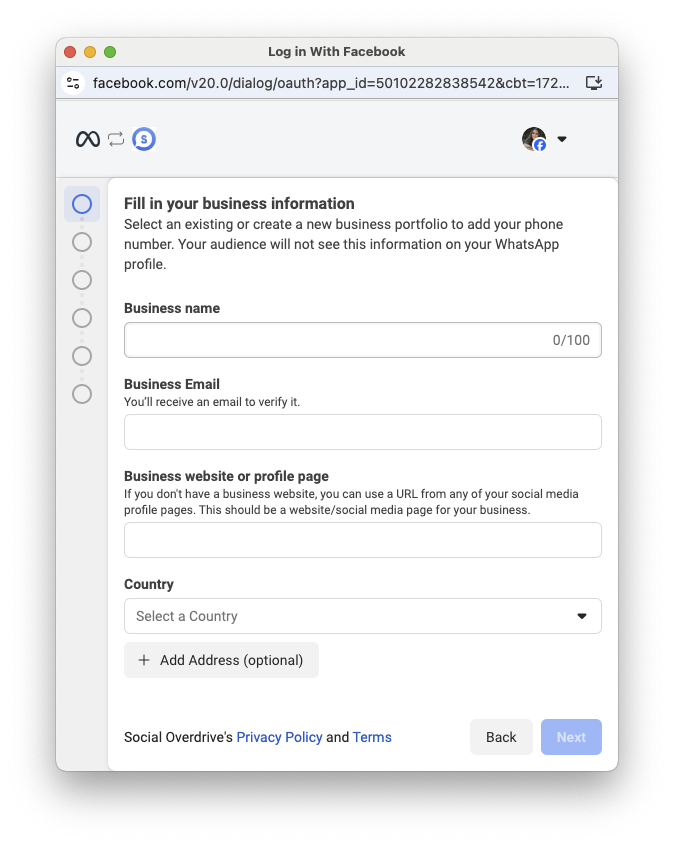
<figure class="nj nk nl nm nn no ng nh paragraph-image" id="bkmrk--6"><div class="np nq fj nr bh ns" tabindex="0"><div class="ng nh po"><picture><source sizes="(min-resolution: 4dppx) and (max-width: 700px) 50vw, (-webkit-min-device-pixel-ratio: 4) and (max-width: 700px) 50vw, (min-resolution: 3dppx) and (max-width: 700px) 67vw, (-webkit-min-device-pixel-ratio: 3) and (max-width: 700px) 65vw, (min-resolution: 2.5dppx) and (max-width: 700px) 80vw, (-webkit-min-device-pixel-ratio: 2.5) and (max-width: 700px) 80vw, (min-resolution: 2dppx) and (max-width: 700px) 100vw, (-webkit-min-device-pixel-ratio: 2) and (max-width: 700px) 100vw, 700px" srcset="https://miro.medium.com/v2/resize:fit:640/format:webp/1*wHMvo_enJ2rh4qdvb3vWaQ.png 640w, https://miro.medium.com/v2/resize:fit:720/format:webp/1*wHMvo_enJ2rh4qdvb3vWaQ.png 720w, https://miro.medium.com/v2/resize:fit:750/format:webp/1*wHMvo_enJ2rh4qdvb3vWaQ.png 750w, https://miro.medium.com/v2/resize:fit:786/format:webp/1*wHMvo_enJ2rh4qdvb3vWaQ.png 786w, https://miro.medium.com/v2/resize:fit:828/format:webp/1*wHMvo_enJ2rh4qdvb3vWaQ.png 828w, https://miro.medium.com/v2/resize:fit:1100/format:webp/1*wHMvo_enJ2rh4qdvb3vWaQ.png 1100w, https://miro.medium.com/v2/resize:fit:1400/format:webp/1*wHMvo_enJ2rh4qdvb3vWaQ.png 1400w" type="image/webp"><source sizes="(min-resolution: 4dppx) and (max-width: 700px) 50vw, (-webkit-min-device-pixel-ratio: 4) and (max-width: 700px) 50vw, (min-resolution: 3dppx) and (max-width: 700px) 67vw, (-webkit-min-device-pixel-ratio: 3) and (max-width: 700px) 65vw, (min-resolution: 2.5dppx) and (max-width: 700px) 80vw, (-webkit-min-device-pixel-ratio: 2.5) and (max-width: 700px) 80vw, (min-resolution: 2dppx) and (max-width: 700px) 100vw, (-webkit-min-device-pixel-ratio: 2) and (max-width: 700px) 100vw, 700px" srcset="https://miro.medium.com/v2/resize:fit:640/1*wHMvo_enJ2rh4qdvb3vWaQ.png 640w, https://miro.medium.com/v2/resize:fit:720/1*wHMvo_enJ2rh4qdvb3vWaQ.png 720w, https://miro.medium.com/v2/resize:fit:750/1*wHMvo_enJ2rh4qdvb3vWaQ.png 750w, https://miro.medium.com/v2/resize:fit:786/1*wHMvo_enJ2rh4qdvb3vWaQ.png 786w, https://miro.medium.com/v2/resize:fit:828/1*wHMvo_enJ2rh4qdvb3vWaQ.png 828w, https://miro.medium.com/v2/resize:fit:1100/1*wHMvo_enJ2rh4qdvb3vWaQ.png 1100w, https://miro.medium.com/v2/resize:fit:1400/1*wHMvo_enJ2rh4qdvb3vWaQ.png 1400w">![](https://miro.medium.com/v2/resize:fit:773/1*wHMvo_enJ2rh4qdvb3vWaQ.png)</source></source></picture></div></div></figure>Now, channeling your inner maestro, click on “Create Account” and orchestrate the symphony of details — give your business a name, grace the stage with your own, and let the crescendo be your business email. Bravo, maestro, the performance of creating a Meta Business Account is about to begin! 🎵🎭✨

<figure class="nj nk nl nm nn no ng nh paragraph-image" id="bkmrk--7"><div class="np nq fj nr bh ns" tabindex="0"><div class="ng nh po"><picture><source sizes="(min-resolution: 4dppx) and (max-width: 700px) 50vw, (-webkit-min-device-pixel-ratio: 4) and (max-width: 700px) 50vw, (min-resolution: 3dppx) and (max-width: 700px) 67vw, (-webkit-min-device-pixel-ratio: 3) and (max-width: 700px) 65vw, (min-resolution: 2.5dppx) and (max-width: 700px) 80vw, (-webkit-min-device-pixel-ratio: 2.5) and (max-width: 700px) 80vw, (min-resolution: 2dppx) and (max-width: 700px) 100vw, (-webkit-min-device-pixel-ratio: 2) and (max-width: 700px) 100vw, 700px" srcset="https://miro.medium.com/v2/resize:fit:640/format:webp/1*Hrg-tYEHUieGWzKIP9HGQQ.png 640w, https://miro.medium.com/v2/resize:fit:720/format:webp/1*Hrg-tYEHUieGWzKIP9HGQQ.png 720w, https://miro.medium.com/v2/resize:fit:750/format:webp/1*Hrg-tYEHUieGWzKIP9HGQQ.png 750w, https://miro.medium.com/v2/resize:fit:786/format:webp/1*Hrg-tYEHUieGWzKIP9HGQQ.png 786w, https://miro.medium.com/v2/resize:fit:828/format:webp/1*Hrg-tYEHUieGWzKIP9HGQQ.png 828w, https://miro.medium.com/v2/resize:fit:1100/format:webp/1*Hrg-tYEHUieGWzKIP9HGQQ.png 1100w, https://miro.medium.com/v2/resize:fit:1400/format:webp/1*Hrg-tYEHUieGWzKIP9HGQQ.png 1400w" type="image/webp"><source sizes="(min-resolution: 4dppx) and (max-width: 700px) 50vw, (-webkit-min-device-pixel-ratio: 4) and (max-width: 700px) 50vw, (min-resolution: 3dppx) and (max-width: 700px) 67vw, (-webkit-min-device-pixel-ratio: 3) and (max-width: 700px) 65vw, (min-resolution: 2.5dppx) and (max-width: 700px) 80vw, (-webkit-min-device-pixel-ratio: 2.5) and (max-width: 700px) 80vw, (min-resolution: 2dppx) and (max-width: 700px) 100vw, (-webkit-min-device-pixel-ratio: 2) and (max-width: 700px) 100vw, 700px" srcset="https://miro.medium.com/v2/resize:fit:640/1*Hrg-tYEHUieGWzKIP9HGQQ.png 640w, https://miro.medium.com/v2/resize:fit:720/1*Hrg-tYEHUieGWzKIP9HGQQ.png 720w, https://miro.medium.com/v2/resize:fit:750/1*Hrg-tYEHUieGWzKIP9HGQQ.png 750w, https://miro.medium.com/v2/resize:fit:786/1*Hrg-tYEHUieGWzKIP9HGQQ.png 786w, https://miro.medium.com/v2/resize:fit:828/1*Hrg-tYEHUieGWzKIP9HGQQ.png 828w, https://miro.medium.com/v2/resize:fit:1100/1*Hrg-tYEHUieGWzKIP9HGQQ.png 1100w, https://miro.medium.com/v2/resize:fit:1400/1*Hrg-tYEHUieGWzKIP9HGQQ.png 1400w">![](https://miro.medium.com/v2/resize:fit:773/1*Hrg-tYEHUieGWzKIP9HGQQ.png)</source></source></picture></div></div></figure>Huzzah! Your account has been birthed into the digital cosmos. Venture forth now, brave soul, to your inbox sanctuary. Confirm the rites of passage via email and return triumphantly to this realm. Click “Done” when your quest is complete, and let the adventures in the Meta Business Portal begin! 🚀📧🏰

<figure class="nj nk nl nm nn no ng nh paragraph-image" id="bkmrk--8"><div class="np nq fj nr bh ns" tabindex="0"><div class="ng nh po"><picture><source sizes="(min-resolution: 4dppx) and (max-width: 700px) 50vw, (-webkit-min-device-pixel-ratio: 4) and (max-width: 700px) 50vw, (min-resolution: 3dppx) and (max-width: 700px) 67vw, (-webkit-min-device-pixel-ratio: 3) and (max-width: 700px) 65vw, (min-resolution: 2.5dppx) and (max-width: 700px) 80vw, (-webkit-min-device-pixel-ratio: 2.5) and (max-width: 700px) 80vw, (min-resolution: 2dppx) and (max-width: 700px) 100vw, (-webkit-min-device-pixel-ratio: 2) and (max-width: 700px) 100vw, 700px" srcset="https://miro.medium.com/v2/resize:fit:640/format:webp/1*9ZV4JuPqSh14vWZtSxGyuA.png 640w, https://miro.medium.com/v2/resize:fit:720/format:webp/1*9ZV4JuPqSh14vWZtSxGyuA.png 720w, https://miro.medium.com/v2/resize:fit:750/format:webp/1*9ZV4JuPqSh14vWZtSxGyuA.png 750w, https://miro.medium.com/v2/resize:fit:786/format:webp/1*9ZV4JuPqSh14vWZtSxGyuA.png 786w, https://miro.medium.com/v2/resize:fit:828/format:webp/1*9ZV4JuPqSh14vWZtSxGyuA.png 828w, https://miro.medium.com/v2/resize:fit:1100/format:webp/1*9ZV4JuPqSh14vWZtSxGyuA.png 1100w, https://miro.medium.com/v2/resize:fit:1400/format:webp/1*9ZV4JuPqSh14vWZtSxGyuA.png 1400w" type="image/webp"><source sizes="(min-resolution: 4dppx) and (max-width: 700px) 50vw, (-webkit-min-device-pixel-ratio: 4) and (max-width: 700px) 50vw, (min-resolution: 3dppx) and (max-width: 700px) 67vw, (-webkit-min-device-pixel-ratio: 3) and (max-width: 700px) 65vw, (min-resolution: 2.5dppx) and (max-width: 700px) 80vw, (-webkit-min-device-pixel-ratio: 2.5) and (max-width: 700px) 80vw, (min-resolution: 2dppx) and (max-width: 700px) 100vw, (-webkit-min-device-pixel-ratio: 2) and (max-width: 700px) 100vw, 700px" srcset="https://miro.medium.com/v2/resize:fit:640/1*9ZV4JuPqSh14vWZtSxGyuA.png 640w, https://miro.medium.com/v2/resize:fit:720/1*9ZV4JuPqSh14vWZtSxGyuA.png 720w, https://miro.medium.com/v2/resize:fit:750/1*9ZV4JuPqSh14vWZtSxGyuA.png 750w, https://miro.medium.com/v2/resize:fit:786/1*9ZV4JuPqSh14vWZtSxGyuA.png 786w, https://miro.medium.com/v2/resize:fit:828/1*9ZV4JuPqSh14vWZtSxGyuA.png 828w, https://miro.medium.com/v2/resize:fit:1100/1*9ZV4JuPqSh14vWZtSxGyuA.png 1100w, https://miro.medium.com/v2/resize:fit:1400/1*9ZV4JuPqSh14vWZtSxGyuA.png 1400w">![](https://miro.medium.com/v2/resize:fit:773/1*9ZV4JuPqSh14vWZtSxGyuA.png)</source></source></picture></div></div></figure>With a victorious click of “Done,” behold as the digital gates of the Developer Portal swing wide open, welcoming you back with open arms. Now, let’s press on bravely! Click “Continue” to resume our noble quest of integrating the WhatsApp product into your app. Onward, fellow traveler, for the realm of communication awaits! 🛡️🔮📱

<figure class="nj nk nl nm nn no ng nh paragraph-image" id="bkmrk--9"><div class="np nq fj nr bh ns" tabindex="0"><div class="ng nh po"><picture><source sizes="(min-resolution: 4dppx) and (max-width: 700px) 50vw, (-webkit-min-device-pixel-ratio: 4) and (max-width: 700px) 50vw, (min-resolution: 3dppx) and (max-width: 700px) 67vw, (-webkit-min-device-pixel-ratio: 3) and (max-width: 700px) 65vw, (min-resolution: 2.5dppx) and (max-width: 700px) 80vw, (-webkit-min-device-pixel-ratio: 2.5) and (max-width: 700px) 80vw, (min-resolution: 2dppx) and (max-width: 700px) 100vw, (-webkit-min-device-pixel-ratio: 2) and (max-width: 700px) 100vw, 700px" srcset="https://miro.medium.com/v2/resize:fit:640/format:webp/1*XAKI1_B84pkruKDCMCqaRQ.png 640w, https://miro.medium.com/v2/resize:fit:720/format:webp/1*XAKI1_B84pkruKDCMCqaRQ.png 720w, https://miro.medium.com/v2/resize:fit:750/format:webp/1*XAKI1_B84pkruKDCMCqaRQ.png 750w, https://miro.medium.com/v2/resize:fit:786/format:webp/1*XAKI1_B84pkruKDCMCqaRQ.png 786w, https://miro.medium.com/v2/resize:fit:828/format:webp/1*XAKI1_B84pkruKDCMCqaRQ.png 828w, https://miro.medium.com/v2/resize:fit:1100/format:webp/1*XAKI1_B84pkruKDCMCqaRQ.png 1100w, https://miro.medium.com/v2/resize:fit:1400/format:webp/1*XAKI1_B84pkruKDCMCqaRQ.png 1400w" type="image/webp"><source sizes="(min-resolution: 4dppx) and (max-width: 700px) 50vw, (-webkit-min-device-pixel-ratio: 4) and (max-width: 700px) 50vw, (min-resolution: 3dppx) and (max-width: 700px) 67vw, (-webkit-min-device-pixel-ratio: 3) and (max-width: 700px) 65vw, (min-resolution: 2.5dppx) and (max-width: 700px) 80vw, (-webkit-min-device-pixel-ratio: 2.5) and (max-width: 700px) 80vw, (min-resolution: 2dppx) and (max-width: 700px) 100vw, (-webkit-min-device-pixel-ratio: 2) and (max-width: 700px) 100vw, 700px" srcset="https://miro.medium.com/v2/resize:fit:640/1*XAKI1_B84pkruKDCMCqaRQ.png 640w, https://miro.medium.com/v2/resize:fit:720/1*XAKI1_B84pkruKDCMCqaRQ.png 720w, https://miro.medium.com/v2/resize:fit:750/1*XAKI1_B84pkruKDCMCqaRQ.png 750w, https://miro.medium.com/v2/resize:fit:786/1*XAKI1_B84pkruKDCMCqaRQ.png 786w, https://miro.medium.com/v2/resize:fit:828/1*XAKI1_B84pkruKDCMCqaRQ.png 828w, https://miro.medium.com/v2/resize:fit:1100/1*XAKI1_B84pkruKDCMCqaRQ.png 1100w, https://miro.medium.com/v2/resize:fit:1400/1*XAKI1_B84pkruKDCMCqaRQ.png 1400w">![](https://miro.medium.com/v2/resize:fit:773/1*XAKI1_B84pkruKDCMCqaRQ.png)</source></source></picture></div></div></figure>Upon clicking “Continue,” the API Setup page for WhatsApp unveils itself. Here, amidst the digital tapestry, let’s weave the threads of integration, setting the stage for a symphony of seamless communication in just a few swift configurations. Get ready, for our app is on the brink of becoming a digital maestro! 🎉📱🎶

<figure class="nj nk nl nm nn no ng nh paragraph-image" id="bkmrk--10"><div class="np nq fj nr bh ns" tabindex="0"><div class="ng nh po"><picture><source sizes="(min-resolution: 4dppx) and (max-width: 700px) 50vw, (-webkit-min-device-pixel-ratio: 4) and (max-width: 700px) 50vw, (min-resolution: 3dppx) and (max-width: 700px) 67vw, (-webkit-min-device-pixel-ratio: 3) and (max-width: 700px) 65vw, (min-resolution: 2.5dppx) and (max-width: 700px) 80vw, (-webkit-min-device-pixel-ratio: 2.5) and (max-width: 700px) 80vw, (min-resolution: 2dppx) and (max-width: 700px) 100vw, (-webkit-min-device-pixel-ratio: 2) and (max-width: 700px) 100vw, 700px" srcset="https://miro.medium.com/v2/resize:fit:640/format:webp/1*FE4mTa-epssWxOteZU7BpA.png 640w, https://miro.medium.com/v2/resize:fit:720/format:webp/1*FE4mTa-epssWxOteZU7BpA.png 720w, https://miro.medium.com/v2/resize:fit:750/format:webp/1*FE4mTa-epssWxOteZU7BpA.png 750w, https://miro.medium.com/v2/resize:fit:786/format:webp/1*FE4mTa-epssWxOteZU7BpA.png 786w, https://miro.medium.com/v2/resize:fit:828/format:webp/1*FE4mTa-epssWxOteZU7BpA.png 828w, https://miro.medium.com/v2/resize:fit:1100/format:webp/1*FE4mTa-epssWxOteZU7BpA.png 1100w, https://miro.medium.com/v2/resize:fit:1400/format:webp/1*FE4mTa-epssWxOteZU7BpA.png 1400w" type="image/webp"><source sizes="(min-resolution: 4dppx) and (max-width: 700px) 50vw, (-webkit-min-device-pixel-ratio: 4) and (max-width: 700px) 50vw, (min-resolution: 3dppx) and (max-width: 700px) 67vw, (-webkit-min-device-pixel-ratio: 3) and (max-width: 700px) 65vw, (min-resolution: 2.5dppx) and (max-width: 700px) 80vw, (-webkit-min-device-pixel-ratio: 2.5) and (max-width: 700px) 80vw, (min-resolution: 2dppx) and (max-width: 700px) 100vw, (-webkit-min-device-pixel-ratio: 2) and (max-width: 700px) 100vw, 700px" srcset="https://miro.medium.com/v2/resize:fit:640/1*FE4mTa-epssWxOteZU7BpA.png 640w, https://miro.medium.com/v2/resize:fit:720/1*FE4mTa-epssWxOteZU7BpA.png 720w, https://miro.medium.com/v2/resize:fit:750/1*FE4mTa-epssWxOteZU7BpA.png 750w, https://miro.medium.com/v2/resize:fit:786/1*FE4mTa-epssWxOteZU7BpA.png 786w, https://miro.medium.com/v2/resize:fit:828/1*FE4mTa-epssWxOteZU7BpA.png 828w, https://miro.medium.com/v2/resize:fit:1100/1*FE4mTa-epssWxOteZU7BpA.png 1100w, https://miro.medium.com/v2/resize:fit:1400/1*FE4mTa-epssWxOteZU7BpA.png 1400w">![](https://miro.medium.com/v2/resize:fit:773/1*FE4mTa-epssWxOteZU7BpA.png)</source></source></picture></div></div></figure>Now, let’s inject a touch of practical magic — add a recipient phone number to test the WhatsApp API with a temporary token. Watch as our digital creation takes its first steps into the world of communication enchantment! 🌐📱✨

<figure class="nj nk nl nm nn no ng nh paragraph-image" id="bkmrk--11"><div class="np nq fj nr bh ns" tabindex="0"><div class="ng nh po"><picture><source sizes="(min-resolution: 4dppx) and (max-width: 700px) 50vw, (-webkit-min-device-pixel-ratio: 4) and (max-width: 700px) 50vw, (min-resolution: 3dppx) and (max-width: 700px) 67vw, (-webkit-min-device-pixel-ratio: 3) and (max-width: 700px) 65vw, (min-resolution: 2.5dppx) and (max-width: 700px) 80vw, (-webkit-min-device-pixel-ratio: 2.5) and (max-width: 700px) 80vw, (min-resolution: 2dppx) and (max-width: 700px) 100vw, (-webkit-min-device-pixel-ratio: 2) and (max-width: 700px) 100vw, 700px" srcset="https://miro.medium.com/v2/resize:fit:640/format:webp/1*FQLiv70ylImeevF77qSURQ.png 640w, https://miro.medium.com/v2/resize:fit:720/format:webp/1*FQLiv70ylImeevF77qSURQ.png 720w, https://miro.medium.com/v2/resize:fit:750/format:webp/1*FQLiv70ylImeevF77qSURQ.png 750w, https://miro.medium.com/v2/resize:fit:786/format:webp/1*FQLiv70ylImeevF77qSURQ.png 786w, https://miro.medium.com/v2/resize:fit:828/format:webp/1*FQLiv70ylImeevF77qSURQ.png 828w, https://miro.medium.com/v2/resize:fit:1100/format:webp/1*FQLiv70ylImeevF77qSURQ.png 1100w, https://miro.medium.com/v2/resize:fit:1400/format:webp/1*FQLiv70ylImeevF77qSURQ.png 1400w" type="image/webp"><source sizes="(min-resolution: 4dppx) and (max-width: 700px) 50vw, (-webkit-min-device-pixel-ratio: 4) and (max-width: 700px) 50vw, (min-resolution: 3dppx) and (max-width: 700px) 67vw, (-webkit-min-device-pixel-ratio: 3) and (max-width: 700px) 65vw, (min-resolution: 2.5dppx) and (max-width: 700px) 80vw, (-webkit-min-device-pixel-ratio: 2.5) and (max-width: 700px) 80vw, (min-resolution: 2dppx) and (max-width: 700px) 100vw, (-webkit-min-device-pixel-ratio: 2) and (max-width: 700px) 100vw, 700px" srcset="https://miro.medium.com/v2/resize:fit:640/1*FQLiv70ylImeevF77qSURQ.png 640w, https://miro.medium.com/v2/resize:fit:720/1*FQLiv70ylImeevF77qSURQ.png 720w, https://miro.medium.com/v2/resize:fit:750/1*FQLiv70ylImeevF77qSURQ.png 750w, https://miro.medium.com/v2/resize:fit:786/1*FQLiv70ylImeevF77qSURQ.png 786w, https://miro.medium.com/v2/resize:fit:828/1*FQLiv70ylImeevF77qSURQ.png 828w, https://miro.medium.com/v2/resize:fit:1100/1*FQLiv70ylImeevF77qSURQ.png 1100w, https://miro.medium.com/v2/resize:fit:1400/1*FQLiv70ylImeevF77qSURQ.png 1400w">![](https://miro.medium.com/v2/resize:fit:773/1*FQLiv70ylImeevF77qSURQ.png)</source></source></picture></div></div></figure>With a click of “Send Message,” anticipate the delightful appearance of a bottom-right toaster, announcing the triumph of our communication endeavor. As if by magic, a testing message shall materialize on WhatsApp, confirming the success of our integration. Behold the wonders of modern sorcery! 🪄📲🎉

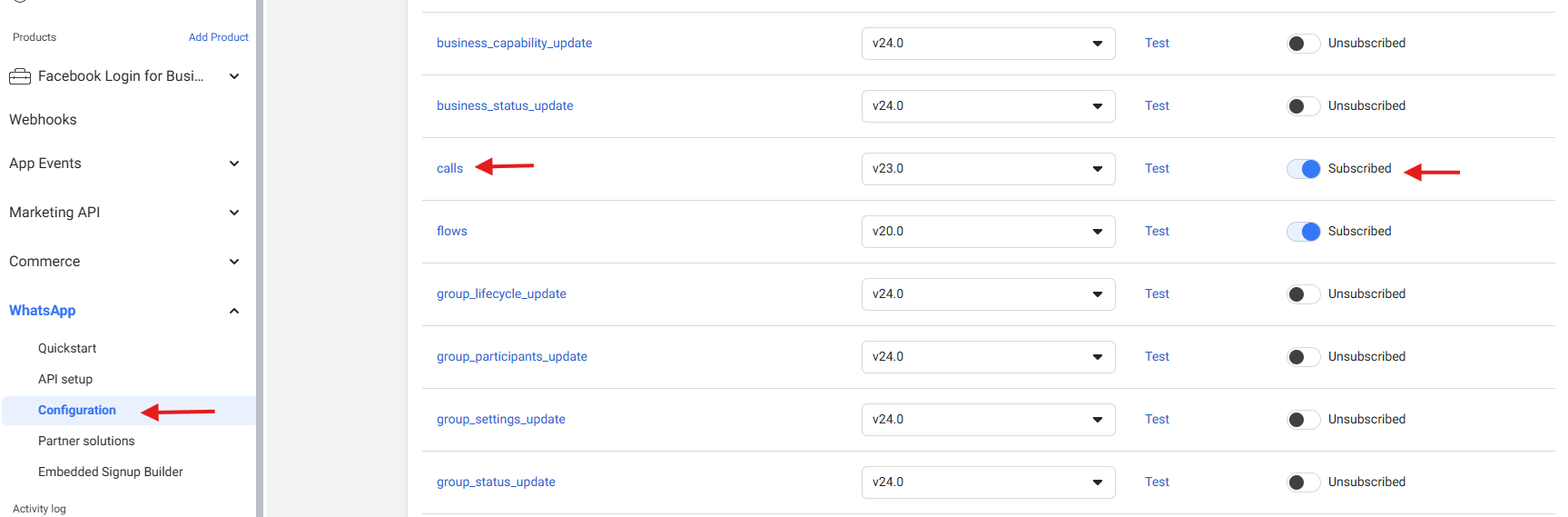
<figure class="nj nk nl nm nn no ng nh paragraph-image" id="bkmrk--12"><div class="np nq fj nr bh ns" tabindex="0"><div class="ng nh po"><picture><source sizes="(min-resolution: 4dppx) and (max-width: 700px) 50vw, (-webkit-min-device-pixel-ratio: 4) and (max-width: 700px) 50vw, (min-resolution: 3dppx) and (max-width: 700px) 67vw, (-webkit-min-device-pixel-ratio: 3) and (max-width: 700px) 65vw, (min-resolution: 2.5dppx) and (max-width: 700px) 80vw, (-webkit-min-device-pixel-ratio: 2.5) and (max-width: 700px) 80vw, (min-resolution: 2dppx) and (max-width: 700px) 100vw, (-webkit-min-device-pixel-ratio: 2) and (max-width: 700px) 100vw, 700px" srcset="https://miro.medium.com/v2/resize:fit:640/format:webp/1*ns3iUC90vh5ysMkcwgOfmw.png 640w, https://miro.medium.com/v2/resize:fit:720/format:webp/1*ns3iUC90vh5ysMkcwgOfmw.png 720w, https://miro.medium.com/v2/resize:fit:750/format:webp/1*ns3iUC90vh5ysMkcwgOfmw.png 750w, https://miro.medium.com/v2/resize:fit:786/format:webp/1*ns3iUC90vh5ysMkcwgOfmw.png 786w, https://miro.medium.com/v2/resize:fit:828/format:webp/1*ns3iUC90vh5ysMkcwgOfmw.png 828w, https://miro.medium.com/v2/resize:fit:1100/format:webp/1*ns3iUC90vh5ysMkcwgOfmw.png 1100w, https://miro.medium.com/v2/resize:fit:1400/format:webp/1*ns3iUC90vh5ysMkcwgOfmw.png 1400w" type="image/webp"><source sizes="(min-resolution: 4dppx) and (max-width: 700px) 50vw, (-webkit-min-device-pixel-ratio: 4) and (max-width: 700px) 50vw, (min-resolution: 3dppx) and (max-width: 700px) 67vw, (-webkit-min-device-pixel-ratio: 3) and (max-width: 700px) 65vw, (min-resolution: 2.5dppx) and (max-width: 700px) 80vw, (-webkit-min-device-pixel-ratio: 2.5) and (max-width: 700px) 80vw, (min-resolution: 2dppx) and (max-width: 700px) 100vw, (-webkit-min-device-pixel-ratio: 2) and (max-width: 700px) 100vw, 700px" srcset="https://miro.medium.com/v2/resize:fit:640/1*ns3iUC90vh5ysMkcwgOfmw.png 640w, https://miro.medium.com/v2/resize:fit:720/1*ns3iUC90vh5ysMkcwgOfmw.png 720w, https://miro.medium.com/v2/resize:fit:750/1*ns3iUC90vh5ysMkcwgOfmw.png 750w, https://miro.medium.com/v2/resize:fit:786/1*ns3iUC90vh5ysMkcwgOfmw.png 786w, https://miro.medium.com/v2/resize:fit:828/1*ns3iUC90vh5ysMkcwgOfmw.png 828w, https://miro.medium.com/v2/resize:fit:1100/1*ns3iUC90vh5ysMkcwgOfmw.png 1100w, https://miro.medium.com/v2/resize:fit:1400/1*ns3iUC90vh5ysMkcwgOfmw.png 1400w">![](https://miro.medium.com/v2/resize:fit:773/1*ns3iUC90vh5ysMkcwgOfmw.png)</source></source></picture></div></div></figure>Ah, onto the next chapter of our adventure! Navigate to the configuration section where the path to glory awaits. Here, we must set up a webhook endpoint to receive crucial events, like messages from eager souls. Additionally, let’s forge a permanent token to solidify our presence in this digital realm. Onward, brave soul, for the journey continues! 🛠️🔗🌟

<figure class="nj nk nl nm nn no ng nh paragraph-image" id="bkmrk--13"><div class="np nq fj nr bh ns" tabindex="0"><div class="ng nh po"><picture><source sizes="(min-resolution: 4dppx) and (max-width: 700px) 50vw, (-webkit-min-device-pixel-ratio: 4) and (max-width: 700px) 50vw, (min-resolution: 3dppx) and (max-width: 700px) 67vw, (-webkit-min-device-pixel-ratio: 3) and (max-width: 700px) 65vw, (min-resolution: 2.5dppx) and (max-width: 700px) 80vw, (-webkit-min-device-pixel-ratio: 2.5) and (max-width: 700px) 80vw, (min-resolution: 2dppx) and (max-width: 700px) 100vw, (-webkit-min-device-pixel-ratio: 2) and (max-width: 700px) 100vw, 700px" srcset="https://miro.medium.com/v2/resize:fit:640/format:webp/1*1frl6e6aE7tXq5u_jDDT2Q.png 640w, https://miro.medium.com/v2/resize:fit:720/format:webp/1*1frl6e6aE7tXq5u_jDDT2Q.png 720w, https://miro.medium.com/v2/resize:fit:750/format:webp/1*1frl6e6aE7tXq5u_jDDT2Q.png 750w, https://miro.medium.com/v2/resize:fit:786/format:webp/1*1frl6e6aE7tXq5u_jDDT2Q.png 786w, https://miro.medium.com/v2/resize:fit:828/format:webp/1*1frl6e6aE7tXq5u_jDDT2Q.png 828w, https://miro.medium.com/v2/resize:fit:1100/format:webp/1*1frl6e6aE7tXq5u_jDDT2Q.png 1100w, https://miro.medium.com/v2/resize:fit:1400/format:webp/1*1frl6e6aE7tXq5u_jDDT2Q.png 1400w" type="image/webp"><source sizes="(min-resolution: 4dppx) and (max-width: 700px) 50vw, (-webkit-min-device-pixel-ratio: 4) and (max-width: 700px) 50vw, (min-resolution: 3dppx) and (max-width: 700px) 67vw, (-webkit-min-device-pixel-ratio: 3) and (max-width: 700px) 65vw, (min-resolution: 2.5dppx) and (max-width: 700px) 80vw, (-webkit-min-device-pixel-ratio: 2.5) and (max-width: 700px) 80vw, (min-resolution: 2dppx) and (max-width: 700px) 100vw, (-webkit-min-device-pixel-ratio: 2) and (max-width: 700px) 100vw, 700px" srcset="https://miro.medium.com/v2/resize:fit:640/1*1frl6e6aE7tXq5u_jDDT2Q.png 640w, https://miro.medium.com/v2/resize:fit:720/1*1frl6e6aE7tXq5u_jDDT2Q.png 720w, https://miro.medium.com/v2/resize:fit:750/1*1frl6e6aE7tXq5u_jDDT2Q.png 750w, https://miro.medium.com/v2/resize:fit:786/1*1frl6e6aE7tXq5u_jDDT2Q.png 786w, https://miro.medium.com/v2/resize:fit:828/1*1frl6e6aE7tXq5u_jDDT2Q.png 828w, https://miro.medium.com/v2/resize:fit:1100/1*1frl6e6aE7tXq5u_jDDT2Q.png 1100w, https://miro.medium.com/v2/resize:fit:1400/1*1frl6e6aE7tXq5u_jDDT2Q.png 1400w">![](https://miro.medium.com/v2/resize:fit:773/1*1frl6e6aE7tXq5u_jDDT2Q.png)</source></source></picture></div></div></figure>Proceed to the webhooks section and set your sights on the WhatsApp Business Account option. Here, amidst the digital crossroads, we shall forge the link that binds our app to the vibrant tapestry of WhatsApp communication. Embrace the power of connection as we embark on this pivotal step of our journey! 🌐📲🔗

<figure class="nj nk nl nm nn no ng nh paragraph-image" id="bkmrk--14"><div class="np nq fj nr bh ns" tabindex="0"><div class="ng nh po"><picture><source sizes="(min-resolution: 4dppx) and (max-width: 700px) 50vw, (-webkit-min-device-pixel-ratio: 4) and (max-width: 700px) 50vw, (min-resolution: 3dppx) and (max-width: 700px) 67vw, (-webkit-min-device-pixel-ratio: 3) and (max-width: 700px) 65vw, (min-resolution: 2.5dppx) and (max-width: 700px) 80vw, (-webkit-min-device-pixel-ratio: 2.5) and (max-width: 700px) 80vw, (min-resolution: 2dppx) and (max-width: 700px) 100vw, (-webkit-min-device-pixel-ratio: 2) and (max-width: 700px) 100vw, 700px" srcset="https://miro.medium.com/v2/resize:fit:640/format:webp/1*LHybkFqk7xx4aK2CI1l1vw.png 640w, https://miro.medium.com/v2/resize:fit:720/format:webp/1*LHybkFqk7xx4aK2CI1l1vw.png 720w, https://miro.medium.com/v2/resize:fit:750/format:webp/1*LHybkFqk7xx4aK2CI1l1vw.png 750w, https://miro.medium.com/v2/resize:fit:786/format:webp/1*LHybkFqk7xx4aK2CI1l1vw.png 786w, https://miro.medium.com/v2/resize:fit:828/format:webp/1*LHybkFqk7xx4aK2CI1l1vw.png 828w, https://miro.medium.com/v2/resize:fit:1100/format:webp/1*LHybkFqk7xx4aK2CI1l1vw.png 1100w, https://miro.medium.com/v2/resize:fit:1400/format:webp/1*LHybkFqk7xx4aK2CI1l1vw.png 1400w" type="image/webp"><source sizes="(min-resolution: 4dppx) and (max-width: 700px) 50vw, (-webkit-min-device-pixel-ratio: 4) and (max-width: 700px) 50vw, (min-resolution: 3dppx) and (max-width: 700px) 67vw, (-webkit-min-device-pixel-ratio: 3) and (max-width: 700px) 65vw, (min-resolution: 2.5dppx) and (max-width: 700px) 80vw, (-webkit-min-device-pixel-ratio: 2.5) and (max-width: 700px) 80vw, (min-resolution: 2dppx) and (max-width: 700px) 100vw, (-webkit-min-device-pixel-ratio: 2) and (max-width: 700px) 100vw, 700px" srcset="https://miro.medium.com/v2/resize:fit:640/1*LHybkFqk7xx4aK2CI1l1vw.png 640w, https://miro.medium.com/v2/resize:fit:720/1*LHybkFqk7xx4aK2CI1l1vw.png 720w, https://miro.medium.com/v2/resize:fit:750/1*LHybkFqk7xx4aK2CI1l1vw.png 750w, https://miro.medium.com/v2/resize:fit:786/1*LHybkFqk7xx4aK2CI1l1vw.png 786w, https://miro.medium.com/v2/resize:fit:828/1*LHybkFqk7xx4aK2CI1l1vw.png 828w, https://miro.medium.com/v2/resize:fit:1100/1*LHybkFqk7xx4aK2CI1l1vw.png 1100w, https://miro.medium.com/v2/resize:fit:1400/1*LHybkFqk7xx4aK2CI1l1vw.png 1400w">![](https://miro.medium.com/v2/resize:fit:773/1*LHybkFqk7xx4aK2CI1l1vw.png)</source></source></picture></div></div></figure>In this digital rendezvous, input your webhook and token like a secret code, then embark on the quest to click “Verify and Save.” Watch as the magic unfolds, sealing the connection between our webhook, token, and the vast WhatsApp realms. Ready yourself for a triumphant salute, for our integration journey takes another leap forward! 🚀🌐🧙‍♂️

<figure class="nj nk nl nm nn no ng nh paragraph-image" id="bkmrk--15"><div class="np nq fj nr bh ns" tabindex="0"><div class="ng nh po"><picture><source sizes="(min-resolution: 4dppx) and (max-width: 700px) 50vw, (-webkit-min-device-pixel-ratio: 4) and (max-width: 700px) 50vw, (min-resolution: 3dppx) and (max-width: 700px) 67vw, (-webkit-min-device-pixel-ratio: 3) and (max-width: 700px) 65vw, (min-resolution: 2.5dppx) and (max-width: 700px) 80vw, (-webkit-min-device-pixel-ratio: 2.5) and (max-width: 700px) 80vw, (min-resolution: 2dppx) and (max-width: 700px) 100vw, (-webkit-min-device-pixel-ratio: 2) and (max-width: 700px) 100vw, 700px" srcset="https://miro.medium.com/v2/resize:fit:640/format:webp/1*eDYCg7gWczFabnh1Tp9Cxw.png 640w, https://miro.medium.com/v2/resize:fit:720/format:webp/1*eDYCg7gWczFabnh1Tp9Cxw.png 720w, https://miro.medium.com/v2/resize:fit:750/format:webp/1*eDYCg7gWczFabnh1Tp9Cxw.png 750w, https://miro.medium.com/v2/resize:fit:786/format:webp/1*eDYCg7gWczFabnh1Tp9Cxw.png 786w, https://miro.medium.com/v2/resize:fit:828/format:webp/1*eDYCg7gWczFabnh1Tp9Cxw.png 828w, https://miro.medium.com/v2/resize:fit:1100/format:webp/1*eDYCg7gWczFabnh1Tp9Cxw.png 1100w, https://miro.medium.com/v2/resize:fit:1400/format:webp/1*eDYCg7gWczFabnh1Tp9Cxw.png 1400w" type="image/webp"><source sizes="(min-resolution: 4dppx) and (max-width: 700px) 50vw, (-webkit-min-device-pixel-ratio: 4) and (max-width: 700px) 50vw, (min-resolution: 3dppx) and (max-width: 700px) 67vw, (-webkit-min-device-pixel-ratio: 3) and (max-width: 700px) 65vw, (min-resolution: 2.5dppx) and (max-width: 700px) 80vw, (-webkit-min-device-pixel-ratio: 2.5) and (max-width: 700px) 80vw, (min-resolution: 2dppx) and (max-width: 700px) 100vw, (-webkit-min-device-pixel-ratio: 2) and (max-width: 700px) 100vw, 700px" srcset="https://miro.medium.com/v2/resize:fit:640/1*eDYCg7gWczFabnh1Tp9Cxw.png 640w, https://miro.medium.com/v2/resize:fit:720/1*eDYCg7gWczFabnh1Tp9Cxw.png 720w, https://miro.medium.com/v2/resize:fit:750/1*eDYCg7gWczFabnh1Tp9Cxw.png 750w, https://miro.medium.com/v2/resize:fit:786/1*eDYCg7gWczFabnh1Tp9Cxw.png 786w, https://miro.medium.com/v2/resize:fit:828/1*eDYCg7gWczFabnh1Tp9Cxw.png 828w, https://miro.medium.com/v2/resize:fit:1100/1*eDYCg7gWczFabnh1Tp9Cxw.png 1100w, https://miro.medium.com/v2/resize:fit:1400/1*eDYCg7gWczFabnh1Tp9Cxw.png 1400w">![](https://miro.medium.com/v2/resize:fit:773/1*eDYCg7gWczFabnh1Tp9Cxw.png)</source></source></picture></div></div></figure>Once your app achieves verification status, you gain access to a plethora of object fields that your webhook can subscribe to. Each field offers the option to both test and subscribe, empowering you to fine-tune your integration and tailor it to your specific needs. It’s time to explore, experiment, and unlock the full potential of your WhatsApp Business API integration! 🚀🌐📲

<figure class="nj nk nl nm nn no ng nh paragraph-image" id="bkmrk--16"><div class="np nq fj nr bh ns" tabindex="0"><div class="ng nh po"><picture><source sizes="(min-resolution: 4dppx) and (max-width: 700px) 50vw, (-webkit-min-device-pixel-ratio: 4) and (max-width: 700px) 50vw, (min-resolution: 3dppx) and (max-width: 700px) 67vw, (-webkit-min-device-pixel-ratio: 3) and (max-width: 700px) 65vw, (min-resolution: 2.5dppx) and (max-width: 700px) 80vw, (-webkit-min-device-pixel-ratio: 2.5) and (max-width: 700px) 80vw, (min-resolution: 2dppx) and (max-width: 700px) 100vw, (-webkit-min-device-pixel-ratio: 2) and (max-width: 700px) 100vw, 700px" srcset="https://miro.medium.com/v2/resize:fit:640/format:webp/1*ASxPoR2kSuty18ZLRzCNcQ.png 640w, https://miro.medium.com/v2/resize:fit:720/format:webp/1*ASxPoR2kSuty18ZLRzCNcQ.png 720w, https://miro.medium.com/v2/resize:fit:750/format:webp/1*ASxPoR2kSuty18ZLRzCNcQ.png 750w, https://miro.medium.com/v2/resize:fit:786/format:webp/1*ASxPoR2kSuty18ZLRzCNcQ.png 786w, https://miro.medium.com/v2/resize:fit:828/format:webp/1*ASxPoR2kSuty18ZLRzCNcQ.png 828w, https://miro.medium.com/v2/resize:fit:1100/format:webp/1*ASxPoR2kSuty18ZLRzCNcQ.png 1100w, https://miro.medium.com/v2/resize:fit:1400/format:webp/1*ASxPoR2kSuty18ZLRzCNcQ.png 1400w" type="image/webp"><source sizes="(min-resolution: 4dppx) and (max-width: 700px) 50vw, (-webkit-min-device-pixel-ratio: 4) and (max-width: 700px) 50vw, (min-resolution: 3dppx) and (max-width: 700px) 67vw, (-webkit-min-device-pixel-ratio: 3) and (max-width: 700px) 65vw, (min-resolution: 2.5dppx) and (max-width: 700px) 80vw, (-webkit-min-device-pixel-ratio: 2.5) and (max-width: 700px) 80vw, (min-resolution: 2dppx) and (max-width: 700px) 100vw, (-webkit-min-device-pixel-ratio: 2) and (max-width: 700px) 100vw, 700px" srcset="https://miro.medium.com/v2/resize:fit:640/1*ASxPoR2kSuty18ZLRzCNcQ.png 640w, https://miro.medium.com/v2/resize:fit:720/1*ASxPoR2kSuty18ZLRzCNcQ.png 720w, https://miro.medium.com/v2/resize:fit:750/1*ASxPoR2kSuty18ZLRzCNcQ.png 750w, https://miro.medium.com/v2/resize:fit:786/1*ASxPoR2kSuty18ZLRzCNcQ.png 786w, https://miro.medium.com/v2/resize:fit:828/1*ASxPoR2kSuty18ZLRzCNcQ.png 828w, https://miro.medium.com/v2/resize:fit:1100/1*ASxPoR2kSuty18ZLRzCNcQ.png 1100w, https://miro.medium.com/v2/resize:fit:1400/1*ASxPoR2kSuty18ZLRzCNcQ.png 1400w">![](https://miro.medium.com/v2/resize:fit:773/1*ASxPoR2kSuty18ZLRzCNcQ.png)</source></source></picture></div></div></figure>For assistance in creating your webhook, I recommend visiting the official documentation provided by WhatsApp Business API. They offer comprehensive guidance on how to set up webhooks, ensuring seamless integration with their platform. Simply follow the link provided: [How to Use Webhooks from WhatsApp Business API](https://business.whatsapp.com/blog/how-to-use-webhooks-from-whatsapp-business-api)

There, you’ll find detailed instructions and best practices to help you navigate the process successfully. 🛠️🌐📲

<figure class="nj nk nl nm nn no ng nh paragraph-image" id="bkmrk--17"><div class="np nq fj nr bh ns" tabindex="0"><div class="ng nh po"><picture><source sizes="(min-resolution: 4dppx) and (max-width: 700px) 50vw, (-webkit-min-device-pixel-ratio: 4) and (max-width: 700px) 50vw, (min-resolution: 3dppx) and (max-width: 700px) 67vw, (-webkit-min-device-pixel-ratio: 3) and (max-width: 700px) 65vw, (min-resolution: 2.5dppx) and (max-width: 700px) 80vw, (-webkit-min-device-pixel-ratio: 2.5) and (max-width: 700px) 80vw, (min-resolution: 2dppx) and (max-width: 700px) 100vw, (-webkit-min-device-pixel-ratio: 2) and (max-width: 700px) 100vw, 700px" srcset="https://miro.medium.com/v2/resize:fit:640/format:webp/1*cM2Mkz5RiQELv_nWJZ7BpQ.png 640w, https://miro.medium.com/v2/resize:fit:720/format:webp/1*cM2Mkz5RiQELv_nWJZ7BpQ.png 720w, https://miro.medium.com/v2/resize:fit:750/format:webp/1*cM2Mkz5RiQELv_nWJZ7BpQ.png 750w, https://miro.medium.com/v2/resize:fit:786/format:webp/1*cM2Mkz5RiQELv_nWJZ7BpQ.png 786w, https://miro.medium.com/v2/resize:fit:828/format:webp/1*cM2Mkz5RiQELv_nWJZ7BpQ.png 828w, https://miro.medium.com/v2/resize:fit:1100/format:webp/1*cM2Mkz5RiQELv_nWJZ7BpQ.png 1100w, https://miro.medium.com/v2/resize:fit:1400/format:webp/1*cM2Mkz5RiQELv_nWJZ7BpQ.png 1400w" type="image/webp"><source sizes="(min-resolution: 4dppx) and (max-width: 700px) 50vw, (-webkit-min-device-pixel-ratio: 4) and (max-width: 700px) 50vw, (min-resolution: 3dppx) and (max-width: 700px) 67vw, (-webkit-min-device-pixel-ratio: 3) and (max-width: 700px) 65vw, (min-resolution: 2.5dppx) and (max-width: 700px) 80vw, (-webkit-min-device-pixel-ratio: 2.5) and (max-width: 700px) 80vw, (min-resolution: 2dppx) and (max-width: 700px) 100vw, (-webkit-min-device-pixel-ratio: 2) and (max-width: 700px) 100vw, 700px" srcset="https://miro.medium.com/v2/resize:fit:640/1*cM2Mkz5RiQELv_nWJZ7BpQ.png 640w, https://miro.medium.com/v2/resize:fit:720/1*cM2Mkz5RiQELv_nWJZ7BpQ.png 720w, https://miro.medium.com/v2/resize:fit:750/1*cM2Mkz5RiQELv_nWJZ7BpQ.png 750w, https://miro.medium.com/v2/resize:fit:786/1*cM2Mkz5RiQELv_nWJZ7BpQ.png 786w, https://miro.medium.com/v2/resize:fit:828/1*cM2Mkz5RiQELv_nWJZ7BpQ.png 828w, https://miro.medium.com/v2/resize:fit:1100/1*cM2Mkz5RiQELv_nWJZ7BpQ.png 1100w, https://miro.medium.com/v2/resize:fit:1400/1*cM2Mkz5RiQELv_nWJZ7BpQ.png 1400w">![](https://miro.medium.com/v2/resize:fit:773/1*cM2Mkz5RiQELv_nWJZ7BpQ.png)</source></source></picture></div></div></figure>As indicated by the red alert in the image above, to receive logs, it’s imperative to transition your app from a testing environment to a live one. This pivotal step ensures that your app is fully operational and ready to receive and process logs effectively. Prepare to elevate your app’s status and unleash its full potential upon the digital landscape! 🚀🔴📊

<figure class="nj nk nl nm nn no ng nh paragraph-image" id="bkmrk--18"><div class="np nq fj nr bh ns" tabindex="0"><div class="ng nh po"><picture><source sizes="(min-resolution: 4dppx) and (max-width: 700px) 50vw, (-webkit-min-device-pixel-ratio: 4) and (max-width: 700px) 50vw, (min-resolution: 3dppx) and (max-width: 700px) 67vw, (-webkit-min-device-pixel-ratio: 3) and (max-width: 700px) 65vw, (min-resolution: 2.5dppx) and (max-width: 700px) 80vw, (-webkit-min-device-pixel-ratio: 2.5) and (max-width: 700px) 80vw, (min-resolution: 2dppx) and (max-width: 700px) 100vw, (-webkit-min-device-pixel-ratio: 2) and (max-width: 700px) 100vw, 700px" srcset="https://miro.medium.com/v2/resize:fit:640/format:webp/1*z_Iw8QQgaprXgGE5k1pWTg.png 640w, https://miro.medium.com/v2/resize:fit:720/format:webp/1*z_Iw8QQgaprXgGE5k1pWTg.png 720w, https://miro.medium.com/v2/resize:fit:750/format:webp/1*z_Iw8QQgaprXgGE5k1pWTg.png 750w, https://miro.medium.com/v2/resize:fit:786/format:webp/1*z_Iw8QQgaprXgGE5k1pWTg.png 786w, https://miro.medium.com/v2/resize:fit:828/format:webp/1*z_Iw8QQgaprXgGE5k1pWTg.png 828w, https://miro.medium.com/v2/resize:fit:1100/format:webp/1*z_Iw8QQgaprXgGE5k1pWTg.png 1100w, https://miro.medium.com/v2/resize:fit:1400/format:webp/1*z_Iw8QQgaprXgGE5k1pWTg.png 1400w" type="image/webp"><source sizes="(min-resolution: 4dppx) and (max-width: 700px) 50vw, (-webkit-min-device-pixel-ratio: 4) and (max-width: 700px) 50vw, (min-resolution: 3dppx) and (max-width: 700px) 67vw, (-webkit-min-device-pixel-ratio: 3) and (max-width: 700px) 65vw, (min-resolution: 2.5dppx) and (max-width: 700px) 80vw, (-webkit-min-device-pixel-ratio: 2.5) and (max-width: 700px) 80vw, (min-resolution: 2dppx) and (max-width: 700px) 100vw, (-webkit-min-device-pixel-ratio: 2) and (max-width: 700px) 100vw, 700px" srcset="https://miro.medium.com/v2/resize:fit:640/1*z_Iw8QQgaprXgGE5k1pWTg.png 640w, https://miro.medium.com/v2/resize:fit:720/1*z_Iw8QQgaprXgGE5k1pWTg.png 720w, https://miro.medium.com/v2/resize:fit:750/1*z_Iw8QQgaprXgGE5k1pWTg.png 750w, https://miro.medium.com/v2/resize:fit:786/1*z_Iw8QQgaprXgGE5k1pWTg.png 786w, https://miro.medium.com/v2/resize:fit:828/1*z_Iw8QQgaprXgGE5k1pWTg.png 828w, https://miro.medium.com/v2/resize:fit:1100/1*z_Iw8QQgaprXgGE5k1pWTg.png 1100w, https://miro.medium.com/v2/resize:fit:1400/1*z_Iw8QQgaprXgGE5k1pWTg.png 1400w">![](https://miro.medium.com/v2/resize:fit:773/1*z_Iw8QQgaprXgGE5k1pWTg.png)</source></source></picture></div></div></figure>Upon toggling the switch to go live, a new frontier unveils itself, beckoning you to fill in basic details like a trailblazing explorer. Arm yourself with a Privacy Policy and Terms of Service URL — the compass and map of the digital wilderness. Ready your details, and let’s pave the way for your app to venture boldly into the live realm! 🌐🔒🚀

<figure class="nj nk nl nm nn no ng nh paragraph-image" id="bkmrk--19"><div class="np nq fj nr bh ns" tabindex="0"><div class="ng nh po"><picture><source sizes="(min-resolution: 4dppx) and (max-width: 700px) 50vw, (-webkit-min-device-pixel-ratio: 4) and (max-width: 700px) 50vw, (min-resolution: 3dppx) and (max-width: 700px) 67vw, (-webkit-min-device-pixel-ratio: 3) and (max-width: 700px) 65vw, (min-resolution: 2.5dppx) and (max-width: 700px) 80vw, (-webkit-min-device-pixel-ratio: 2.5) and (max-width: 700px) 80vw, (min-resolution: 2dppx) and (max-width: 700px) 100vw, (-webkit-min-device-pixel-ratio: 2) and (max-width: 700px) 100vw, 700px" srcset="https://miro.medium.com/v2/resize:fit:640/format:webp/1*elRIp90tQXv2euDj3MKarQ.png 640w, https://miro.medium.com/v2/resize:fit:720/format:webp/1*elRIp90tQXv2euDj3MKarQ.png 720w, https://miro.medium.com/v2/resize:fit:750/format:webp/1*elRIp90tQXv2euDj3MKarQ.png 750w, https://miro.medium.com/v2/resize:fit:786/format:webp/1*elRIp90tQXv2euDj3MKarQ.png 786w, https://miro.medium.com/v2/resize:fit:828/format:webp/1*elRIp90tQXv2euDj3MKarQ.png 828w, https://miro.medium.com/v2/resize:fit:1100/format:webp/1*elRIp90tQXv2euDj3MKarQ.png 1100w, https://miro.medium.com/v2/resize:fit:1400/format:webp/1*elRIp90tQXv2euDj3MKarQ.png 1400w" type="image/webp"><source sizes="(min-resolution: 4dppx) and (max-width: 700px) 50vw, (-webkit-min-device-pixel-ratio: 4) and (max-width: 700px) 50vw, (min-resolution: 3dppx) and (max-width: 700px) 67vw, (-webkit-min-device-pixel-ratio: 3) and (max-width: 700px) 65vw, (min-resolution: 2.5dppx) and (max-width: 700px) 80vw, (-webkit-min-device-pixel-ratio: 2.5) and (max-width: 700px) 80vw, (min-resolution: 2dppx) and (max-width: 700px) 100vw, (-webkit-min-device-pixel-ratio: 2) and (max-width: 700px) 100vw, 700px" srcset="https://miro.medium.com/v2/resize:fit:640/1*elRIp90tQXv2euDj3MKarQ.png 640w, https://miro.medium.com/v2/resize:fit:720/1*elRIp90tQXv2euDj3MKarQ.png 720w, https://miro.medium.com/v2/resize:fit:750/1*elRIp90tQXv2euDj3MKarQ.png 750w, https://miro.medium.com/v2/resize:fit:786/1*elRIp90tQXv2euDj3MKarQ.png 786w, https://miro.medium.com/v2/resize:fit:828/1*elRIp90tQXv2euDj3MKarQ.png 828w, https://miro.medium.com/v2/resize:fit:1100/1*elRIp90tQXv2euDj3MKarQ.png 1100w, https://miro.medium.com/v2/resize:fit:1400/1*elRIp90tQXv2euDj3MKarQ.png 1400w">![](https://miro.medium.com/v2/resize:fit:773/1*elRIp90tQXv2euDj3MKarQ.png)</source></source></picture></div></div></figure>Ah, the plot thickens! While you’ve gained the ability to receive logs and send template-based interactive messages, the coveted feature of Meta’s latest innovation, Flow, remains just beyond reach. Fear not, for the key to unlocking this treasure trove lies in verifying your business. Prepare to embark on the final leg of this epic journey, where the rewards of verification await! 🌟🔒🔑

<figure class="nj nk nl nm nn no ng nh paragraph-image" id="bkmrk--20"><div class="np nq fj nr bh ns" tabindex="0"><div class="ng nh po"><picture><source sizes="(min-resolution: 4dppx) and (max-width: 700px) 50vw, (-webkit-min-device-pixel-ratio: 4) and (max-width: 700px) 50vw, (min-resolution: 3dppx) and (max-width: 700px) 67vw, (-webkit-min-device-pixel-ratio: 3) and (max-width: 700px) 65vw, (min-resolution: 2.5dppx) and (max-width: 700px) 80vw, (-webkit-min-device-pixel-ratio: 2.5) and (max-width: 700px) 80vw, (min-resolution: 2dppx) and (max-width: 700px) 100vw, (-webkit-min-device-pixel-ratio: 2) and (max-width: 700px) 100vw, 700px" srcset="https://miro.medium.com/v2/resize:fit:640/format:webp/1*GwqYisETw0wL7Bvt78Qqgw.png 640w, https://miro.medium.com/v2/resize:fit:720/format:webp/1*GwqYisETw0wL7Bvt78Qqgw.png 720w, https://miro.medium.com/v2/resize:fit:750/format:webp/1*GwqYisETw0wL7Bvt78Qqgw.png 750w, https://miro.medium.com/v2/resize:fit:786/format:webp/1*GwqYisETw0wL7Bvt78Qqgw.png 786w, https://miro.medium.com/v2/resize:fit:828/format:webp/1*GwqYisETw0wL7Bvt78Qqgw.png 828w, https://miro.medium.com/v2/resize:fit:1100/format:webp/1*GwqYisETw0wL7Bvt78Qqgw.png 1100w, https://miro.medium.com/v2/resize:fit:1400/format:webp/1*GwqYisETw0wL7Bvt78Qqgw.png 1400w" type="image/webp"><source sizes="(min-resolution: 4dppx) and (max-width: 700px) 50vw, (-webkit-min-device-pixel-ratio: 4) and (max-width: 700px) 50vw, (min-resolution: 3dppx) and (max-width: 700px) 67vw, (-webkit-min-device-pixel-ratio: 3) and (max-width: 700px) 65vw, (min-resolution: 2.5dppx) and (max-width: 700px) 80vw, (-webkit-min-device-pixel-ratio: 2.5) and (max-width: 700px) 80vw, (min-resolution: 2dppx) and (max-width: 700px) 100vw, (-webkit-min-device-pixel-ratio: 2) and (max-width: 700px) 100vw, 700px" srcset="https://miro.medium.com/v2/resize:fit:640/1*GwqYisETw0wL7Bvt78Qqgw.png 640w, https://miro.medium.com/v2/resize:fit:720/1*GwqYisETw0wL7Bvt78Qqgw.png 720w, https://miro.medium.com/v2/resize:fit:750/1*GwqYisETw0wL7Bvt78Qqgw.png 750w, https://miro.medium.com/v2/resize:fit:786/1*GwqYisETw0wL7Bvt78Qqgw.png 786w, https://miro.medium.com/v2/resize:fit:828/1*GwqYisETw0wL7Bvt78Qqgw.png 828w, https://miro.medium.com/v2/resize:fit:1100/1*GwqYisETw0wL7Bvt78Qqgw.png 1100w, https://miro.medium.com/v2/resize:fit:1400/1*GwqYisETw0wL7Bvt78Qqgw.png 1400w">![](https://miro.medium.com/v2/resize:fit:773/1*GwqYisETw0wL7Bvt78Qqgw.png)</source></source></picture></div></div></figure>With a click on “Start Verification,” prepare for a seamless transition as you’re whisked away to the Meta Business Portal. Here, amidst the digital corridors, you’ll embark on the noble quest to verify your business, unlocking a world of possibilities for your app’s integration journey. Ready yourself, adventurer, for the path to verification awaits! 🚀🏰🔍

<figure class="nj nk nl nm nn no ng nh paragraph-image" id="bkmrk--21"><div class="np nq fj nr bh ns" tabindex="0"><div class="ng nh po"><picture><source sizes="(min-resolution: 4dppx) and (max-width: 700px) 50vw, (-webkit-min-device-pixel-ratio: 4) and (max-width: 700px) 50vw, (min-resolution: 3dppx) and (max-width: 700px) 67vw, (-webkit-min-device-pixel-ratio: 3) and (max-width: 700px) 65vw, (min-resolution: 2.5dppx) and (max-width: 700px) 80vw, (-webkit-min-device-pixel-ratio: 2.5) and (max-width: 700px) 80vw, (min-resolution: 2dppx) and (max-width: 700px) 100vw, (-webkit-min-device-pixel-ratio: 2) and (max-width: 700px) 100vw, 700px" srcset="https://miro.medium.com/v2/resize:fit:640/format:webp/1*pnvshOd-RLr511aSWbu1YA.png 640w, https://miro.medium.com/v2/resize:fit:720/format:webp/1*pnvshOd-RLr511aSWbu1YA.png 720w, https://miro.medium.com/v2/resize:fit:750/format:webp/1*pnvshOd-RLr511aSWbu1YA.png 750w, https://miro.medium.com/v2/resize:fit:786/format:webp/1*pnvshOd-RLr511aSWbu1YA.png 786w, https://miro.medium.com/v2/resize:fit:828/format:webp/1*pnvshOd-RLr511aSWbu1YA.png 828w, https://miro.medium.com/v2/resize:fit:1100/format:webp/1*pnvshOd-RLr511aSWbu1YA.png 1100w, https://miro.medium.com/v2/resize:fit:1400/format:webp/1*pnvshOd-RLr511aSWbu1YA.png 1400w" type="image/webp"><source sizes="(min-resolution: 4dppx) and (max-width: 700px) 50vw, (-webkit-min-device-pixel-ratio: 4) and (max-width: 700px) 50vw, (min-resolution: 3dppx) and (max-width: 700px) 67vw, (-webkit-min-device-pixel-ratio: 3) and (max-width: 700px) 65vw, (min-resolution: 2.5dppx) and (max-width: 700px) 80vw, (-webkit-min-device-pixel-ratio: 2.5) and (max-width: 700px) 80vw, (min-resolution: 2dppx) and (max-width: 700px) 100vw, (-webkit-min-device-pixel-ratio: 2) and (max-width: 700px) 100vw, 700px" srcset="https://miro.medium.com/v2/resize:fit:640/1*pnvshOd-RLr511aSWbu1YA.png 640w, https://miro.medium.com/v2/resize:fit:720/1*pnvshOd-RLr511aSWbu1YA.png 720w, https://miro.medium.com/v2/resize:fit:750/1*pnvshOd-RLr511aSWbu1YA.png 750w, https://miro.medium.com/v2/resize:fit:786/1*pnvshOd-RLr511aSWbu1YA.png 786w, https://miro.medium.com/v2/resize:fit:828/1*pnvshOd-RLr511aSWbu1YA.png 828w, https://miro.medium.com/v2/resize:fit:1100/1*pnvshOd-RLr511aSWbu1YA.png 1100w, https://miro.medium.com/v2/resize:fit:1400/1*pnvshOd-RLr511aSWbu1YA.png 1400w">![](https://miro.medium.com/v2/resize:fit:773/1*pnvshOd-RLr511aSWbu1YA.png)</source></source></picture></div></div></figure>To verify your business, prepare to provide essential details, including connections such as the founder or CEO’s profile and relevant documents. Upload these documents as instructed. If all proceeds smoothly, anticipate your business verification within a swift timeframe of 2–4 hours, with a maximum duration of 48 hours. Ready your documents and embark on this final step toward unlocking the full potential of your business integration! 📄🔐🕒

<figure class="nj nk nl nm nn no ng nh paragraph-image" id="bkmrk--22"><div class="np nq fj nr bh ns" tabindex="0"><div class="ng nh po"><picture><source sizes="(min-resolution: 4dppx) and (max-width: 700px) 50vw, (-webkit-min-device-pixel-ratio: 4) and (max-width: 700px) 50vw, (min-resolution: 3dppx) and (max-width: 700px) 67vw, (-webkit-min-device-pixel-ratio: 3) and (max-width: 700px) 65vw, (min-resolution: 2.5dppx) and (max-width: 700px) 80vw, (-webkit-min-device-pixel-ratio: 2.5) and (max-width: 700px) 80vw, (min-resolution: 2dppx) and (max-width: 700px) 100vw, (-webkit-min-device-pixel-ratio: 2) and (max-width: 700px) 100vw, 700px" srcset="https://miro.medium.com/v2/resize:fit:640/format:webp/1*2Gzwcp_B_X-6v3HB2ownLA.png 640w, https://miro.medium.com/v2/resize:fit:720/format:webp/1*2Gzwcp_B_X-6v3HB2ownLA.png 720w, https://miro.medium.com/v2/resize:fit:750/format:webp/1*2Gzwcp_B_X-6v3HB2ownLA.png 750w, https://miro.medium.com/v2/resize:fit:786/format:webp/1*2Gzwcp_B_X-6v3HB2ownLA.png 786w, https://miro.medium.com/v2/resize:fit:828/format:webp/1*2Gzwcp_B_X-6v3HB2ownLA.png 828w, https://miro.medium.com/v2/resize:fit:1100/format:webp/1*2Gzwcp_B_X-6v3HB2ownLA.png 1100w, https://miro.medium.com/v2/resize:fit:1400/format:webp/1*2Gzwcp_B_X-6v3HB2ownLA.png 1400w" type="image/webp"><source sizes="(min-resolution: 4dppx) and (max-width: 700px) 50vw, (-webkit-min-device-pixel-ratio: 4) and (max-width: 700px) 50vw, (min-resolution: 3dppx) and (max-width: 700px) 67vw, (-webkit-min-device-pixel-ratio: 3) and (max-width: 700px) 65vw, (min-resolution: 2.5dppx) and (max-width: 700px) 80vw, (-webkit-min-device-pixel-ratio: 2.5) and (max-width: 700px) 80vw, (min-resolution: 2dppx) and (max-width: 700px) 100vw, (-webkit-min-device-pixel-ratio: 2) and (max-width: 700px) 100vw, 700px" srcset="https://miro.medium.com/v2/resize:fit:640/1*2Gzwcp_B_X-6v3HB2ownLA.png 640w, https://miro.medium.com/v2/resize:fit:720/1*2Gzwcp_B_X-6v3HB2ownLA.png 720w, https://miro.medium.com/v2/resize:fit:750/1*2Gzwcp_B_X-6v3HB2ownLA.png 750w, https://miro.medium.com/v2/resize:fit:786/1*2Gzwcp_B_X-6v3HB2ownLA.png 786w, https://miro.medium.com/v2/resize:fit:828/1*2Gzwcp_B_X-6v3HB2ownLA.png 828w, https://miro.medium.com/v2/resize:fit:1100/1*2Gzwcp_B_X-6v3HB2ownLA.png 1100w, https://miro.medium.com/v2/resize:fit:1400/1*2Gzwcp_B_X-6v3HB2ownLA.png 1400w">![](https://miro.medium.com/v2/resize:fit:773/1*2Gzwcp_B_X-6v3HB2ownLA.png)</source></source></picture></div></div></figure>Congratulations, trailblazer! You’ve triumphed through the entire saga — from crafting Meta and integrating WhatsApp products to birthing a business account, configuring webhooks, setting your app live, and finally, attaining the illustrious verification for your business.

# Embedded Signup for WhatsApp Business API

<p class="callout info">Refer [https://developers.facebook.com/docs/whatsapp/embedded-signup/](https://developers.facebook.com/docs/whatsapp/embedded-signup/) for details</p>

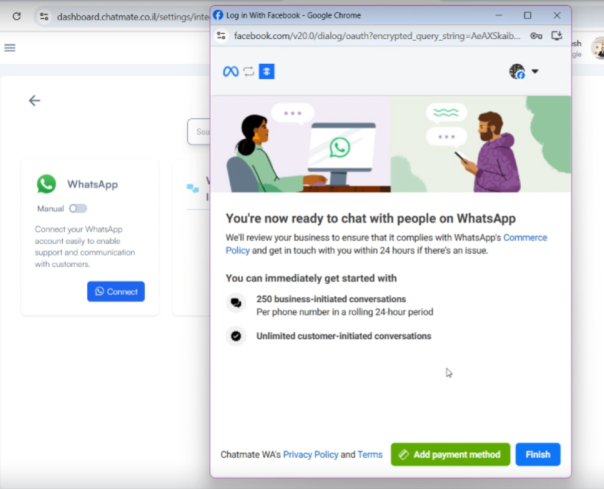
[![image.png](https://docs.versalence.online/uploads/images/gallery/2025-02/scaled-1680-/EBNsdoacGjaychkQ-image.png)](https://docs.versalence.online/uploads/images/gallery/2025-02/EBNsdoacGjaychkQ-image.png)[![image.png](https://docs.versalence.online/uploads/images/gallery/2025-02/scaled-1680-/NmclfG75bZTAw29b-image.png)](https://docs.versalence.online/uploads/images/gallery/2025-02/NmclfG75bZTAw29b-image.png)
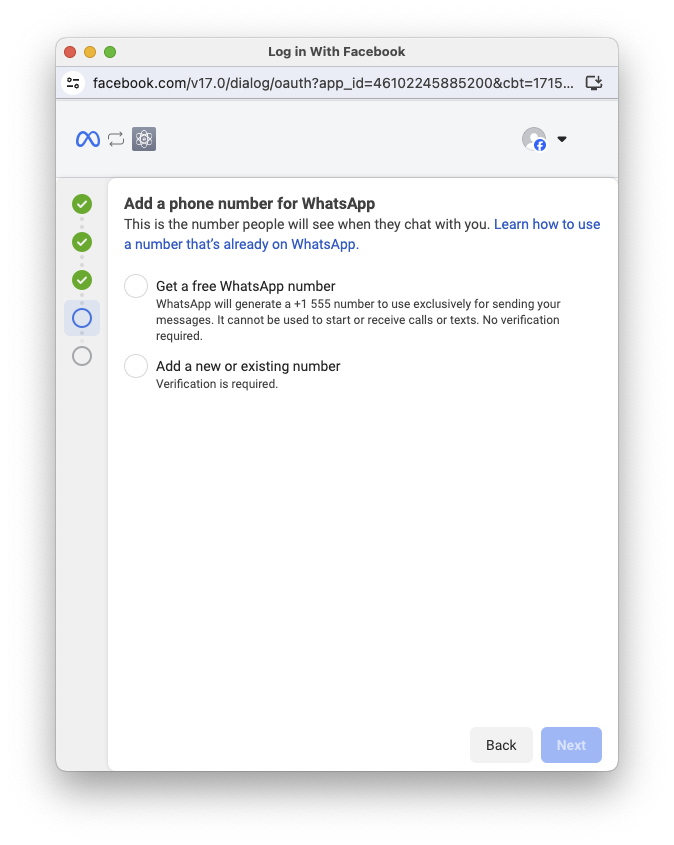
[![image.png](https://docs.versalence.online/uploads/images/gallery/2025-02/scaled-1680-/jeQBoXQ48IQGYPy7-image.png)](https://docs.versalence.online/uploads/images/gallery/2025-02/jeQBoXQ48IQGYPy7-image.png)
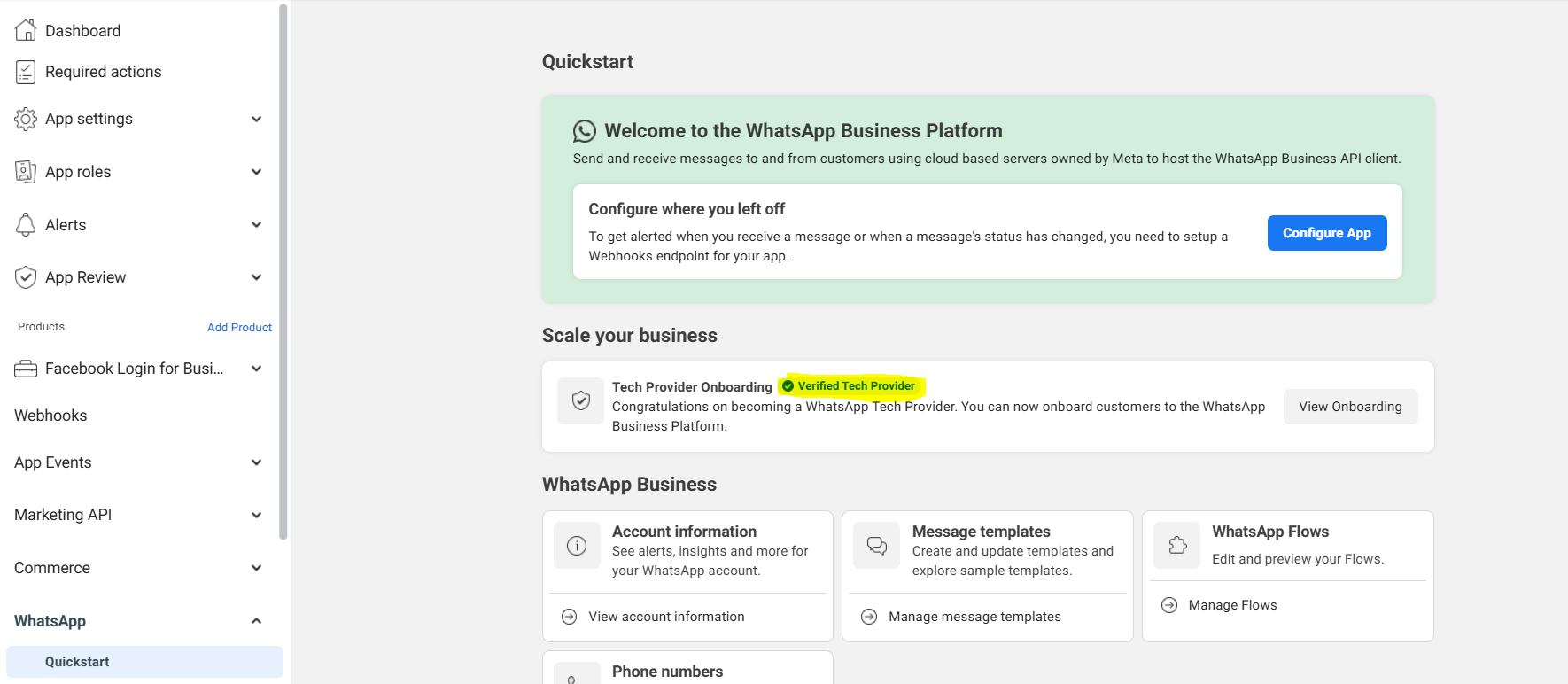
Once your App verification is complete and you receive the verified tech provider badge, lets us move to build the Embedded Signup

[![image.png](https://docs.versalence.online/uploads/images/gallery/2025-02/scaled-1680-/C62uwaBFbPCtOgZn-image.png)](https://docs.versalence.online/uploads/images/gallery/2025-02/C62uwaBFbPCtOgZn-image.png)
Ensure you have Facebook Login for Business enabled in your app, if not click on Dashboard and enable it

[![image.png](https://docs.versalence.online/uploads/images/gallery/2025-02/scaled-1680-/nQ962i0EvjiPtrMJ-image.png)](https://docs.versalence.online/uploads/images/gallery/2025-02/nQ962i0EvjiPtrMJ-image.png)
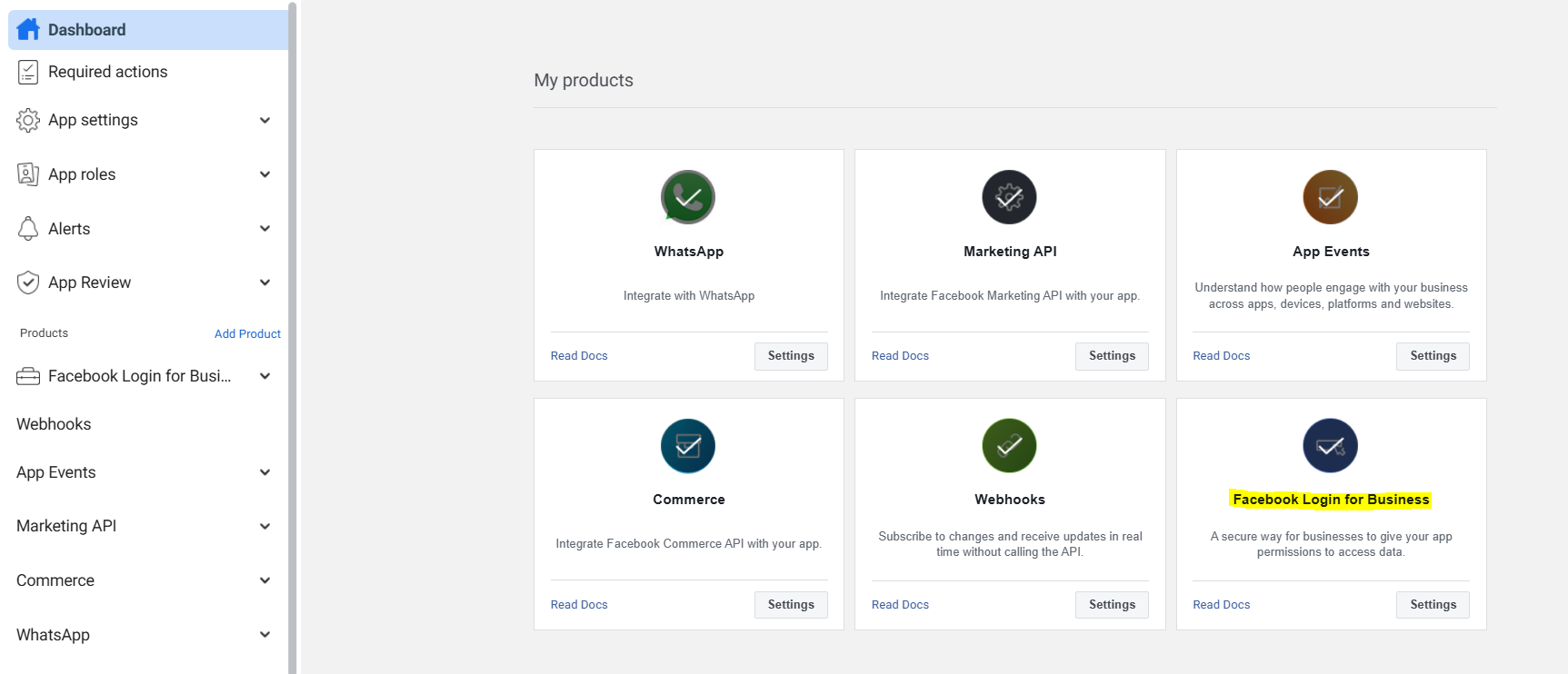
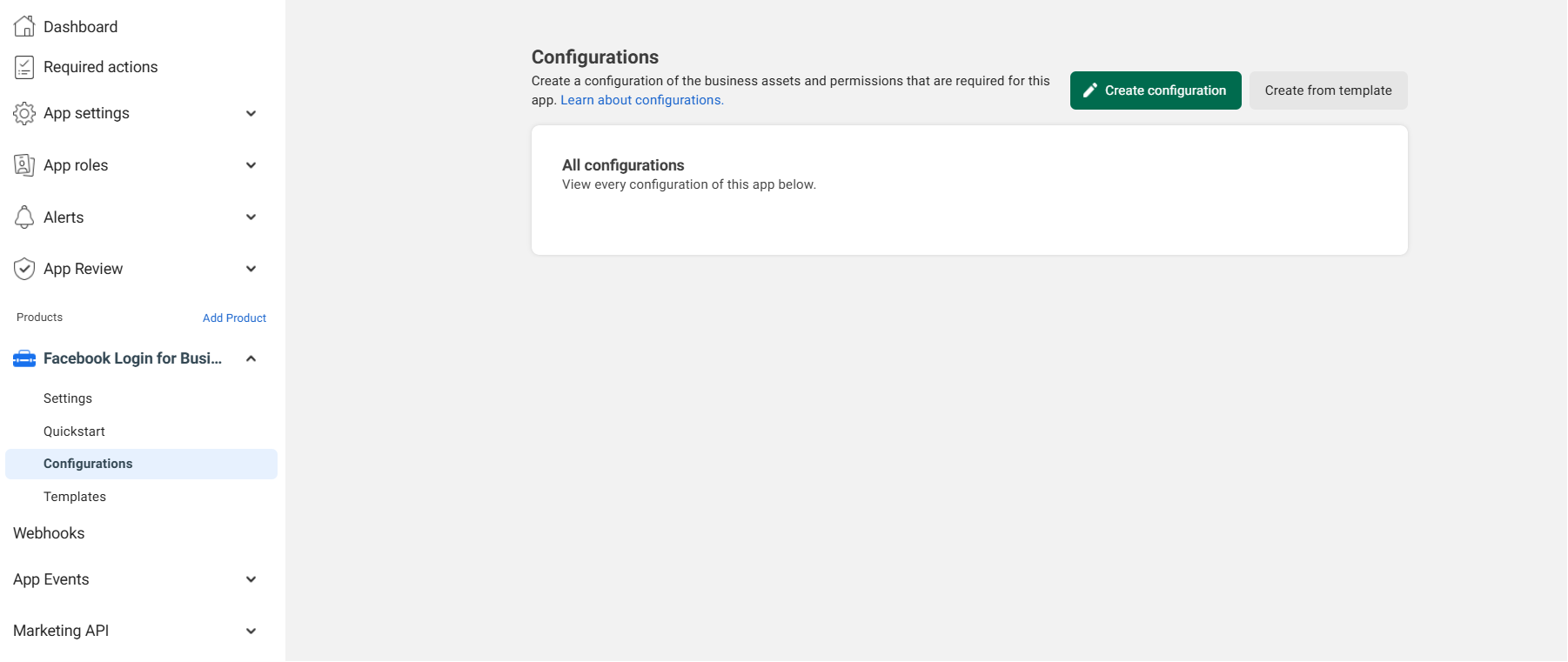
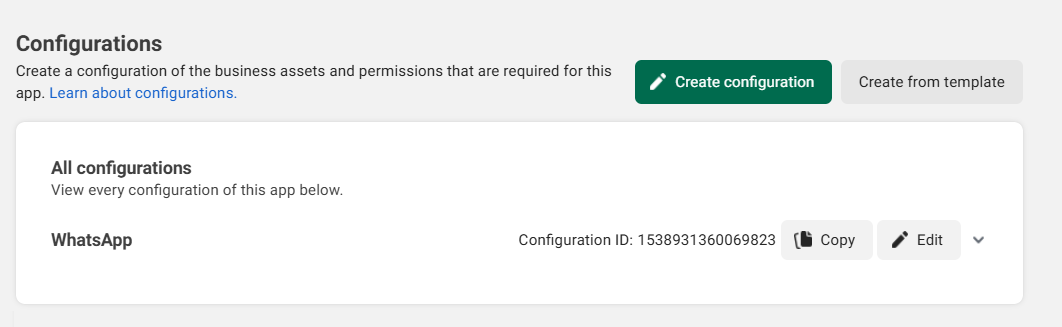
Head to Facebook Login for Business and select Configurations -&gt; Create configuration

[![image.png](https://docs.versalence.online/uploads/images/gallery/2025-02/scaled-1680-/xlIym8KUwvwceTxf-image.png)](https://docs.versalence.online/uploads/images/gallery/2025-02/xlIym8KUwvwceTxf-image.png)

Add a Name to the configuration

[![image.png](https://docs.versalence.online/uploads/images/gallery/2025-02/scaled-1680-/rHAIZyjnwPHVYz8E-image.png)](https://docs.versalence.online/uploads/images/gallery/2025-02/rHAIZyjnwPHVYz8E-image.png)
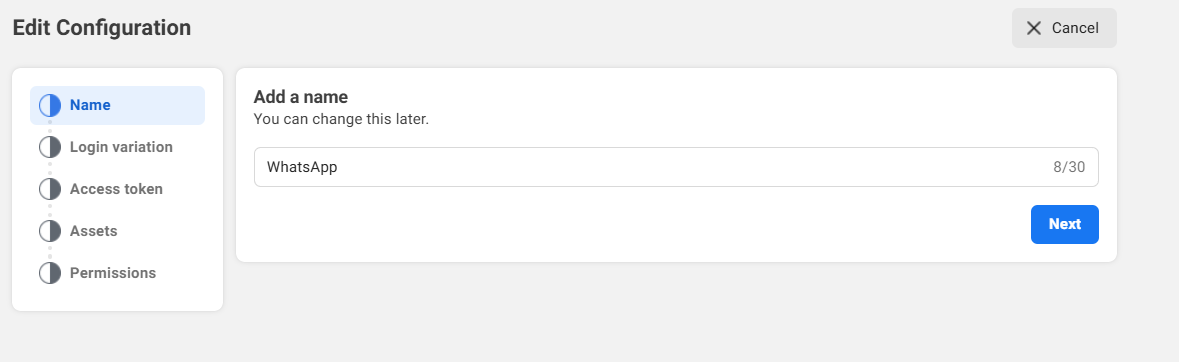
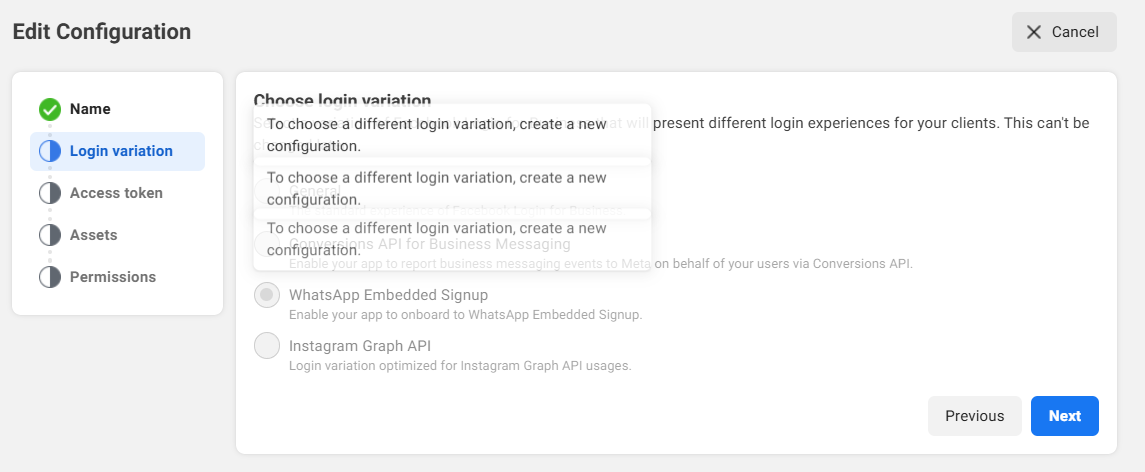
Select Login variation as WhatsApp Embedded Signup

[![image.png](https://docs.versalence.online/uploads/images/gallery/2025-02/scaled-1680-/8eCiqhfSmzSjuJzh-image.png)](https://docs.versalence.online/uploads/images/gallery/2025-02/8eCiqhfSmzSjuJzh-image.png)
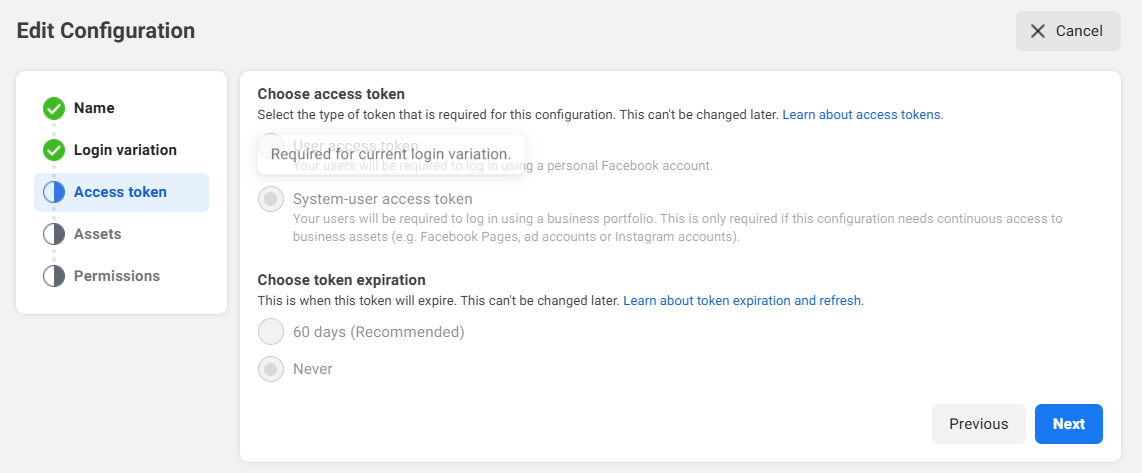
Select System-user Access Token &amp; Never Expire

[![image.png](https://docs.versalence.online/uploads/images/gallery/2025-02/scaled-1680-/QRdoT8v0nXFTfUl5-image.png)](https://docs.versalence.online/uploads/images/gallery/2025-02/QRdoT8v0nXFTfUl5-image.png)

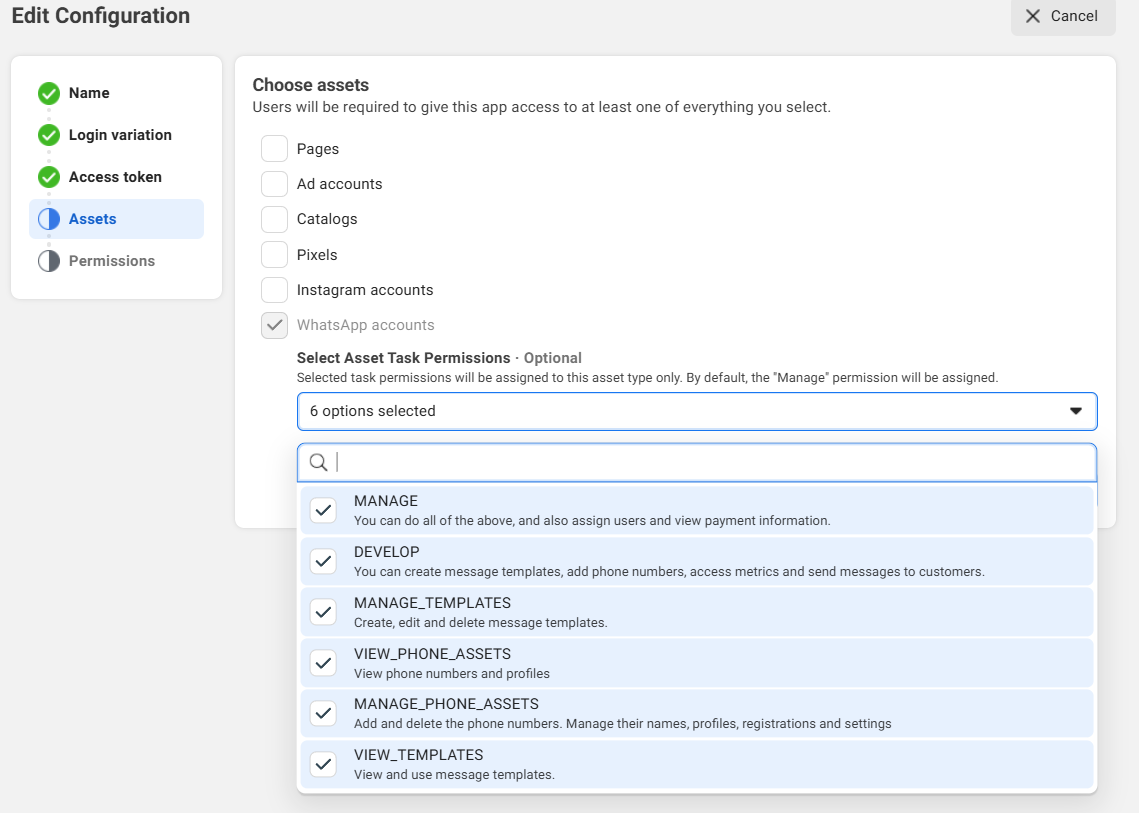
Select WhatsApp Accounts and Select all Asset Task Permissions

[![image.png](https://docs.versalence.online/uploads/images/gallery/2025-02/scaled-1680-/CLxOZSGmLGdAJ3xh-image.png)](https://docs.versalence.online/uploads/images/gallery/2025-02/CLxOZSGmLGdAJ3xh-image.png)
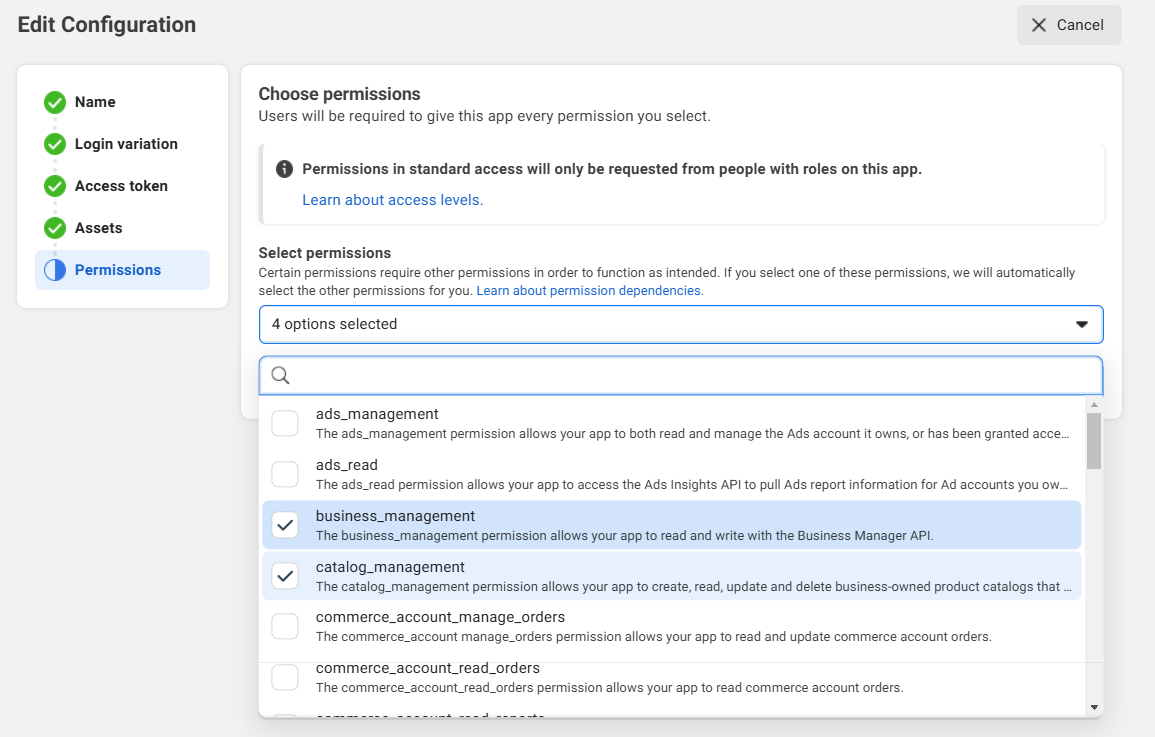
From Permssions select business\_management, catalog\_management, whataspp\_business\_management &amp; whatsapp\_business\_messaggng

[![image.png](https://docs.versalence.online/uploads/images/gallery/2025-02/scaled-1680-/OdCFa0PtaWpE4LBj-image.png)](https://docs.versalence.online/uploads/images/gallery/2025-02/OdCFa0PtaWpE4LBj-image.png)

click Save to save the configuration

[![image.png](https://docs.versalence.online/uploads/images/gallery/2025-02/scaled-1680-/tc3kFhGwusTczspV-image.png)](https://docs.versalence.online/uploads/images/gallery/2025-02/tc3kFhGwusTczspV-image.png)
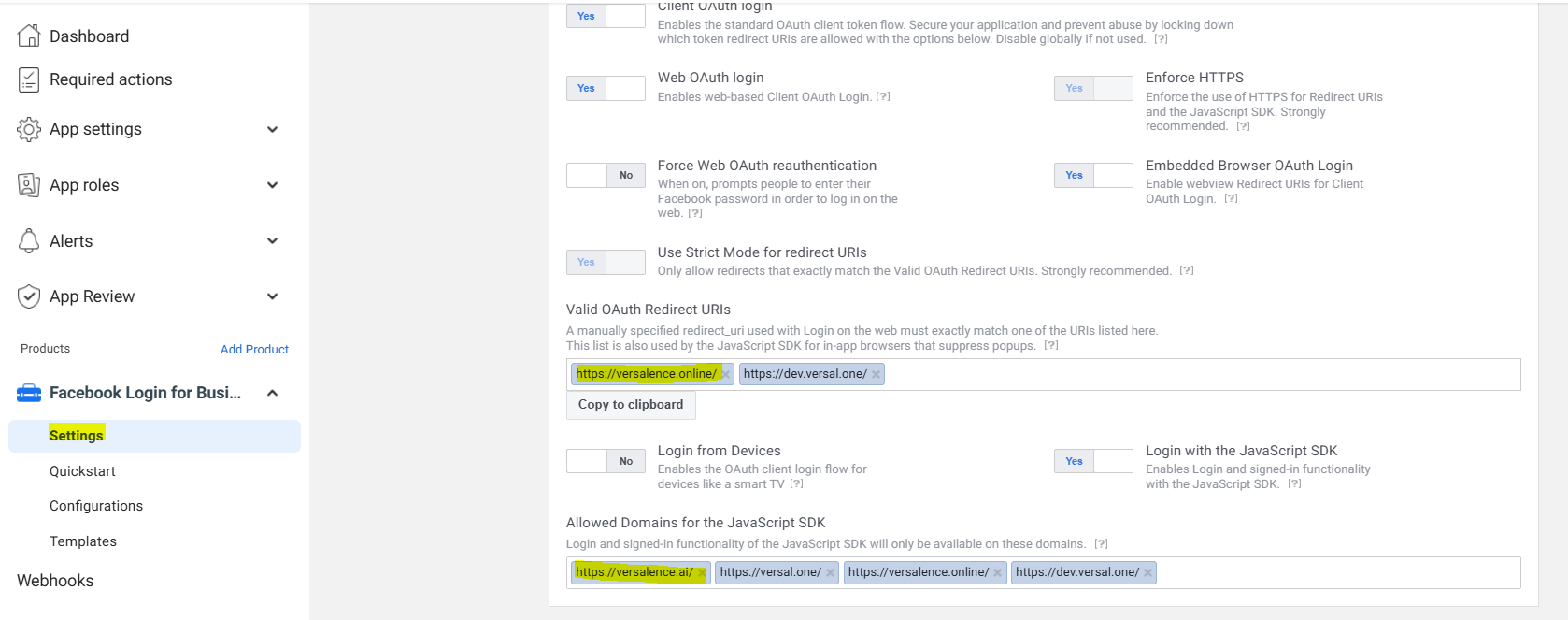
To whitelist the domains, head to settings and add the domains and ensure to enable Client OAuth Login, Web OAuth Login, Embedded Browser OAuth Login

[![image.png](https://docs.versalence.online/uploads/images/gallery/2025-02/scaled-1680-/1YbvL824mFXNgoWD-image.png)](https://docs.versalence.online/uploads/images/gallery/2025-02/1YbvL824mFXNgoWD-image.png)
Finally to embed the code you will need

- Configuration ID
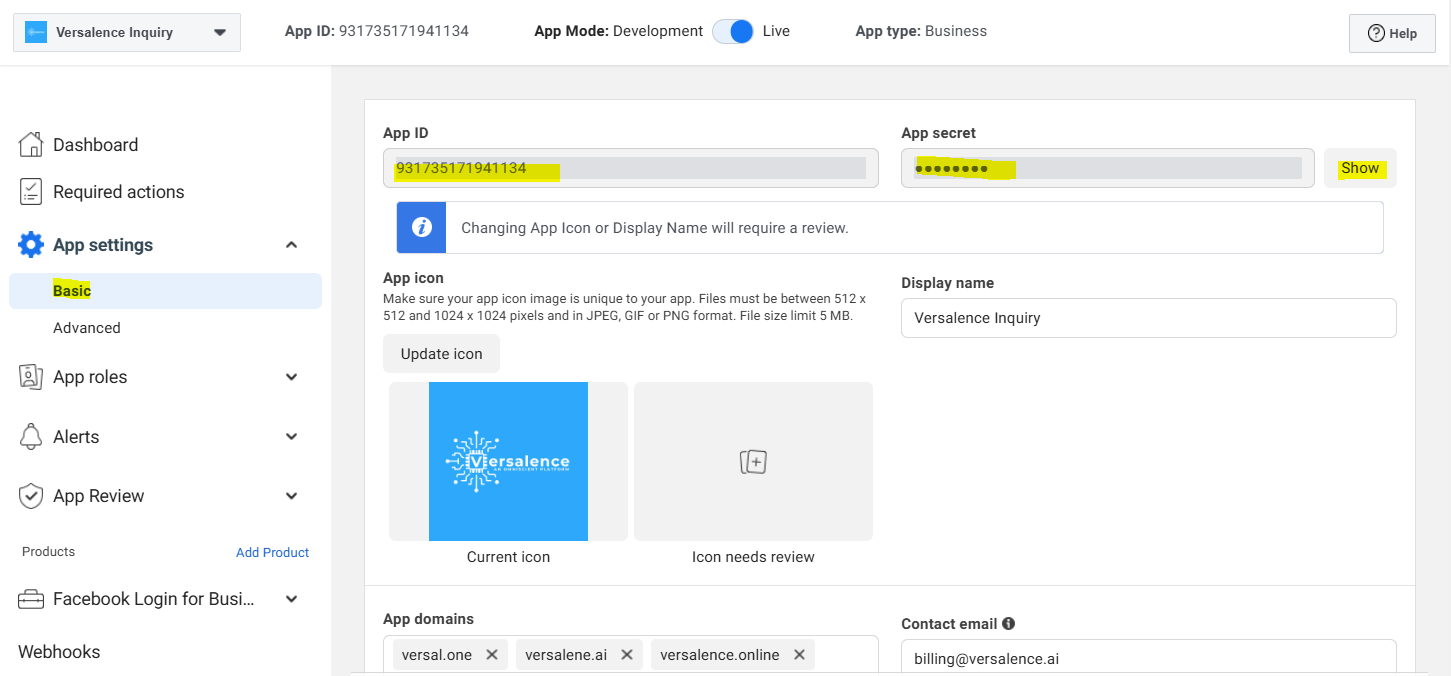
- App ID
- App Secret

Configuration ID from the screen above. App ID and App secret from the screen below

[![image.png](https://docs.versalence.online/uploads/images/gallery/2025-02/scaled-1680-/UfZNdsGw3M5Ok2Bn-image.png)](https://docs.versalence.online/uploads/images/gallery/2025-02/UfZNdsGw3M5Ok2Bn-image.png)
---

---

# Onboarding business customers as a Tech Provider or Tech Partner

This document describes the steps Tech Providers and Tech Partners must perform to onboard new business customers who have completed the Embedded Signup flow.

If you are a Tech Provider or Tech Partner, any business customer who completes your implementantation of the Embedded Signup flow will not be able to use your app to access their WhatsApp assets or send and receive messages (if you are offering messaging services) until you complete these steps.

## What you will need

<div class="_4-u2 _57mb _1u44 _3fw6 _4-u8 _3la3" id="bkmrk-the-business-custome"><div class="_4-u3 _588p">- the business customer's WABA ID (returned via [session logging](https://developers.facebook.com/docs/whatsapp/embedded-signup/implementation#session-logging-message-event-listener) or [API request](https://developers.facebook.com/docs/whatsapp/embedded-signup/manage-accounts#get-shared-waba-id-with-access-token))
- the business customer's business phone number ID (returned via [session logging](https://developers.facebook.com/docs/whatsapp/embedded-signup/implementation#session-logging-message-event-listener) or [API request](https://developers.facebook.com/docs/whatsapp/embedded-signup/manage-accounts/phone-numbers#getting-phone-numbers))
- your app ID (displayed at the top of the **App Dashboard**)
- your app secret (displayed in the **App Dashboard** &gt; **App settings** &gt; **Basic** panel)

</div></div>Also, if you wish to test messaging capabilities using the customer's business phone number, you will need a WhatsApp phone number that can already send and receive messages from other WhatsApp numbers.

Perform all of the requests described below using server-to-server requests. Do not use client-side requests.

## Step 1: Exchange the token code for a business token

Use the **GET /oauth/access\_token** endpoint to exchange the token code [returned](https://developers.facebook.com/docs/whatsapp/embedded-signup/implementation#session-logging-message-event-listener) by Embedded Signup for a business integration system user access token ("business token").

### Request

```
curl --get 'https://graph.facebook.com/v21.0/oauth/access_token' \
-d 'client_id=<APP_ID>' \
-d 'client_secret=<APP_SECRET>' \
-d 'code=<CODE>'
```

### Request parameters

<div class="_4-u2 _57mb _1u44 _3fw6 _4-u8 _3la3" id="bkmrk-placeholder-descript"><div class="_4-u3 _588p"><div class="_57-c"><table class="_4-ss _5k9x" style="width:100.002%;"><thead><tr><th style="width:15.363%;">Placeholder</th><th style="width:32.9041%;">Description</th><th style="width:51.7233%;">Example value</th></tr></thead><tbody class="_5m37" id="bkmrk-%3Capp_id%3E-required.-y"><tr class="row_0"><td style="width:15.363%;">`<APP_ID>`

</td><td style="width:32.9041%;">**Required.**

Your app ID. This is displayed at the top of the **App Dashboard**.

</td><td style="width:51.7233%;">`236484624622562`

</td></tr><tr class="row_1 _5m29"><td style="width:15.363%;">`<APP_SECRET>`

</td><td style="width:32.9041%;">**Required.**

Your app secret. You can get this from the **App Dashboard** &gt; **App Secret** &gt; **Basic** panel.

</td><td style="width:51.7233%;">`614fc2afde15eee07a26b2fe3eaee9b9`

</td></tr><tr class="row_2"><td style="width:15.363%;">`<CODE>`

</td><td style="width:32.9041%;">**Required.**

The code [returned by Embedded Signup](https://developers.facebook.com/docs/whatsapp/embedded-signup/implementation#session-logging-message-event-listener) when the customer successfully completed the flow.

</td><td style="width:51.7233%;">`AQBhlXsctMxJYbwbrpybxlo9tLPGy-QAmjBJA03jxLos43wxlBlrYozY5C33BXJULd133cOJf_5y6EkJZYMrAmW-EMj3Wdap9-NUM2nS4s8tC-ES7slBhh6QpCFM7-SzpI-iqsjqTGyxbUUW3AeaEyLkeZFIkBgcQ_SOxo9HShm20SDR5_n7AT9ZJ5dcgpqBQykNT-pQ8V7Ne9-sr6RLAWtJMF7-Zx6ABudRcWIN53tUTtquDVNuq3lrco4BlVQAv-54tR83Ae0ODN9Uet6j-BVLuetXhQCM3sz9RdgedlbxkidMbkztvYX1j7baOrJxyLyYGWYgbnUrKRQKCtWTsO5ekIGFgtbpS8UPJNqV6j8E5XKPJ8QA7ZFqzkB0s2O__J5FrjHzc_rDo1EuRbw98ihHDzQnvuXeHapEyfhLDJct0A`

</td></tr></tbody></table>

</div></div></div>### Response

Upon success:

```
<BUSINESS_TOKEN>
```

### Response parameters

<div class="_4-u2 _57mb _1u44 _3fw6 _4-u8 _3la3" id="bkmrk-placeholder-descript-1"><div class="_4-u3 _588p"><div class="_57-c"><table class="_4-ss _5k9x" style="width:100.002%;"><thead><tr><th style="width:17.1602%;">Placeholder</th><th style="width:30.7494%;">Description</th><th style="width:52.0808%;">Example value</th></tr></thead><tbody class="_5m37" id="bkmrk-%3Cbusiness_token%3E-the"><tr class="row_0"><td style="width:17.1602%;">`<BUSINESS_TOKEN>`

</td><td style="width:30.7494%;">The customer's [business token](https://developers.facebook.com/docs/whatsapp/business-management-api/get-started#business-integration-system-user-access-tokens).

</td><td style="width:52.0808%;">`EAAAN6tcBzAUBOwtDtTfmZCJ9n3FHpSDcDTH86ekf89XnnMZAtaitMUysPDE7LES3CXkA4MmbKCghdQeU1boHr0QZA05SShiILcoUy7ZAb2GE7hrUEpYHKLDuP2sYZCURkZCHGEvEGjScGLHzC4KDm8tq2slt4BsOQE1HHX8DzHahdT51MRDqBw0YaeZByrVFZkVAoVTxXUtuKgDDdrmJQXMnI4jqJYetsZCP1efj5ygGscZBm4OvvuCYB039ZAFlyNn`

</td></tr></tbody></table>

</div><div>  
</div></div></div>## Step 2: Subscribe to webhooks on the customer's WABA

Use the [POST /&lt;WABA\_ID&gt;/subscribed\_apps](https://developers.facebook.com/docs/graph-api/reference/whats-app-business-account/subscribed_apps/#Creating) endpoint to subscribe your app to webhooks on the business customer's WABA. If you want the customer's webhooks to be sent to a different callback URL than the one set on your app, you have multiple [webhook override](https://developers.facebook.com/docs/whatsapp/embedded-signup/webhooks/override) options.

### Request

```
curl -X POST 'https://graph.facebook.com/<API_VERSION>/<WABA_ID>/subscribed_apps' \
-H 'Authorization: Bearer <BUSINESS_TOKEN>'
```

### Request parameters

<div class="_4-u2 _57mb _1u44 _3fw6 _4-u8 _3la3" id="bkmrk-placeholder-descript-2"><div class="_4-u3 _588p"><div class="_57-c"><table class="_4-ss _5k9x" style="width:100.002%;"><thead><tr><th style="width:17.4%;">Placeholder</th><th style="width:26.7035%;">Description</th><th style="width:55.887%;">Example value</th></tr></thead><tbody class="_5m37" id="bkmrk-%3Cbusiness_token%3E-req"><tr class="row_0"><td style="width:17.4%;">`<BUSINESS_TOKEN>`

</td><td style="width:26.7035%;">**Required.**

The customer's[ business token](https://developers.facebook.com/docs/whatsapp/business-management-api/get-started#business-integration-system-user-access-tokens).

</td><td style="width:55.887%;">`EAAAN6tcBzAUBOwtDtTfmZCJ9n3FHpSDcDTH86ekf89XnnMZAtaitMUysPDE7LES3CXkA4MmbKCghdQeU1boHr0QZA05SShiILcoUy7ZAb2GE7hrUEpYHKLDuP2sYZCURkZCHGEvEGjScGLHzC4KDm8tq2slt4BsOQE1HHX8DzHahdT51MRDqBw0YaeZByrVFZkVAoVTxXUtuKgDDdrmJQXMnI4jqJYetsZCP1efj5ygGscZBm4OvvuCYB039ZAFlyNn`

</td></tr><tr class="row_1 _5m29"><td style="width:17.4%;">`<WABA_ID>`

</td><td style="width:26.7035%;">**Required.**

The customer's WABA ID.

</td><td style="width:55.887%;">`102290129340398`

</td></tr></tbody></table>

</div></div></div>### Response

Upon success:

```
{
  "success": true
}
```

<div class="_4-u2 _57mb _1u44 _3fw6 _4-u8 _3la3" id="bkmrk--15"><div class="_4-u3 _588p"><div></div><div>  
</div></div></div>## Step 3: Register the customer's phone number

Use the [POST /&lt;BUSINESS\_PHONE\_NUMBER\_ID&gt;/register](https://developers.facebook.com/docs/whatsapp/cloud-api/reference/registration#register) endpoint to register the customer's business phone number for use with Cloud API.

### Request

```
curl 'https://graph.facebook.com/v21.0/<BUSINESS_PHONE_NUMBER_ID>/register' \
-H 'Content-Type: application/json' \
-H 'Authorization: Bearer <BUSINESS_TOKEN>' \
-d '
{
  "messaging_product": "whatsapp",
  "pin": "<DESIRED_PIN>"
}'
```

### Request parameters

<div class="_4-u2 _57mb _1u44 _3fw6 _4-u8 _3la3" id="bkmrk-placeholder-descript-3"><div class="_4-u3 _588p"><div class="_57-c"><table class="_4-ss _5k9x" style="width:100.002%;"><thead><tr><th style="width:26.9343%;">Placeholder</th><th style="width:28.8328%;">Description</th><th style="width:44.2234%;">Example value</th></tr></thead><tbody class="_5m37" id="bkmrk-%3Cbusiness_phone_numb"><tr class="row_0"><td style="width:26.9343%;">`<BUSINESS_PHONE_NUMBER_ID>`

</td><td style="width:28.8328%;">**Required.**

The customer's business phone number ID returned.

</td><td style="width:44.2234%;">`106540352242922`

</td></tr><tr class="row_1 _5m29"><td style="width:26.9343%;">`<BUSINESS_TOKEN>`

</td><td style="width:28.8328%;">**Required.**

The customer's business token.

</td><td style="width:44.2234%;">`EAAAN6tcBzAUBOwtDtTfmZCJ9n3FHpSDcDTH86ekf89XnnMZAtaitMUysPDE7LES3CXkA4MmbKCghdQeU1boHr0QZA05SShiILcoUy7ZAb2GE7hrUEpYHKLDuP2sYZCURkZCHGEvEGjScGLHzC4KDm8tq2slt4BsOQE1HHX8DzHahdT51MRDqBw0YaeZByrVFZkVAoVTxXUtuKgDDdrmJQXMnI4jqJYetsZCP1efj5ygGscZBm4OvvuCYB039ZAFlyNn`

</td></tr><tr class="row_2"><td style="width:26.9343%;">`<DESIRED_PIN>`

</td><td style="width:28.8328%;">**Required.**

Set this value to a 6-digit number. This will be the business phone number's two-step verification PIN.

</td><td style="width:44.2234%;">`581063`

</td></tr></tbody></table>

</div></div></div>### Response

Upon success:

```
{
  "success": true
}
```

<div class="_4-u2 _57mb _1u44 _3fw6 _4-u8 _3la3" id="bkmrk--16"><div class="_4-u3 _588p"><div>  
</div></div></div>## Step 4: Send a test message

*This step is optional.*

If you wish to test the messaging capabilities of your business customer's business phone number, send a message to the customer's number from your own WhatsApp number (this will open a [customer service window](https://developers.facebook.com/docs/whatsapp/cloud-api/guides/send-messages#customer-service-windows), allowing you to respond with any type of message).

Next, use the [POST /&lt;BUSINESS\_PHONE\_NUMBER\_ID&gt;/messages](https://developers.facebook.com/docs/whatsapp/cloud-api/reference/messages) endpoint to send a [text message](https://developers.facebook.com/docs/whatsapp/cloud-api/messages/text-messages) in response.

### Request

```
curl 'https://graph.facebook.com/v21.0/<BUSINESS_PHONE_NUMBER_ID>/messages' \
-H 'Content-Type: application/json' \
-H 'Authorization: Bearer <BUSINESS_TOKEN>' \
-d '
{
  "messaging_product": "whatsapp",
  "recipient_type": "individual",
  "to": "<WHATSAPP_USER_NUMBER>",
  "type": "text",
  "text": {
    "body": "<BODY_TEXT>"
  }
}'
```

### Request parameters

<div class="_4-u2 _57mb _1u44 _3fw6 _4-u8 _3la3" id="bkmrk-placeholder-descript-4"><div class="_4-u3 _588p"><div class="_57-c"><table class="_4-ss _5k9x" style="width:100.002%;"><thead><tr><th style="width:27.8839%;">Placeholder</th><th style="width:25.7463%;">Description</th><th style="width:46.3603%;">Example value</th></tr></thead><tbody class="_5m37" id="bkmrk-%3Cbody_text%3E-required"><tr class="row_0"><td style="width:27.8839%;">`<BODY_TEXT>`

</td><td style="width:25.7463%;">**Required.**

Message body text. Supports URLs.

Maximum 4096 characters.

</td><td style="width:46.3603%;">`Message received, loud and clear!`

</td></tr><tr class="row_1 _5m29"><td style="width:27.8839%;">`<BUSINESS_PHONE_NUMBER_ID>`

</td><td style="width:25.7463%;">**Required.**

The customer's business phone number ID.

</td><td style="width:46.3603%;">`106540352242922`

</td></tr><tr class="row_2"><td style="width:27.8839%;">`<BUSINESS_TOKEN>`

</td><td style="width:25.7463%;">**Reqiured.**

The customer's business token.

</td><td style="width:46.3603%;">`EAAAN6tcBzAUBOwtDtTfmZCJ9n3FHpSDcDTH86ekf89XnnMZAtaitMUysPDE7LES3CXkA4MmbKCghdQeU1boHr0QZA05SShiILcoUy7ZAb2GE7hrUEpYHKLDuP2sYZCURkZCHGEvEGjScGLHzC4KDm8tq2slt4BsOQE1HHX8DzHahdT51MRDqBw0YaeZByrVFZkVAoVTxXUtuKgDDdrmJQXMnI4jqJYetsZCP1efj5ygGscZBm4OvvuCYB039ZAFlyNn`

</td></tr><tr class="row_3 _5m29"><td style="width:27.8839%;">`<WHATSAPP_USER_NUMBER>`

</td><td style="width:25.7463%;">**Required.**

Your WhatsApp phone number that can send and receive messages from other WhatsApp numbers.

Note that this cannot be a business phone number already registered for use with Cloud API or On-Premises API.

</td><td style="width:46.3603%;">`+16505551234`

</td></tr></tbody></table>

</div></div></div>### Response

Upon success:

```
{
  "messaging_product": "whatsapp",
  "contacts": [
    {
      "input": "<WHATSAPP_USER_NUMBER>",
      "wa_id": "<WHATSAPP_USER_ID>"
    }
  ],
  "messages": [
    {
      "id": "<WHATSAPP_MESSAGE_ID>"
    }
  ]
}
```

### Response parameters

<div class="_4-u2 _57mb _1u44 _3fw6 _4-u8 _3la3" id="bkmrk-placeholder-descript-5"><div class="_4-u3 _588p"><div class="_57-c"><table class="_4-ss _5k9x" style="width:100.002%;"><thead><tr><th style="width:29.1865%;">Placeholder</th><th style="width:27.8998%;">Description</th><th style="width:42.9041%;">Example value</th></tr></thead><tbody class="_5m37" id="bkmrk-%3Cwhatsapp_message_id"><tr class="row_0"><td style="width:29.1865%;">`<WHATSAPP_MESSAGE_ID>`

</td><td style="width:27.8998%;">WhatsApp message ID.

</td><td style="width:42.9041%;">`wamid.HBgLMTY0NjcwNDM1OTUVAgARGBI1RjQyNUE3NEYxMzAzMzQ5MkEA`

</td></tr><tr class="row_1 _5m29"><td style="width:29.1865%;">`<WHATSAPP_USER_ID>`

</td><td style="width:27.8998%;">Your WhatsApp user ID.

</td><td style="width:42.9041%;">`16505551234`

</td></tr><tr class="row_2"><td style="width:29.1865%;">`<WHATSAPP_USER_NUMBER>`

</td><td style="width:27.8998%;">Your WhatsApp phone number that the message was sent to.

</td><td style="width:42.9041%;">`+16505551234`

</td></tr></tbody></table>

</div></div></div>If you were able to successfully send and receive messages using the customer's business phone number, and if **messages** webhooks were triggered [describing the initial message that you sent](https://developers.facebook.com/docs/whatsapp/cloud-api/webhooks/payload-examples#received-messages), as well as the [delivery statuses](https://developers.facebook.com/docs/whatsapp/cloud-api/webhooks/payload-examples#message-status-updates) of the message you sent in response, the customer's business phone number is working properly.

## Step 5: Instruct the customer to add a payment method

Instruct your customer to use the WhatsApp Manager to add a payment method. You can provide them with the following Help Center link:

[https://www.facebook.com/business/help/488291839463771](https://www.facebook.com/business/help/488291839463771)

Alternatively, you can instruct them to:

<div class="_4-u2 _57mb _1u44 _3fw6 _4-u8 _3la3" id="bkmrk-access-the%C2%A0whatsapp-"><div class="_4-u3 _588p">1. Access the **WhatsApp Manager** &gt; **Overview** panel at [https://business.facebook.com/wa/manage/home/](https://business.facebook.com/wa/manage/home/)
2. Click the **Add payment method** button
3. Complete the flow

</div></div>Once your customer adds a payment method, they are fully onboarded onto the WhatsApp Business Platform and can begin using your app to access their WhatsApp assets and send and receive messages (if you are providing them with that service).

# WhatsApp API Calls - Inbound

<p class="callout info">Versalence currently provides WhatsApp call feature for incoming calls</p>

To enable WhatsApp Service, you need to subscribe to WhatsApp Calling Service

[![image.png](https://docs.versalence.online/uploads/images/gallery/2025-12/scaled-1680-/BYbk03GnxVB2tOII-image.png)](https://docs.versalence.online/uploads/images/gallery/2025-12/BYbk03GnxVB2tOII-image.png)
once the payment is completed - your subscription will be active

[![image.png](https://docs.versalence.online/uploads/images/gallery/2025-12/scaled-1680-/eQboXJyGARNWmjIa-image.png)](https://docs.versalence.online/uploads/images/gallery/2025-12/eQboXJyGARNWmjIa-image.png)

In Integrations -&gt; WhatsApp Integration -&gt; WhatsApp Calling features will be enabled - you can enable or disable this service from here

[![image.png](https://docs.versalence.online/uploads/images/gallery/2025-12/scaled-1680-/kLs7wDpUWgehK3pf-image.png)](https://docs.versalence.online/uploads/images/gallery/2025-12/kLs7wDpUWgehK3pf-image.png)
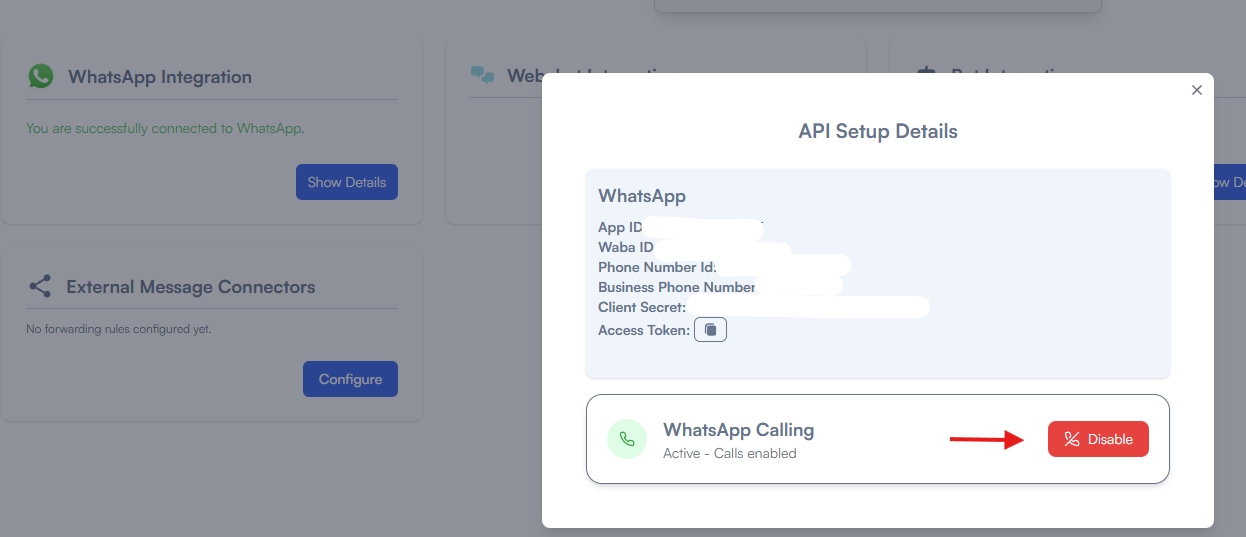
<p class="callout danger">If you have **not** setup WhatsApp with vCX usign our embedded signup, the process will differ as you have to perform the adddtional step below</p>

you have to goto [https://developers.facebook.com/apps/](https://developers.facebook.com/apps/) open the app that is linked with vCX, once inside the page, under WhatsApp Settings select Configuration and enable calls as shown below

[![image.png](https://docs.versalence.online/uploads/images/gallery/2025-12/scaled-1680-/MSmbaVZ65F8ILi5T-image.png)](https://docs.versalence.online/uploads/images/gallery/2025-12/MSmbaVZ65F8ILi5T-image.png)